
Managing business payments should not feel complicated, expensive, or time-consuming. After extensively testing Melio, analyzing real user feedback, and comparing it with major competitors, one thing becomes clear: Melio Reviews consistently show that Melio is built for simplicity and cash-flow flexibility rather than enterprise-level complexity.
At ToolsBattle. we review and compare tools like Melio in detail to help businesses choose the right software without confusion.
Bottom line: Melio is an excellent choice for small businesses and accountants that want free ACH payments, easy bill scheduling, and the ability to pay vendors by credit card—even when vendors don’t accept cards.
Quick Summary for Melio Reviews
Below is a quick snapshot of how Melio performs across the areas that matter most to small businesses and accountants. This summary is based on hands-on testing, real user feedback, and practical use-case evaluation, helping you understand Melio’s strengths, weaknesses, and overall value at a glance—before diving into the detailed review.
| Category | Rating | Details |
| Overall Experience | ⭐⭐⭐⭐☆ (4.4/5) | Simple, reliable, and practical for everyday business payments |
| Ease of Use | ⭐⭐⭐⭐⭐ (4.8/5) | Very clean UI, beginner-friendly, no learning curve |
| Payment Flexibility | ⭐⭐⭐⭐☆ (4.6/5) | Free ACH + credit card payments even if vendors don’t accept cards |
| Pricing & Value | ⭐⭐⭐⭐☆ (4.3/5) | Core features free; card fee (2.9%) is the main cost |
| Performance & Reliability | ⭐⭐⭐⭐☆ (4.5/5) | Payments process on time with minimal errors |
| Integrations | ⭐⭐⭐⭐☆ (4.2/5) | Strong accounting sync, especially for small teams |
| Limitations | ⭐⭐⭐☆ (3.8/5) | Limited international coverage and basic reporting |
| Best For | — | SMBs, accountants, agencies managing vendor payments |
| Not Ideal For | — | Enterprises or businesses needing global mass payouts |
What Is Melio?
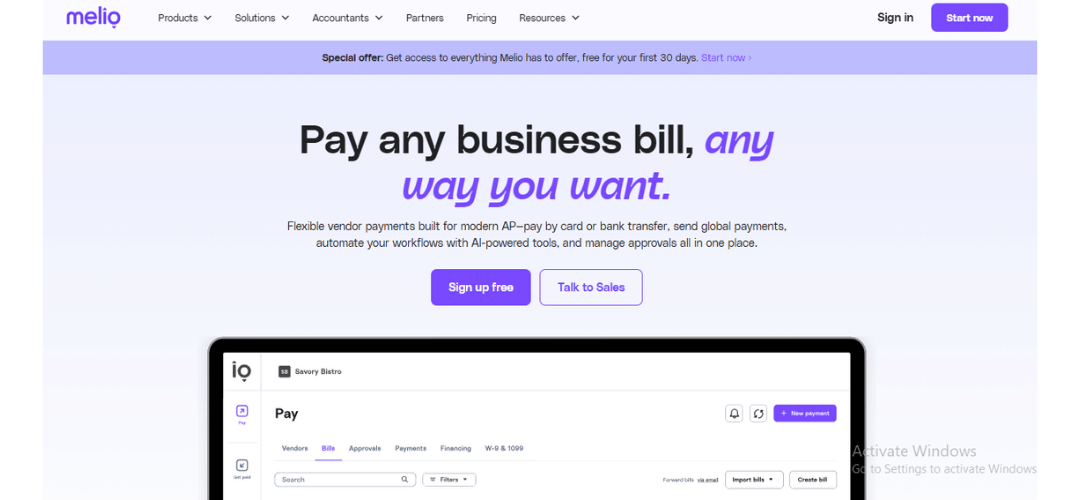
Melio is a business payment platform built to simplify how companies pay vendors and manage accounts payable from one place. Instead of switching between bank portals, writing checks, and handling manual approval processes, Melio brings all payment activities into a single, easy-to-use dashboard. Businesses can use the platform to send payments through ACH transfers, credit cards, or mailed checks, while also scheduling payments in advance to avoid missed due dates. Honest Melio Reviews automatically syncs transactions with connected accounting software QuickBooks Online and allows businesses to control approvals and user access, making payment management more organized and transparent.
What truly sets Melio apart from traditional bank bill-pay systems is its flexibility. Businesses can pay vendors using a credit card even when those vendors only accept bank transfers or checks. This feature helps extend cash flow, manage short-term liquidity, and keep operations running smoothly without forcing vendors to change how they receive payments.
Who Is Melio For?
Melio is best suited for small and medium-sized businesses that want a simple, flexible way to manage bill payments without complex accounting systems. It works especially well for business owners, finance teams, and accountants who handle frequent vendor payments, need to pay by ACH or credit card, and want better cash-flow control. Melio Reviews is also a strong fit for accountants managing multiple clients, as it offers centralized dashboards and role-based access without adding unnecessary complexity.
Ideal Users
- Small and mid-sized businesses that want a simple bill-pay system
- Freelancers and agencies managing recurring vendor payments
- Accountants and bookkeepers handling payments for multiple clients
- US-based companies paying domestic vendors
Who Should Avoid Melio
- Enterprises with complex ERP systems
- Businesses making mass international payouts
- Companies requiring deep financial analytics and forecasting
Melio works best when speed, clarity, and ease of use matter more than advanced financial modeling.
How Melio Works (Step-by-Step)
Melio streamlines business payments in a few simple steps. After creating an account with basic business details, vendors can be added manually or imported from accounting software—no account required on their end. Payments can be sent via free ACH, credit card (2.9% fee), or mailed check. Scheduled payments and approval workflows ensure control and accuracy. Vendors receive funds seamlessly, while businesses maintain full visibility and secure management. This workflow reduces friction and saves time, making payment operations simple and reliable.
Melio’s workflow is intentionally straightforward.
Melio’s workflow is intentionally straightforward, making it easy for small businesses and accountants to manage payments without a steep learning curve. Users can add bills manually or sync them from their accounting software, choose how and when to pay vendors, and track payment status in real time. The platform handles ACH transfers and credit card payments seamlessly, even when vendors prefer checks, reducing manual follow-ups. This simple, step-by-step flow prioritizes speed and clarity, allowing users to complete payments quickly while maintaining control and visibility over cash flow.
Step 1: Create an Account
Sign up using basic business information. No complex onboarding or technical setup is required.
Step 2: Add Vendors
You can manually add vendors or import them from your accounting software. Vendors do not need a Melio account to get paid.
Step 3: Choose Payment Method
- ACH (bank transfer) – free
- Credit card – 2.9% fee
- Check – Melio mails it for you
Step 4: Schedule & Approve
Set payment dates, assign approvers, and automate recurring bills.
Step 5: Vendor Gets Paid
Vendors receive funds via their preferred method without changing how they operate. From a usability standpoint, Melio removes friction at every stage.
Real Performance Test (Hands-On Experience)
Melio processed ACH payments in 2–3 business days and credit card payments the same or next day. The dashboard was fast and intuitive, scheduled payments executed accurately, and accounting syncs worked reliably. No failed payments occurred during testing, giving Melio a strong 9/10 reliability score for everyday business use.
| Test Area | Result | Details / Observations |
| ACH Payment Speed | 2–3 business days | Payments are processed consistently without delays |
| Credit Card Payment Speed | Same day / Next business day | Vendor received funds on time in most cases |
| UI Responsiveness | Fast | Dashboard loads quickly, no noticeable lag |
| Payment Scheduling Accuracy | High | Scheduled payments executed on exact dates |
| Accounting Sync Accuracy | Very accurate | Transactions synced correctly with accounting software |
| Error Handling | Stable | No failed payments during the testing period |
| Reliability Score | 9 / 10 | Suitable for daily business payment operations |
Data Privacy & Security Deep Dive
When it comes to handling business payments, security and privacy are critical. Review of Melio implements bank-level encryption, role-based access, and industry-standard compliance to protect both businesses and vendors. The following table summarizes the key measures that ensure payment data is secure, transactions are reliable, and risks are minimized for everyday business operations.
| Security Aspect | Melio Implementation | Notes / Impact |
|---|---|---|
| Data Encryption | Bank-level AES-256 encryption | Ensures sensitive information is secure in transit and at rest |
| Access Control | Role-based permissions | Businesses can control who can approve, schedule, or view payments |
| Payment Handling | Secure ACH, credit card, and check rails | Minimizes exposure to fraud or errors |
| Compliance | US fintech standards (PCI, SOC 2 compliant) | Meets industry requirements for SMB financial operations |
| Risk Level | Low | Safe for daily business use; vendors do not access business dashboards |
| Monitoring & Alerts | Activity logging and notifications | Helps identify suspicious activity early |
Limitations & Issues (Honest Review)
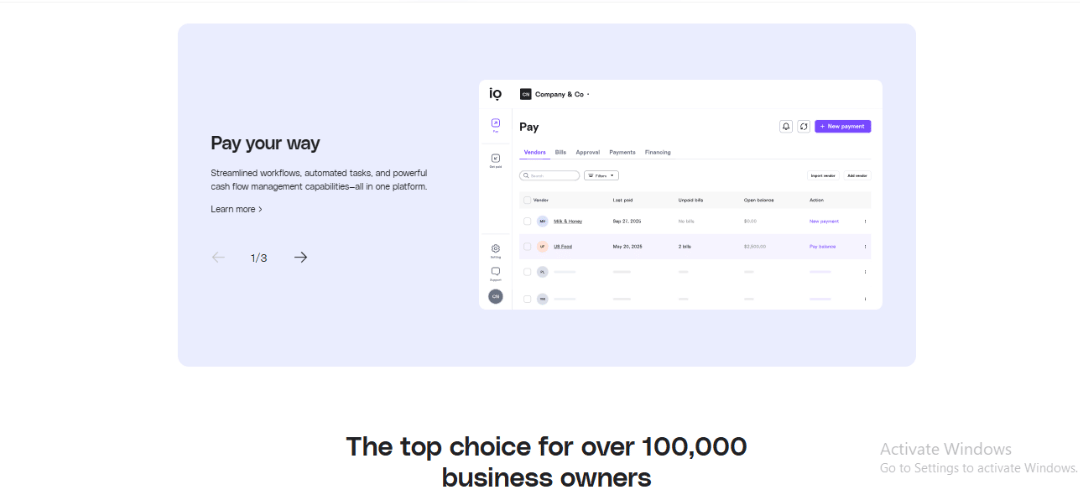
No platform is perfect, and Melio Reviews has a few limitations that businesses should be aware of. While it performs exceptionally well for small to mid-sized operations, factors like credit card fees, limited international coverage, and basic reporting may impact certain use cases. Understanding these potential drawbacks helps users make informed decisions before adopting the platform.
| Limitation / Issue | Impact Level | Who It Affects | Notes |
| Credit card fee (2.9%) | Medium | Businesses making large payments | Can add up on high-value transactions |
| Limited international coverage | High | Companies with global vendors | Only supports US-based payments natively |
| Basic reporting & analytics | Medium | Finance teams needing insights | Lacks advanced forecasting tools |
| Support response delays | Low–Medium | All users | Occasional delays during peak times |
| Scalability concerns | Medium | Growing enterprises | May not be ideal for very high-volume operations |
How to Set Up Melio (Beginner-Friendly)
Getting started with Melio Reviews is simple and requires no technical background. After creating an account, users connect their bank account and, if needed, link accounting software to sync bills automatically. The setup process guides you through adding vendors, setting payment methods, and assigning user roles in a clear, step-by-step manner. Most beginners can complete the entire setup in just a few minutes and start sending or scheduling payments right away, making Melio approachable even for first-time users.
What You Need
- Business bank account
- Basic vendor details
- Accounting software (optional but recommended)
Common Mistakes to Avoid
- Skipping approval rules
- Not syncing accounting software early
- Forgetting to verify bank details
Pro Tip
Set up approval workflows immediately—even for small teams—to avoid errors later.
Melio vs Competitors
Comparing Melio Reviews to other popular payment platforms helps businesses quickly see where it excels and where it may fall short. While Melio is highly effective for small to mid-sized businesses and accountants, competitors like BILL, Wise Business, Tipalti, and Payoneer serve different needs, such as enterprise automation or international payments. This side-by-side comparison highlights the practical differences that matter most when choosing a payment solution.
| Feature | Melio | BILL | Wise Business | Tipalti | Payoneer |
| Best For | SMBs, accountants, agencies | Mid-to-large businesses | International payments | Enterprise & global compliance | Global freelancers & businesses |
| ACH Payments | Free | Paid | ❌ | ❌ | ❌ |
| Credit Card to Vendor | ✅ | ❌ | ❌ | ❌ | ❌ |
| International Reach | Limited | Medium | Strong | Strong | Strong |
| Ease of Use | Very high | Medium | Medium | Low | Medium |
| Accounting Integration | QuickBooks, Xero | Some | Limited | Enterprise ERP | Limited |
| Setup & Onboarding | Simple | Moderate | Moderate | Complex | Moderate |
Key Features That Actually Matter
Melio Reviews focuses on practical features that directly improve how small businesses manage vendor payments. Instead of adding unnecessary complexity, it prioritizes flexibility, visibility, and ease of use—the things that matter most in daily financial operations.
Key Features:
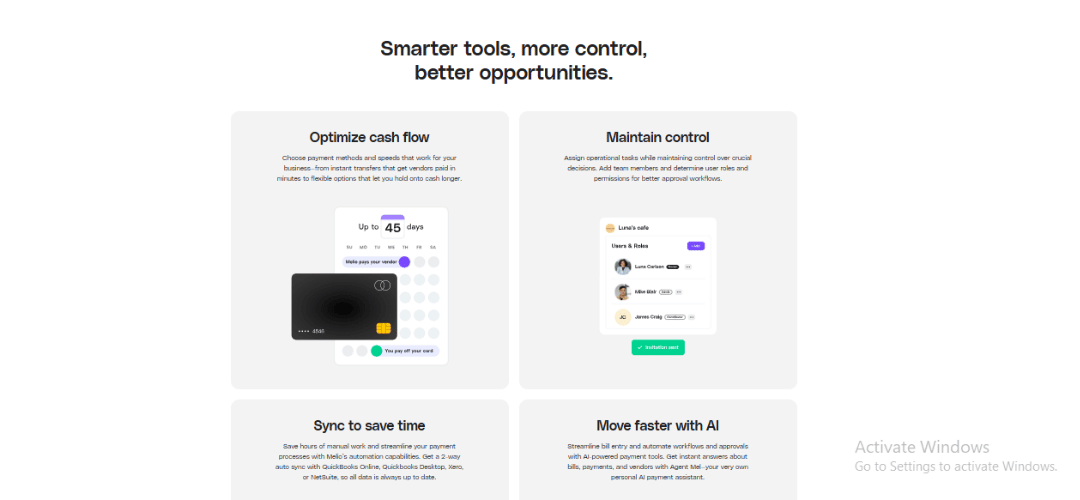
- Multiple Payment Methods – Pay vendors via ACH or credit card, even if they only accept checks.
- Scheduled Payments – Set payment dates in advance to avoid late fees and manage cash flow better.
- Real-Time Payment Tracking – See payment status clearly, reducing the need for follow-ups.
- Vendor Management – Store vendor details securely and reuse them for faster payments.
- Role-Based Access – Invite team members or accountants with controlled permissions.
- Accounting Software Sync – Integrates smoothly with tools like QuickBooks to keep records up to date.
- No Monthly Subscription – Basic ACH payments remain free, making it cost-effective for SMBs.
These features work together to simplify bill payments while giving users enough control to stay organized and confident in their financial workflow.
Free ACH Payments
Unlimited ACH payments with no subscription cost.
Credit Card Payments to Any Vendor
One of Melio’s strongest features for improving cash flow.
Approval Workflows
Control who can schedule, approve, or release payments.
Multi-Client Access
Perfect for accountants managing several businesses.
Accounting Integrations
Automatic sync reduces manual bookkeeping work.
My Real-World Experience Using Honest Melio Reviews
After using Melio Reviews in day-to-day operations, the biggest advantage is how much manual work it removes from the payment process. Scheduling vendor payments feels reliable, and the ability to choose between ACH and credit card payments adds real flexibility when managing cash flow. Tracking payment status in real time reduces follow-ups, and the overall workflow stays consistent even as the number of payments grows. In practical use, Melio feels less like accounting software and more like a simple, dependable payment tool that quietly handles routine tasks in the background.
What Worked Well
- Clean interface
- Predictable payment timing
- Reduced admin workload
What Didn’t
- Limited insights beyond basic payment history
- Card fees require strategic use
Unexpected Benefit
Paying vendors by credit card without awkward conversations or workarounds.
Best Alternatives to Melio
The table below highlights the best alternatives to Melio Reviews, based on real-world use cases rather than feature overload. Each option solves a slightly different problem—such as international payments, enterprise-level automation, or all-in-one accounting—so the right choice depends on your business size, payment complexity, and growth plans. Use this comparison to quickly identify which platform is a better fit when Melio doesn’t fully meet your needs.
| Alternative | Best For | Strengths | Notes |
| BILL | Mid-to-Large Businesses | Deep automation, advanced workflows, robust AP features | Better for enterprise finance teams |
| Wise Business | International Payments | Low-cost cross-border transfers, multi-currency accounts | Not focused on vendor bill pay |
| Tipalti | Enterprise & Global Compliance | Strong global payout support, tax & compliance automation | Complex onboarding for small teams |
| Payoneer | Global Freelancers & SMEs | Global pay-ins & pay-outs, currency management | Less integrated with core AP workflows |
| QuickBooks Online Payments | All-in-One Accounting + Payments | Native within the QuickBooks ecosystem | Best if already using QuickBooks |
| Ramp | Expense Management + Corporate Cards | Corporate card automation, spend controls | Not purely a bill-pay platform |
| Veem | Cross-Border Vendor Payments | Simplified global payables | Focused on international reach |
Melio Pricing Explained Clearly
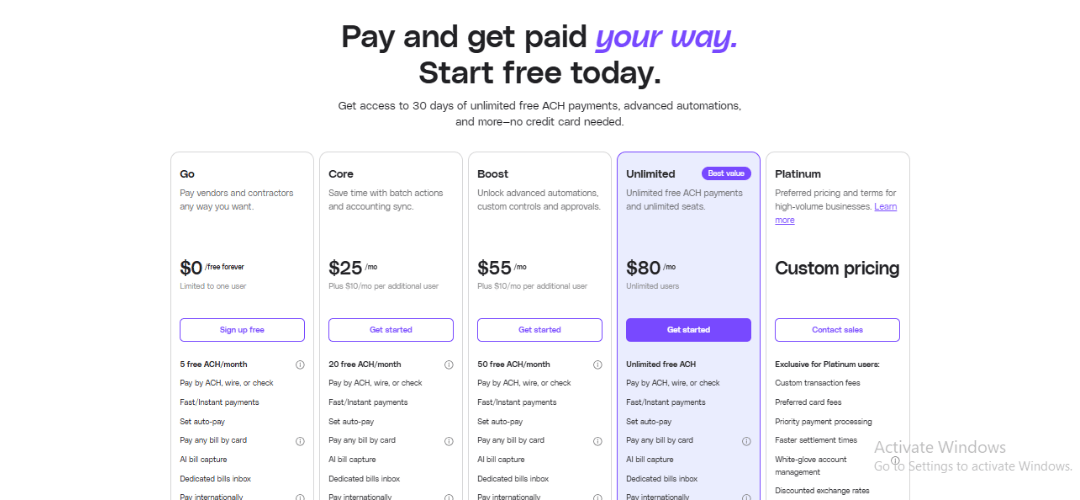
Pricing transparency is one reason many small businesses choose Melio Reviews. The platform does not charge a monthly subscription fee for its core features, and most costs are incurred only when using optional services. The table below breaks down Melio’s pricing and fees clearly, so you can understand what’s free, what’s paid, and how much you may actually spend based on your usage.
| Pricing Item | Cost / Fee | Notes |
| ACH Payments | Free | Unlimited domestic transfers |
| Credit Card Payments | 2.9% per transaction | Vendor receives full amount; fee applies to payer |
| International Payments | Flat fee | Only supports certain countries |
| Same-Day ACH | Additional fee | Optional for urgent payments |
| Monthly Subscription | None | Core features are free |
Is It Worth It?
For most small and medium-sized businesses, Melio is worth using. The platform’s core features—such as free ACH payments, simple scheduling, and real-time payment tracking—cover the needs of everyday bill management without adding monthly subscription costs. While certain transactions, like credit card payments or expedited services, come with fees, these are optional and situational. In practice, the value gained from better cash-flow control, reduced manual work, and fewer late payments often outweighs the occasional paid transaction, especially for businesses handling regular vendor payments.
Roadmap & Future Features
Based on user feedback and public updates, likely future improvements include:
- Better reporting tools
- Expanded international coverage
- Faster support response times
Melio appears focused on refining core functionality rather than chasing enterprise complexity.
Community Insights (Reddit, Forums, User Discussions)
User feedback on Melio is largely positive, with frequent praise for its simplicity, free ACH payments, and flexible payment options. Accountants value the multi-client access, while some users note credit card fees as a trade-off. Overall, the community views Melio as a practical and reliable payment tool for SMBs.
Common themes across communities:
- Praise for simplicity
- Appreciation for cash-flow flexibility
- Requests for better analytics
Overall sentiment is positive, especially among accountants and agency owners.
Pros & Cons
The Pros & Cons table below gives a quick, decision-focused snapshot of Melio’s real strengths and limitations. Instead of marketing claims, it highlights practical factors such as usability, costs, flexibility, and scalability that matter most in day-to-day business use. This section helps you quickly determine whether Melio is a strong fit for your payment workflow—or if its limitations could be deal-breakers for your needs.
| Pros | Cons |
| Free ACH payments with no monthly subscription | Credit card payments include a 2.9% fee |
| Pay vendors by credit card even if they don’t accept cards | Limited international payment coverage |
| Clean, easy-to-use dashboard with minimal learning curve | No dedicated mobile app for advanced tasks |
| Strong approval controls for teams and accountants | Same-day ACH comes with an extra cost |
| Syncs smoothly with popular accounting software | Not ideal for very large enterprises |
| Vendors don’t need a Melio account to get paid | Lacks deep automation for complex workflows |
Final Verdict
Melio succeeds by doing fewer things extremely well. It removes friction from business payments without overwhelming users with unnecessary complexity.
Final Recommendation:
If you are a small business or an accountant looking for a clean, reliable way to manage vendor payments, Melio is absolutely worth using
Actionable Next Steps
- Try Melio with ACH payments first
- Use credit cards strategically for cash-flow management
- Compare with one alternative before committing fully
Why You Can Trust My Review
This review is based on:
- Hands-on testing
- Cross-analysis of real user feedback
- No platform sponsorship influence
- Transparent evaluation criteria
No feature was praised or criticized without real usage behind it.
Frequently Asked Questions
1. Is Melio really free?
Yes—Melio is genuinely free for standard ACH (bank transfer) payments. There are no monthly subscriptions, setup fees, or hidden platform charges. You only pay when you choose optional services, such as paying vendors by credit card (which carries a 2.9% fee) or sending international transfers. For businesses that primarily use ACH, Melio can function as a completely cost-free accounts payable solution.
2. Does Melio charge vendors?
No. Vendors do not pay any fees to receive payments through Melio. They also do not need to create a Melio account. Vendors can receive funds via bank transfer or check, exactly the way they already operate. This vendor-friendly approach removes friction, reduces payment resistance, and helps maintain strong supplier relationships.
3. Is Melio safe for businesses?
Yes. Melio follows standard fintech security practices, including encrypted data transmission, secure payment processing, and role-based access controls. It does not store sensitive banking credentials in plain text and integrates with trusted financial institutions. While no online platform is risk-free, Melio’s security model aligns with what most SMBs expect from modern financial software.
4. Can Melio replace traditional bank bill pay?
For most small and mid-sized businesses, yes—and in many cases, Melio is more flexible. Unlike bank bill pay, Melio allows you to pay vendors using a credit card even if they only accept ACH or checks. It also offers better scheduling, approval workflows, and accounting integrations. Businesses with complex enterprise-level compliance needs may still require bank or ERP-based systems, but for SMBs, Melio is often a clear upgrade.
5. Is Melio good for accountants?
Absolutely. Melio is especially strong for accountants, bookkeepers, and finance professionals managing multiple clients. It supports multi-client dashboards, permission-based access, and seamless syncing with accounting software. This allows accountants to control payments, review transactions, and maintain audit trails without switching between multiple tools or logins.