· By IMRAN HOSSAIN
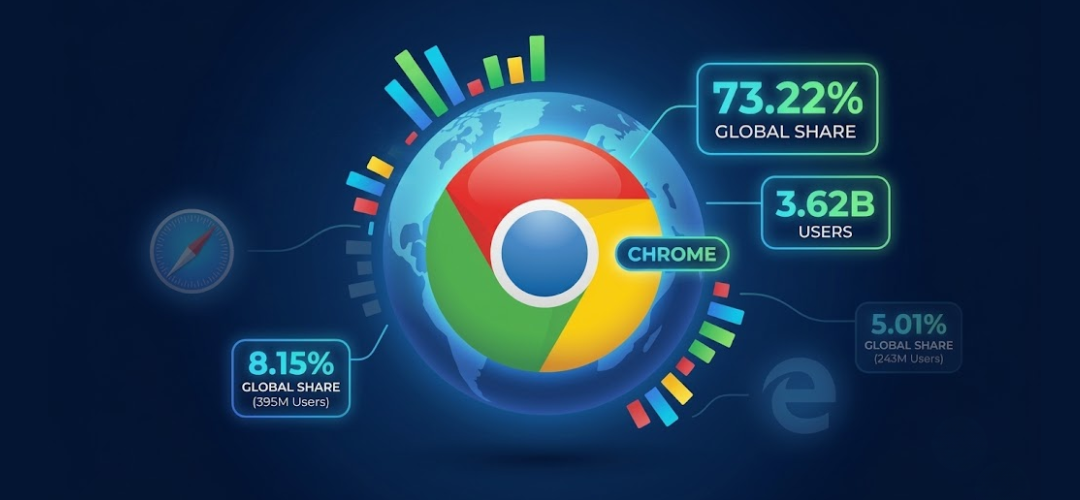
Quick answer: In 2026, Google Chrome continues to lead the global browser market with around 3.62 billion users, capturing a substantial 73.22% market share. This article compiles over 150 statistics detailing its performance, extensions, user trends, and security features, reflecting its significant influence in the web browsing ecosystem.
- Over 3.62 billion users rely on Google Chrome worldwide.
- Google Chrome holds a market share of 73.22% in 2026.
- There are approximately 112,000 active extensions available in the Chrome Web Store.
- Mobile market share for Chrome is 68.75%, making it a dominant choice for mobile users.
- Chrome updates regularly every four weeks to ensure security and functionality.
What is Chrome’s Global Adoption and Market Share in 2026?
Approximately 3.62 billion people utilize Google Chrome, representing a significant portion of the global internet user base of about 5.65 billion. This equates to 73.22% of the global browser market, marking a slight decline from a higher share in previous years. Notably, Chrome’s desktop market share stands at 76.39%, while its mobile market share is 68.75%, indicating its strong presence across devices.
StatCounter’s data supports that Chrome continues to overshadow competition, with Safari capturing only 13.27% and Microsoft Edge at 4.61%. In terms of tablets, Chrome holds a 48.69% share, showcasing its versatility across device types. The sustained growth of Chrome reflects its continual enhancements and user preferences, solidifying its position as the leading browser in 2026.
What Are the Regional and Demographic Insights for Chrome?
In the United States, Google Chrome dominates with a market share of 59.34%, considerably surpassing Safari’s 25.1% and Edge’s 6.38%. Chrome’s desktop share in the U.S. elevates to 65.47%, illustrating its strong foothold in desktop browsing.
Globally, India’s market dominance is remarkable, with Chrome holding an immense 92.24% of the desktop browser market. This indicates a robust loyalty in emerging markets. Moreover, demographic patterns show that 71.4% of Android users rely on Chrome, while a significant percentage of users in other demographics frequently switch browsers, with approximately 78.3% utilizing multiple browsers.
User preference varies across operating systems, as 58.7% of Mac users favor Safari, while Windows users exhibit a marked preference for Chrome, enhancing platform loyalty among its user base. These insights reflect varying user behaviors influenced by regional and device factors. The growth in user adoption, especially in mobile markets and emerging economies, is significant as more people access the internet primarily through mobile devices.
What Are the Trends in Chrome’s Market Share and Usage Patterns?
Since its release, Google Chrome has shown impressive growth, solidifying its market position. As of 2026, Chrome’s global market share is reported at 73.22%, a significant rise from just 3.23% in 2009. In contrast, Safari escalated from a minimal presence to approximately 13.27%, pointing to the competitive landscape of browser preferences over the years.
In terms of mobile usage, Chrome has increased its share from a mere 0.35% in 2012 to 68.34% in 2025, affirming the shift toward mobile browsing. Meanwhile, its tablet market share saw a similar growth trajectory, reaching 48.69%. Notably, U.S. data indicates substantial growth in its desktop share, exemplifying Chrome’s sustained popularity and user trust. The increasing reliance on web-based applications further highlights the shift toward using efficient and fast browsers like Chrome, positioning it with a competitive edge.
What Do Usage and User Behavior Statistics Reveal About Chrome?
The usage behavior of Google Chrome users indicates that the browser plays a vital role in their everyday online activities. Users engage in 19% more searches per session compared to other browsers, significantly enhanced by Chrome’s preloading feature, which boosts search frequency by 26%. This indicates a higher level of user engagement facilitated by Chrome’s interface.
Additionally, Chrome’s autocomplete feature is influential, impacting 12-15% of click-through rates, indicating that users rely on these suggestions for web navigation. Interestingly, device synchronization across different platforms enhances user retention by 18%, emphasizing the importance of a seamless browsing experience.
Privacy concerns do play a critical role in Chrome’s usage, with 72% of users expressing worry over tracking, while only 14% regularly utilize the Incognito mode to enhance privacy. User perceptions about privacy are evolving, and this fear is driving some to seek out alternative browsers. Also noteworthy is that 35% of users have adjusted their ad personalization settings, demonstrating the ongoing conversation around privacy and user control over their browsing experience as people strive for a more tailored and secure online experience.
How Extensive is the Chrome Extension Ecosystem?
As of early 2026, the Chrome Web Store boasts around 112,000 active extensions, reflecting a vibrant ecosystem that enhances user functionality. Productivity tools comprise 55.5% of all extensions, suggesting that users prioritize efficiency-enhancing features in their browser experience. In an increasingly digital world, the accessibility of these extensions can transform how users interact with their web browsers, streamlining tasks and improving workflow.
The total number of installations across all Chrome extensions exceeds 1.69 billion, highlighting the popularity and necessity of these tools among users. However, it’s critical to note that the median extension typically has only 17 installations, showing that a select few extensions dominate the market while many remain underutilized.
Furthermore, security remains a key focus with Chrome extensions. A significant issue is the 60% of extensions that have not been updated in over 12 months, potentially exposing users to outdated code. These patterns reveal not only the importance of keeping extensions updated for security but also the reliance on a small number of widely-used extensions. This reliance creates opportunities for more tailored and specialized extensions to enhance specific user needs effectively while bringing attention to safety concerns facing the average user.
What Are the Implications of Chrome’s Influence on Search and Browsing?
Google Chrome significantly influences online search patterns and user behavior. More than 5.1 billion devices worldwide have Chrome installed, underscoring its extensive reach. Additionally, the preloading feature in Chrome boosts search frequency by 26%, contributing to the browser’s overall usability.
Google Discover, facilitated through Chrome, delivers over 5 billion daily impressions, showcasing the impact of Chrome on content visibility and user engagement. Its autocomplete suggestions guide 12-15% of user navigation, while URL suggestions account for 20% of navigational searches, solidifying Chrome’s critical role in shaping online search dynamics.
However, user privacy remains a concern, with 72% of users worried about tracking. Notably, only 14% of users actively use the Incognito mode for private browsing sessions. This tension between user convenience and privacy concerns demonstrates the challenges browsers like Chrome face in navigating user expectations. It also shows a clear need for ongoing education around privacy options and features readily available to users on the platform.
What New Trends Are Emerging in Chrome’s Security and Privacy Features?
Security and privacy are areas of growing importance for Google Chrome users. A staggering 63.7% of users block trackers by default, indicating a heightened awareness regarding online privacy. Furthermore, WebAssembly is supported by over 92.1% of websites, offering enhanced performance but also requiring vigilant security practices.
Moreover, 35.7% of browsers have begun supporting HTTP/3, which is crucial for improved speed and security in online interactions. Chrome’s built-in Safe Browsing technology plays a critical role in scanning billions of URLs daily to protect against phishing and malware attacks, although specific figures on how many URLs are scanned annually have not been disclosed by Google. This continued enhancement in security features assures users of a safer browsing experience, incentivizing them to remain within the Chrome ecosystem.
Users have expressed significant concerns regarding the permissions that extensions require, with 52% of AI-powered extensions collecting at least one type of user data. This underscores the need for more stringent permission management practices to better safeguard user data from unwarranted access. The balance between enhanced functionality and user protection remains a crucial area where further improvements could drive user trust and satisfaction.
What is the Current State of Chrome Versions and Release Cycle?
Google Chrome follows a structured release cycle that has proven effective in delivering new features and updates to users. The browser adheres to a predictable four-week release timeline for major versions, allowing it to stay competitive and responsive to user needs. As of March 2026, the current stable version is Chrome 146, with expected updates rolling out consistently in this structured manner.
For enterprise users, there’s an extended-stable channel available, which extends the release cycle to eight weeks. This option provides additional time for testing and minimizes disruptions during transitions. Moreover, Chrome automatically updates in the background to ensure that users are protected with the latest security patches.
Multi-channel availability facilitates access to different versions, such as Canary, Dev, Beta, and Stable, across multiple platforms including Windows, macOS, iOS, Android, and ChromeOS, offering users flexibility in feature testing and experience. The approach allows developers and power users the chance to glimpse new features while providing regular users with a stable experience through continuous updates.
What is the Impact of Chrome OS and Chromebooks on Education?
The Chromebook market has seen significant growth, with a global value of approximately $14.7 billion in 2026. The projections suggest an expected market valuation of $42.9 billion by 2034 as the adoption of Chromebooks continues to rise, especially in education. Manufacturers shipped 22.11 million units of Chromebooks in 2026, demonstrating robust demand driven largely by educational institutions.
In the U.S., Chromebooks account for about 8.44% of the desktop OS market and play a crucial role in K-12 education, with around 93% of school districts planning to acquire additional Chromebooks this year. The educational sector comprises 60.1% of all Chromebook sales, signaling a trend toward digital learning solutions, supported by Google Workspace for Education, which caters to over 150 million students globally. The combination of affordability, ease of use, and direct integration of Google services makes Chromebooks a favored choice among schools.
These trends demonstrate how deeply embedded Chromebooks have become in educational strategies over recent years, particularly as schools pivot toward digital solutions in learning and teaching environments. Furthermore, as online learning becomes more prominent, this growth trend is expected to continue, potentially leading to advancements in educational technology integration.
What Are Chrome’s Current Security and Privacy Innovations?
Chrome is committed to continually enhancing user security and privacy. A notable innovation is its integration of the Privacy Sandbox, which aims to phased out third-party cookies by providing tools for user privacy while still allowing advertisers to reach their audiences. By 2026, about 60% of Chrome browsers have adopted these features, representing significant progress in Google’s cookie-less advertising approach.
Additionally, the built-in Safe Browsing feature exemplifies Chrome’s dedication to user safety, scanning billions of URLs daily to mitigate risks associated with malware and phishing. The automatic update policy ensures regular security patches are applied without user intervention, bolstering the security architecture further.
Privacy risks associated with extensions remain a significant concern. Research indicates that 52% of AI-powered extensions gather user data, highlighting the critical need for better monitoring and oversight of extension permissions to protect user information effectively. Overall, Chrome’s focus on security features, innovations, and proactive approaches to privacy reflects an evolving landscape that responds to user needs and growing concerns about data safety while maintaining competitiveness in the browser market.
Common Mistakes Users Make with Chrome
Despite its popularity, users often make common mistakes that can hinder their browsing experience with Google Chrome. One prevalent mistake is neglecting to regularly update both Chrome and its extensions, which can expose users to security vulnerabilities. Extensions that have not been updated in over a year may harbor outdated code, potentially putting user data at risk.
Another mistake involves not customizing Chrome’s privacy settings. Many users are unaware of the extent to which they can adjust privacy controls, leading to increased tracking by advertisers. For instance, failure to adjust cookie settings or ad personalizations can result in unsolicited targeted advertising, diminishing the browsing experience.
Lastly, users often overlook the importance of using Chrome’s built-in features, such as tab grouping and bookmark synchronization, which can significantly enhance organization and productivity. Leveraging these features thoughtfully can optimize the browser’s performance. By improving awareness and adopting best practices, users can enhance their overall Chrome experience, reduce risks, and enjoy a seamless browsing experience.
Which One Fits You? Reader Profiles and Recommendations
Understanding the differences in user profiles can assist individuals in making the most of their Google Chrome experience based on their unique needs. Here are a few profiles with tailored recommendations.
Casual Users
For those who use Chrome for basic browsing, checking emails, and watching videos, the built-in features such as bookmarks, and the easy-to-use interface will suffice. Casual users benefit most from Chrome’s seamless integration with Google services, emphasizing login features and personalized recommendations.
Power Users
Power users who rely heavily on productivity tools should delve into the extensive Chrome extensions ecosystem. Extensions for project management, advanced tab organization, and productivity trackers will enhance efficiency. Integrating tools such as Google Docs or third-party applications can create a robust workflow.
Privacy-Conscious Users
For users concerned with privacy, utilizing features such as Incognito mode, tracker blocking, and understanding Chrome’s privacy settings becomes essential. Consider using privacy-focused extensions and regularly reviewing permissions granted to installed extensions.
Tailoring your approach to how you use Chrome can significantly enhance the browsing experience, ensuring users extract maximum value from the browser.
FAQ Section
How many people are using Google Chrome in 2026?
Approximately 3.62 billion people use Google Chrome as of 2026.
What is Chrome’s market share worldwide?
As of 2026, Google Chrome holds a global market share of 73.22%, significantly ahead of its competitors.
How many Chrome extensions are available?
In early 2026, the Chrome Web Store features around 112,000 active extensions.
What is Chrome’s mobile market share?
Chrome dominates the mobile browser market with a share of 68.75% in 2026.
How frequently does Chrome release updates?
Chrome follows a predictable four-week release cycle for major updates.
What security features does Chrome offer?
Chrome includes features like Safe Browsing and automatic updates to enhance user security.
In summary, Google Chrome continues to dominate the browser market in 2026, with a vast user base and significant market share across devices. Understanding these statistics not only aids users in optimizing their browsing experience but also highlights the essential features that contribute to Chrome’s ongoing popularity.