
Managing notes, projects, tasks, and documents across different apps can become overwhelming. This Notion review explores how the platform combines everything into one flexible workspace built for productivity and collaboration.
You’ll learn about Notion’s features, pricing, pros, cons, and whether it’s worth using for individuals and teams in 2026.
Quick Summary
Get a quick overview of Notion’s core features, strengths, pricing, and limitations before diving into the full review.
| Best For | Individuals, small teams, documentation, knowledge management |
| Platforms | Web, Mac, Windows, iOS, Android |
| Free Plan | Yes — unlimited blocks for solo use |
| Starting Price | $10/user/month (Plus, billed annually) |
| G2 Rating | 4.7 / 5 (6,000+ reviews) |
| Capterra Rating | 4.7 / 5 |
| Verdict | Best flexible workspace for documentation-first teams |
What Is Notion?
A plain-language explanation of what Notion actually is and how it works.
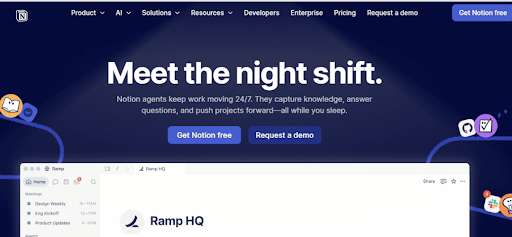
Notion is an all-in-one workspace that combines notes, databases, task boards, and team wikis under one roof. Everything is built from drag-and-drop “blocks” text, tables, checklists, embeds so you shape your workspace around how you actually work, not the other way around.
Founded in 2016, it is used by millions of freelancers, startups, and enterprise teams who are tired of paying for four separate tools.
Key Features
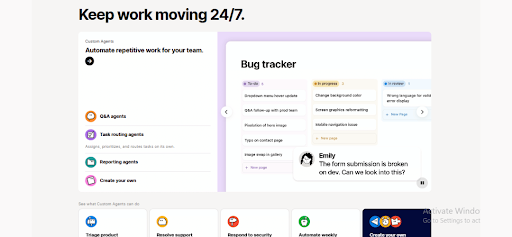
Notion Review; Notion offers much more than basic note-taking tools. Its flexible workspace combines databases, task management, collaboration, templates, and AI features in one platform.
Block-based editor
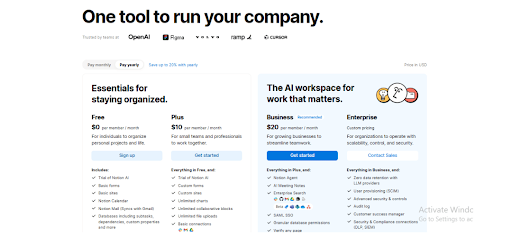
Every element text, image, table, checklist is a block you can move and nest freely. No templates forced on you. You build exactly what you need.
Databases with multiple views
One dataset, six ways to see it — table, Kanban, calendar, timeline, gallery, or list. Switch views in one click without touching your data. This alone replaces Trello and spreadsheets for most teams.
Team wiki and knowledge base
Stop losing information in Slack threads. Notion gives teams a structured, searchable home for documentation, SOPs, and company knowledge that actually stays organized.
Templates library
Hundreds of ready-to-use templates for project management, CRM, meeting notes, and roadmaps. You can go from blank page to working system in under 10 minutes.
Notion AI
Drafts content, summarizes pages, and answers questions about your workspace data. Useful — but full AI access (AI Agents, Ask Notion) now requires the Business plan as of May 2026.
Integrations
Connects with Slack, Google Drive, Jira, Asana, and Zapier (7,000+ apps). An open API lets technical teams build custom connections.
Real-time collaboration
See teammates typing live, leave inline comments, and tag people — all inside the same page where the work actually lives. No more context switching to a separate chat tool.
Pricing of Notion Review
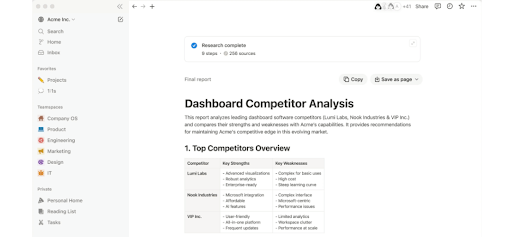
Notion changed its pricing in May 2025. Here is what each plan costs now. Students and educators with a .edu email get Plus free. Eligible startups can claim up to 6 months free on the Business plan.
| Plan | Price (annual) | Best For |
| Free | $0 | Solo users, personal projects |
| Plus | $10/user/mo | Small teams, startups |
| Business | $20/user/mo | Teams needing full AI + SSO |
| Enterprise | Custom | Large orgs, advanced security |
⚠️ The separate AI add-on was removed in May 2026. Full Notion AI now requires the Business plan at $20/user/month.Nonprofits get 50% off Plus.
Notion for Teams vs Individuals
Notion offers a powerful free plan for solo users with unlimited blocks, flexible layouts, and hundreds of templates at zero cost. For small teams of 2–20 people, the Plus plan at $10/user/month delivers strong value with shared workspaces, real-time collaboration, and database views.
However, larger teams may face limitations with reporting, time tracking, and performance on very large databases.
Notion Learning Curve: What to Expect
Most reviews skip this — Notion takes real time to set up before it clicks.
Notion is not plug-and-play. Total freedom sounds great until you are staring at a blank page with no idea where to start. Most users need 1–2 weeks before their workspace feels organized. Start from a template — it removes the blank-canvas paralysis and cuts setup time dramatically.
Pros and Cons
An honest look at what Notion gets right and where it still frustrates users in 2025.
| ✅ Pros | ❌ Cons |
| One tool replaces notes, tasks, wikis, databases | Steep learning curve for new users |
| Powerful databases with six view types | Slow on large databases (5,000+ records) |
| Excellent for documentation and team wikis | No built-in time tracking or native reporting |
| Genuinely useful free plan for solo users | Full AI locked to $20/user/mo Business plan |
| 100+ integrations including Zapier | Mobile app is weaker than desktop |
| Smooth real-time collaboration | Customer support is slow and hard to reach |
Who Should Use Notion?
Notion is not built for everyone — this section tells you exactly where it fits and where it does not.
Notion works best for:
- Freelancers managing projects, notes, and client work in one place
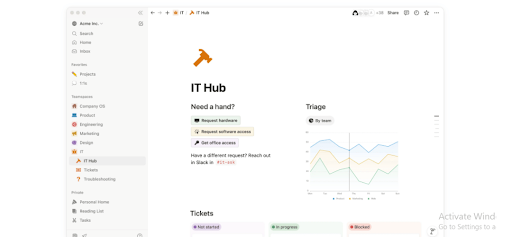
- Small teams (2–20 people) building shared wikis and documentation
- Product and content teams with documentation-heavy workflows
- Startups replacing 3–4 separate tools with one unified workspace
Skip Notion if you need:
- Built-in time tracking, resource management, or advanced reporting
- A CRM with real automation built in
- Complex project execution at scale with tight deadlines
- High-performance databases above 5,000 records
Top 5 Notion Alternatives
If Notion does not fit your workflow, these alternatives are worth a serious look.
| Tool | Best For | Key Edge Over Notion |
| ClickUp | Project management | Built-in time tracking and native reporting |
| Monday.com | Team execution at scale | Advanced automations, more visualization types |
| Confluence | Enterprise documentation | Deeper Jira integration, stronger governance |
| Obsidian | Personal knowledge management | Fully offline, local storage, powerful linking |
| Coda | Docs with automation | Stronger formula engine and interactive buttons |
| Airtable | Database-heavy workflows | Better performance on large relational datasets |
Final Verdict
This Notion review shows why Notion remains one of the best all-in-one productivity tools for notes, tasks, documentation, and team collaboration. Its free plan is powerful for individuals, while the Plus plan offers strong value for small teams managing projects and knowledge in one workspace.
For advanced permissions, AI tools, and enterprise-level features, pricing increases quickly. Notion excels in flexibility and organization, but some teams may prefer tools like ClickUp or Monday.com for faster project execution and deeper reporting features.
Frequently Asked Questions about our Notion Review
Can Notion replace Jira or Asana for engineering teams?
For lightweight sprint tracking and documentation — yes. For complex engineering workflows with deep dependency tracking and CI/CD integrations, Jira still wins.
How does Notion handle data privacy and security compliance?
Notion is SOC 2 Type II certified with AES-256 encryption. SAML SSO and audit logs are available on Business and Enterprise plans. For HIPAA or GDPR workflows, review Notion’s Data Processing Addendum before committing.
Is Notion a good Confluence alternative for growing startups?
Usually yes — more flexible, cheaper, and easier to set up for teams under 100 people. Confluence pulls ahead when deep Jira integration or strict enterprise governance is required.
Can Notion be used as a client-facing portal?
Pages can be shared publicly or with guests without an account. Guest limits apply on lower plans and branding options are minimal — it works for simple portals but is not a substitute for a dedicated client portal tool.