
Deciding on the best tool to organize your thoughts and boost productivity can feel overwhelming, but both Anytype vs Capacities offer new, powerful ways to manage your digital life. These next-generation apps move beyond simple folders, helping you see the connections between your notes, ideas, projects, and contacts.
They are designed to act as your “Second Brain,” allowing you to link pieces of information together like a web. Understanding the core differences between Anytype vs Capacities will help you pick the right digital space to store, connect, and grow your personal knowledge base.
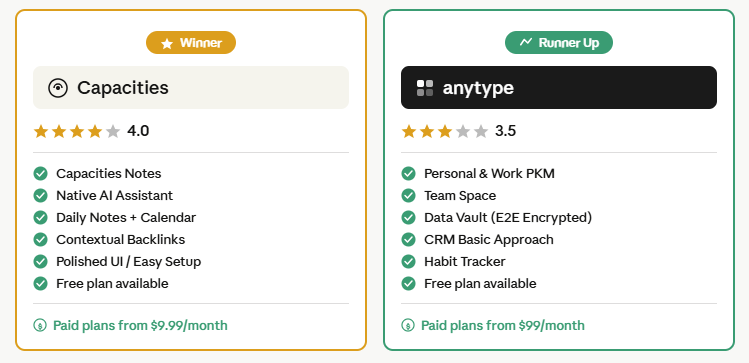
What is Anytype?
Anytype is a local-first “everything app” that is built around privacy and flexibility, letting you create and link various types of information on your device. It works even when you are offline, and your data is protected with end-to-end encryption, meaning only you can unlock and view your files.
This platform uses an object-oriented structure where every piece of information, whether it’s a note, a person, or a task, is a unique ‘Object’ with properties you define. This allows for powerful connections and customizations, enabling you to build a system that works exactly how your own mind thinks.
Key highlights:
- Object-based workspace (notes, tasks, and databases are all “objects”)
- End-to-end encrypted sync included for free
- Fully offline-first with P2P device sync
- Available on Windows, Mac, Linux, iOS, and Android
- Open-source with an active development roadmap
- Block-based editor with slash commands, drag-and-drop, and multiple views
Anytype appeals to users who want maximum control, deep customization, and a tool that works entirely on their terms.
| ✅ Pros | ❌ Cons |
| True offline-first — works without internet | Higher learning curve to set up properly |
| P2P encrypted sync included for free | Daily notes feature less polished than Capacities |
| Open-source & privacy-focused by design | AI features still limited & evolving |
| Deep customization — build your own system | Proprietary format — harder to export data |
| Available on Windows, Mac, Linux, iOS, Android | Smaller community & fewer templates |
| Built-in CRM, habit tracker, team spaces | Pro plan is expensive ($99/month) |
What are Capacities?
Capacities is a sleek and intuitive tool that helps you create a network of interconnected thoughts in a visually appealing and organized way, often described as a “studio for your mind.” It uses a structured approach, making it generally easier to start and navigate than other similar apps.
Like its competitor, Capacities uses an object-based system for its core structure, where things like books, people, and ideas are treated as custom ‘Objects’ instead of plain documents. This design, combined with a focus on a helpful Daily Note feature, makes it excellent for journaling and consistent knowledge capture.
Key highlights:
- Object-based note-taking with custom types (books, people, ideas, etc.)
- Strong Daily Notes feature with built-in calendar integration
- Native AI assistant for summarizing, brainstorming, and contextual search
- Contextual backlinks that show rich surrounding context
- Clean, modern UI with dark mode
- Cloud-based sync across all devices
Capacities is ideal for users who want a structured, aesthetically pleasing workspace without needing to build everything from scratch.

| ✅ Pros | ❌ Cons |
| Best-in-class daily notes with calendar integration | Cloud-based — your data lives on their servers |
| Native AI assistant built into the workspace | Limited offline functionality |
| Beautiful, polished UI — easy to get started | Pro plan required for AI & full features ($9.99/mo) |
| Contextual backlinks with rich surrounding context | Mobile app still improving |
| Great for journaling & daily knowledge capture | Less flexible customization than Anytype |
| Beginner-friendly onboarding experience | No Linux desktop support |
Anytype vs Capacities: Quick Comparison Table
| Feature | Anytype | Capacities |
| Storage | Local-first (P2P encrypted sync) | Cloud-based |
| Pricing | Free (sync included) | Free + Pro ($10/mo) |
| Data Privacy | E2E encrypted, offline-first | Cloud-hosted |
| Open Source | ✅ Yes | ❌ No |
| Object-Based Structure | ✅ Yes | ✅ Yes |
| Daily Notes | Basic | ✅ Strong (calendar-linked) |
| AI Assistant | Limited | ✅ Native, integrated |
| Graph View | ✅ Yes | ✅ Yes |
| Built-in Databases | ✅ Yes (Sets & Collections) | ✅ Yes (Queries & Collections) |
| Mobile App | Native (iOS & Android) | iOS & Android (improving) |
| Offline Mode | ✅ Fully offline-first | Limited offline support |
| Learning Curve | Moderate–High | Moderate |
| Best For | Privacy-focused power users | Polished daily knowledge work |
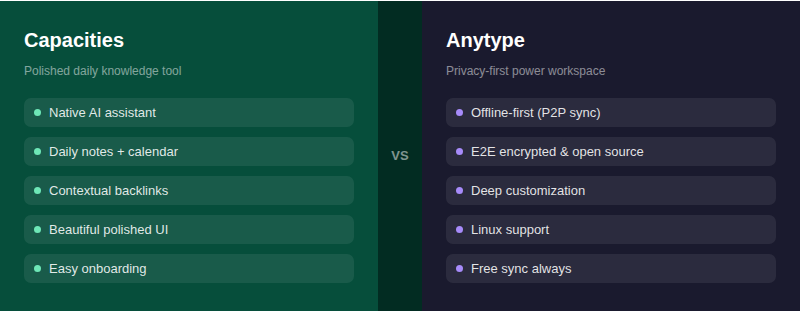
Core Features Comparison
Note-Taking & Editor Experience
Both tools use a block-based editor, so the day-to-day writing experience feels somewhat familiar if you’ve used Notion. But the philosophy behind each editor is different.
AnyType editor is built for flexibility and customization. Every block is part of an object, and you can assign types, relations, and layouts to shape your workspace exactly how you want. The block-based editor supports the slash command, and you have no problem formatting pages the way you want and like Notion, it also lets you create complex databases with multiple views.
Capacities take a more guided, structured approach. When you create a new note, you’re prompted to select a type: is this a book, a person, an idea, a meeting? This simple habit nudges you toward consistently typed, well-organized content rather than a pile of unstructured pages. The result is a workspace that feels curated rather than chaotic.
Object-Based Knowledge Management
This is the core architectural feature both tools share and also where they diverge most meaningfully. In Anytype, the tagging system transcends object types, allowing users to create connections between diverse pieces of information effortlessly. You define your own object types, create custom relations (like adding a “social media” property to a person object), and essentially build your own knowledge system from the ground up.
In Capacities, collections function as a way to group related notes, yet they are limited to specific object types meaning you categorize notes effectively, but the flexibility to apply collections across varying content types is somewhat restricted compared to Anytype. Anytype wins on depth of customization. Capacities win on out-of-the-box usability.
Daily Notes & Calendar Integration
This is one of Capacities strongest differentiators. Capacities has a particularly strong and integrated Daily Note feature, which makes it very well-suited for users who like to journal, capture daily thoughts, and link their activities to a specific date. Toolsbattle Every daily note is calendar-linked, so your knowledge base doubles as a time-based log of your thinking. It’s one of the most thoughtfully implemented daily journaling systems in any PKM tool.
Anytype does support daily notes, but the feature is more basic. It doesn’t have the same tight calendar integration or the workflow polish that makes Capacities’ daily journaling feel natural and habitual.
AI Assistant
This is another area where Capacities currently hold an advantage. Capacities include an AI assistant that dynamically interacts with your notes to answer questions, spark ideas, and provide contextual backlinks with rich surrounding information.It’s natively integrated not bolted on which means it can search across your entire knowledge base intelligently.
Anytype is still developing its AI capabilities. As of 2026, AI features in Anytype are more limited compared to what Capacities offers natively. For users who rely on AI to surface connections and draft content within their notes, Capacities has a meaningful advantage today.
Anytype: Privacy and Decentralization
One of Anytype’s biggest selling points is its dedication to data autonomy. It is designed to be open-source and stores your data locally first, giving you full control over your personal information and making it incredibly fast.
Anytype uses a peer-to-peer sync protocol to connect your devices, which is different from the traditional cloud-based systems used by most apps. This method, along with its strong encryption, makes it an ideal choice for users who prioritize top-level security and want to avoid third-party servers.
Capacities is cloud-based. Capacities uses a more traditional cloud-based syncing method Toolsbattle, which makes setup and cross-device access seamless but it means your data lives on Capacities’ servers. For most users this is completely fine. For privacy-first users, this is a dealbreaker.
Top reasons to care about local-first data storage:
- No third-party server holds your personal notes or intellectual property
- Full offline access even without an internet connection
- Your data isn’t subject to a company’s privacy policy changes or breach risks
- Long-term access guaranteed your notes survive even if the company shuts down
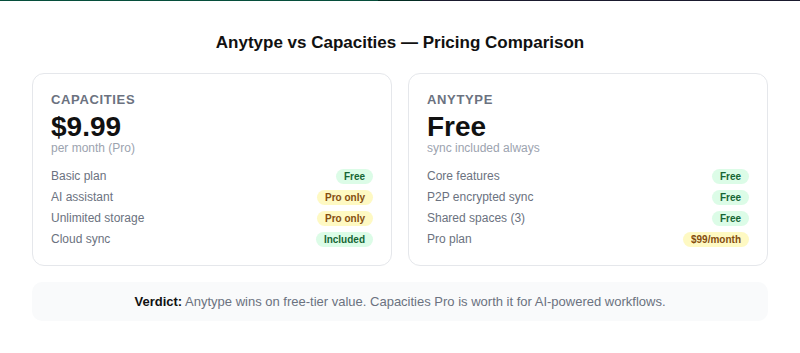
Pricing
Pricing is a significant practical differentiator here.
Anytype Pricing:
- Free plan includes all core features, unlimited objects, encrypted P2P sync, and up to 3 shared spaces
- Paid plans available for higher storage limits and advanced collaboration
- Sync is free no upsell needed for basic multi-device access
Capacities Pricing:
- Free plan available with limited features and storage
- Pro plan: ~$10/month (monthly) or ~$8/month (billed annually)
- Pro unlocks unlimited storage, advanced AI features, and priority support
Capacities: Design and Ease of Use
Capacities offers a highly polished user experience that feels smooth and intuitive right from the start. It gives you a clear structural framework with object folders and different page layouts, which can be a relief for those who prefer a guided setup over total freedom.
The platform is focused on helping you build a beautiful, interconnected knowledge base with features like contextual backlinks, powerful AI assistance for summarizing and brainstorming, and native calendar integration. Capacities is currently cloud-based, offering easy syncing and a focus on a professional, cohesive workflow.
Performance & Platform Support
Both tools support Windows, macOS, iOS, and Android. Anytype also has full Linux support, which Capacities lack. On mobile, Capacities and Anytype have both done an excellent job with their native mobile apps, though both come with a slight learning curve. Anytype has a native app on Android that feels robust and fast, built to be offline-first.
Capacities’ mobile app is improving rapidly but has historically been noted as still in a more limited state compared to its desktop experience. Its cloud-based nature means it requires an internet connection to access notes fully, a limitation Anytype doesn’t share.
Learning Curve
Both tools have a learning curve, but they’re different in nature.
Capacities are generally considered easier to get started with due to its more structured design and polished user interface. Anytype, while very powerful, has a slightly steeper learning curve because of its high level of customization. Toolsbattle
With Capacities, you’re guided into a system that works from day one. With Anytype, you’re handed the building blocks and asked to design your own system which is powerful, but can be overwhelming for new users.
Capacities, with its user-friendly interface, presents an easier learning curve and is more accessible for new users, while AnyType requires more time and effort to understand and harness its full potential.
Use Case Scenarios
✅ Choose Anytype if:
- Privacy and data ownership are non-negotiable for you
- You want a fully offline-first tool that works without internet
- You love deep customization and want to build your own PKM system from scratch
- You need a free all-in-one workspace with encrypted sync included
- You’re on Linux or need cross-platform consistency
Best use cases for Anytype:
- Building a privacy-first personal knowledge base or second brain
- Project management + notes + databases in a single self-hosted-style workspace
- Personal CRM tracking contacts, meetings, and relationships as objects
- Students managing research, reading notes, and task tracking in one place
- Developers and technical users who value open-source tools
✅ Choose Capacities if:
- You want a beautiful, polished tool that works great from day one
- Daily journaling and calendar-linked notes are a key part of your workflow
- You want native AI to help surface connections and speed up writing
- You’re comfortable with cloud storage and prioritize convenience over privacy
- You’re new to object-based PKM and want a guided, structured onboarding
Best use cases for Capacities:
- Daily journaling and personal knowledge capture with a calendar-first workflow
- Researchers and creatives building a visually organized knowledge base
- Writers who want AI assistance integrated directly into their notes
- Professionals managing meeting notes, people, and projects in one workspace
- Users migrating from Roam Research or Logseq who want more visual polish
What Are Users Saying?
Community sentiment across Reddit, Product Hunt, and PKM forums paints a consistent picture. Anytype users praise its privacy model, open-source nature, and how much it does for free. The most common criticism is that it can feel unfinished in spots and that the learning curve is steep without good templates or onboarding tutorials.
Capacity users love the daily notes system, the clean UI, and the AI assistant. Their main pain points are the cost of the Pro plan and the limited offline functionality especially for users who frequently work without internet access.
In head-to-head testing across Android, reviewers who spent a month comparing both tools found AnyType’s combination of privacy, open-source design, feature depth, and offline-first architecture to be the deciding factor in their final choice.
Both tools score strongly on community platforms with users consistently rating each in the 4.4 — 4.7 range on review sites, reflecting that both are genuinely high-quality products serving different audiences.
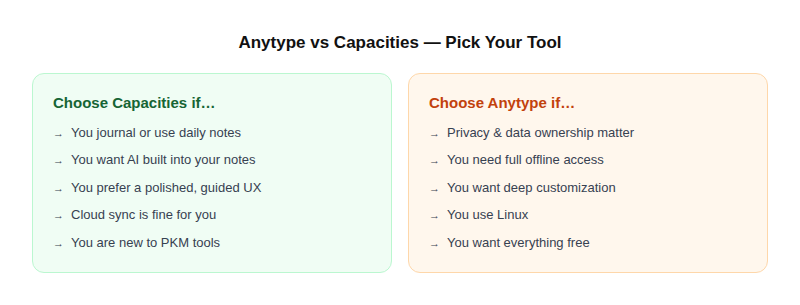
Verdict: Anytype vs Capacities Which Should You Choose?
Both Anytype and Capacities offer unique, powerful ways to manage your knowledge using an object-based structure. Anytype is the clear winner for users who demand maximum privacy and love to customize every detail of their system. Capacities is perfect for those seeking a highly polished, easy-to-use, and more structured experience with helpful features like a daily journal and integrated AI. Toolsbattle
In practical terms: if you’re a privacy-conscious power user who wants to own your data completely and is willing to invest time building your ideal system, Anytype is the obvious choice. If you want a beautifully designed tool that works brilliantly out of the box complete with AI assistance and a best-in-class daily notes experience, Capacities is worth every penny of the Pro plan.
The good news? Both offer free plans. Try Anytype first if privacy is your priority. Try Capacities first if onboarding experience and daily journaling matter most. They’re different enough that most people will know within a week which one fits their brain.
Conclusion
Both Anytype and Capacities offer unique, powerful ways to manage your knowledge using an object-based structure. Anytype is the clear winner for users who demand maximum privacy and love to customize every detail of their system. Capacities, on the other hand, is perfect for those seeking a highly polished, easy-to-use, and more structured experience with helpful features like a daily journal and integrated AI, though it is cloud-based. The best choice ultimately depends on whether you value security and ultimate customization (Anytype) or a beautiful, streamlined, and guided experience (Capacities).
Frequently Asked Questions (FAQs) Anytype vs Capacities
1. What is the main difference between Anytype and Capacities?
The main difference is their approach to data. Anytype is local-first and uses end-to-end encryption for maximum privacy and data ownership, while Capacities is a cloud-based application with a more streamlined and guided user experience.
2. Do both apps use an “object-based” system?
Yes, both Anytype and Capacities use an object-based approach. This means that every note, person, book, or task is treated as a unique ‘Object’ with specific properties, allowing for powerful linking and organization.
3. Which app is better for privacy?
Anytype is significantly better for privacy because it is offline-first and uses peer-to-peer sync with end-to-end encryption. This means your data is stored locally on your device, and only you have the keys to access it.
4. Which tool is easier to learn for a beginner?
Capacities is generally considered easier to get started with due to its more structured design and polished user interface. Anytype, while very powerful, has a slightly steeper learning curve because of its high level of customization.
5. Are both Anytype and Capacities free to use?
Both applications offer a free basic plan that allows users to access and explore their core features, though they also offer paid ‘Pro’ tiers for advanced functionality like unlimited storage or AI features.
6. Do they both have mobile apps?
Anytype is available on all major platforms, including Windows, Mac, Linux, iOS, and Android. Capacities is primarily desktop-focused but does have an app on iOS and Android.
7. Can I work offline in both applications?
Yes, both tools support an offline mode, but Anytype is built to be truly offline-first, meaning your data lives on your device and syncs locally, which is one of its core design philosophies.
8. Which app is better for visualizing connections between notes?
Both apps offer a graph view to visualize the relationships between your objects and notes. They are both excellent tools for seeing the connections in your personal knowledge management (PKM) system.
9. What makes Anytype’s sync different?
Anytype uses a peer-to-peer (P2P) sync technology, which is a decentralized method where your devices connect and sync directly with each other. This is different from Capacities, which uses a more traditional cloud-based syncing method.
10. Which app has better support for Daily Notes and journaling?
Capacities has a particularly strong and integrated Daily Note feature, which makes it very well-suited for users who like to journal, capture daily thoughts, and link their activities to a specific date.
11. Is Anytype better than Capacities?
It depends on your priorities. Anytype is better for privacy, offline use, customization, and free-tier value. Capacities are better for a polished guided experience, daily journaling, and native AI integration. Neither is universally superior.
12. Is Capacities free to use?
Yes, Capacities has a free plan with limited storage and features. The Pro plan costs around $10/month and unlocks unlimited storage, full AI access, and priority support.
13, Does Anytype work without the internet?
Yes. Anytype is fully offline-first all your data lives on your device and syncs via peer-to-peer encryption when you’re back online. You can use it completely offline indefinitely.
14, Can I migrate from Capacities to Anytype?
There’s no direct migration path between the two. You can export notes from Capacities and manually import content into Anytype, but custom object types, backlinks, and daily note structures won’t carry over automatically.
15. Which tool is better for daily journaling?
Capacity wins here. Its Daily Notes feature is tightly integrated with a native calendar and is one of the most polished journaling experiences in any PKM tool. Anytype’s daily notes are functional but don’t match the depth of Capacities’ implementation.
16. Which is more beginner-friendly?
Capacities have the gentler onboarding experience. Its guided, type-first structure means you can build a useful knowledge base quickly without reading documentation. Anytype’s power comes at the cost of more setup time.