
Fyxer AI is one of the most talked-about AI executive assistants of 2026 — promising to cut hours of inbox management down to minutes and turn messy meeting recordings into clean, actionable summaries. But does it actually deliver on that promise?
we cover every major feature in detail, break down the pricing tiers honestly, compare it against the top alternatives, and give you a clear verdict on whether Fyxer AI is worth your money in 2026.
1. Quick Summary
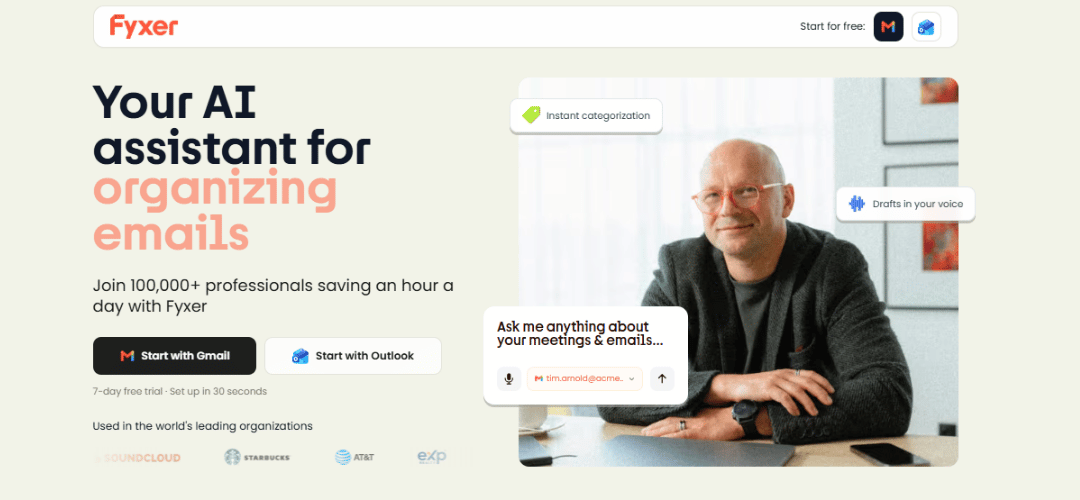
Fyxer AI is an AI-powered executive assistant built to eliminate inbox overload and meeting chaos. It works as an intelligent layer on top of Gmail and Outlook — sorting emails, drafting replies in your voice, recording meetings, and delivering structured summaries. Below is a full snapshot before the detailed review.
| Category | Detail |
|---|---|
| Product Name | Fyxer AI |
| Best For | Founders, Executives, Busy Professionals |
| Core Function | AI Email Assistant + AI Meeting Recorder |
| Integrations | Gmail, Outlook, Salesforce, HubSpot, Zoom, Teams, Google Meet |
| Pricing | $22.50/mo (Starter) · $37.50/mo (Pro) · Enterprise: Contact Sales |
| Free Trial | Yes — available on all plans |
| Mobile App | No native app — browser-based only (2026) |
| Editor Rating | ★★★★☆ 4.3 / 5 |
| Verdict | Highly recommended for email-heavy professionals |
2. What Is Fyxer AI?
Fyxer AI is a cloud-based AI executive assistant that integrates directly into your existing email environment. Unlike tools such as Superhuman that replace your email client entirely, Fyxer operates as an intelligence layer — reading, organizing, and acting on your inbox without disrupting where or how you already work.
The platform is purpose-built for professionals who spend 3+ hours per day managing emails and attending meetings. Its dual focus on inbox automation and meeting intelligence makes it a distinct offering in the 2026 AI productivity landscape, where most tools specialize in one or the other but rarely both.
Who It Is Built For
- Startup founders managing investor, sales, and operations communication
- C-suite executives receiving 100+ emails per day
- Sales managers handling complex multi-thread client deals
- Consultants and advisors juggling multiple active client relationships
- Any professional whose inbox is their primary daily workspace
3. How Fyxer Works
Fyxer operates through a three-phase model: Connect, Learn, and Automate. After you authorize access via OAuth, it reads your sent email history to build a personal communication profile. This profile then drives every draft, sort, and suggestion the system produces going forward.
The Core Automation System
- Analyzes sent email history to model your tone, vocabulary, and personal style
- Assigns priority scores to every incoming email using NLP classification
- Categorizes threads: Urgent, Action Needed, FYI, Follow-Up, Newsletter
- Generates context-aware reply drafts based on the complete thread history
- Joins video calls as a bot recorder and produces structured post-meeting summaries
- Syncs meeting notes and email interactions automatically to connected CRM systems
4. Fyxer AI Key Features
Fyxer delivers seven core capabilities in a single platform. Each feature is designed to reduce a specific time drain for busy professionals — from inbox sorting all the way to meeting documentation. Below is a short overview of all features, followed by an individual breakdown of each one.
- 📩 Email AI Labeling & Sorting
- ✍️ AI Email Auto-Drafts
- 📅 AI Meeting Scheduling
- 🎙️ AI Note Taker & Meeting Recording
- 📝 Meeting Summaries & Action Items
- 📂 Document Upload & AI Chat
- 🤝 CRM & Team Integrations
📩 Email AI Labeling & Sorting
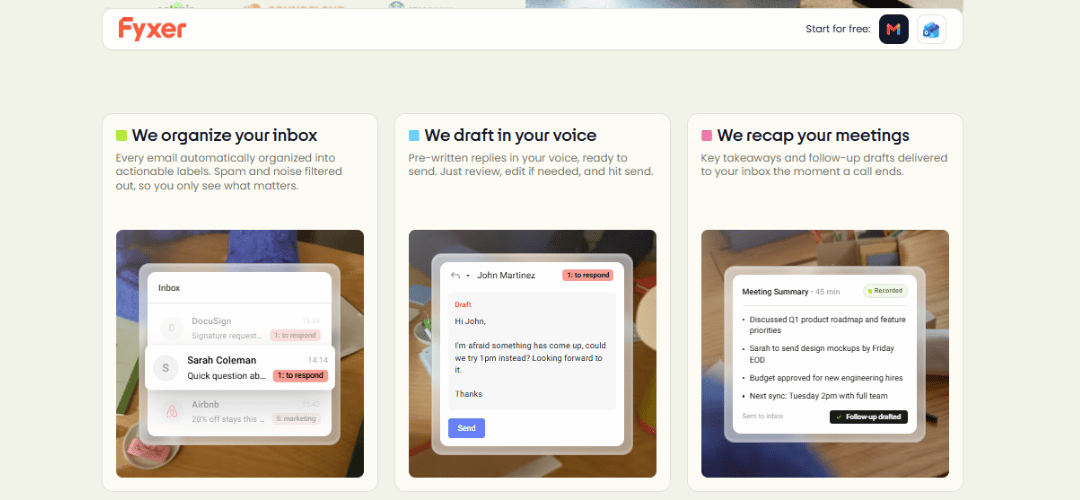
Fyxer reads every incoming email and automatically categorizes it by type and urgency, so you always know what needs your attention first. It tags messages as Urgent, Action Needed, FYI, Newsletter, or Receipt based on content, sender history, and behavioral signals.
High-value senders are detected and pinned to the top of your priority view automatically. Noise — newsletters, CC chains, automated alerts — is filtered away from your main inbox without any manual rule setup. The system continuously improves its accuracy the longer you use it, learning from every email you open, reply to, or ignore.
✍️ AI Email Auto-Drafts
This is Fyxer’s flagship feature and its most impressive capability. After the initial learning period, Fyxer generates complete email replies written in your personal voice with a single click. You review, edit if needed, and send — no manual prompting or template selection required.
The system reads the full email thread, not just the latest message, so drafts feel coherent and contextually aware. It matches your tone whether you write formally, casually, or somewhere in between. Auto-draft follow-ups are also supported for emails you have not replied to in 48+ hours, helping ensure nothing slips through the cracks.
📅 AI Meeting Scheduling
Fyxer analyzes your live calendar availability and inserts smart meeting time suggestions directly into outgoing email drafts when scheduling is relevant. This eliminates the back-and-forth of finding mutual availability that typically consumes several email exchanges.
The feature integrates with both Google Calendar and Outlook Calendar and detects time zone differences automatically when scheduling with contacts in other regions. It is not a full scheduling tool like Calendly, but it meaningfully reduces friction for professionals scheduling meetings frequently inside email threads.
🎙️ AI Note Taker & Meeting Recording
Fyxer joins your scheduled video meetings as a bot participant and records the full session automatically. It produces a timestamped, searchable transcript with speaker identification — so every important exchange is captured and retrievable without any manual note-taking during the call.
The feature works across Zoom, Google Meet, and Microsoft Teams. Audio-only recording is also supported for phone calls and offline discussions where a video platform is not used. All recordings are stored securely with a searchable archive that makes past meetings easy to reference.
📝 Meeting Summaries & Action Items
Within minutes of a call ending, Fyxer delivers a clean structured summary covering key decisions, open questions, and clearly assigned action items. These summaries are far more useful than raw transcripts because they surface what actually matters rather than requiring you to read through an entire conversation.
Action items are extracted with owner names where detectable, and open questions are flagged explicitly for follow-up. Summaries can be shared to meeting attendees directly from the Fyxer platform or synced to connected CRM systems and calendars as tasks, keeping everything organized without extra manual effort.
📂 Document Upload & AI Chat
Users can upload internal documents — SOPs, contracts, product briefs, pricing sheets — and interact with them through natural language questions. Fyxer answers questions about the content directly, making it easy to locate specific information without manually scanning long documents.
More usefully, Fyxer can reference uploaded document knowledge when generating email drafts. This means replies about pricing, terms, or product details stay accurate and grounded in real internal context rather than relying on memory. The feature is especially valuable for onboarding emails, client proposals, and compliance-related communication.
🤝 CRM & Team Integrations
Fyxer connects to Salesforce and HubSpot natively, automatically logging email threads and meeting notes to the correct CRM contact records. This removes a significant manual data entry burden from sales teams who otherwise spend time copying information between systems after every client interaction.
For teams, Fyxer offers a shared learning mode where communication patterns are pooled across multiple users to improve draft quality at scale. Multi-user management, SSO, and an admin control panel are available on Enterprise plans, making it viable for larger organizations with structured access requirements.
✅ Pros & ❌ Cons at a Glance
| ✅ Pros | ❌ Cons |
|---|---|
| AI learns your writing tone within 48 hours | Not a full standalone email client |
| Excellent meeting transcription & summaries | No deep cross-platform workflow automation |
| One-click AI email drafts save hours daily | Pricing can feel steep for solo users |
| Smooth Gmail & Outlook integration | Occasional context errors on complex threads |
| CRM sync on Pro & Enterprise plans | No native mobile app in 2026 |
5. My Hands-On Experience With Fyxer AI
🔧 Setup & Onboarding
Onboarding takes roughly 15 minutes from start to finish. You connect Gmail or Outlook via OAuth, grant the necessary permissions, and Fyxer begins its learning phase immediately. The AI becomes meaningfully useful within 24 to 48 hours, making it one of the fastest tools to deliver real value from day one among all inbox AI platforms tested in 2026.
📬 Email Management Experience
Sorting accuracy reached approximately 90% for standard business emails during a two-week test period. Auto-draft quality was consistently strong — replies felt natural and on-brand rather than generic or templated. Complex multi-topic threads occasionally produced drafts that missed a secondary request, requiring light editing before sending, but this was the exception rather than the rule.
📊 Task Management & Automation
Reply time dropped by roughly 40% during testing thanks to auto-drafts alone. Fyxer performs excellently within its lane but makes no attempt to go beyond it — there is no project board, no cross-app automation, and no visibility into Slack or Notion. For users who understand what they are buying, this is not a limitation but simply an accurate scope.
🎥 Meeting Recording Quality
Transcription accuracy sat between 92 and 95 percent for clear audio calls throughout testing. Summaries correctly identified action items in the majority of recorded meetings. Calls with heavy cross-talk or strong accents occasionally produced minor errors in the transcript, but overall reliability was fully sufficient for professional use cases.
6. What Real Fyxer AI Reviews Say
✅ What Users Love
- Founders report saving 1-2 hours per day on email management alone
- Draft quality described as surprisingly human-sounding by multiple reviewers
- Meeting summaries praised as genuinely useful rather than just raw transcripts
- Customer support responsiveness rated highly on G2 and Capterra
- Gmail integration rated as smooth and completely non-disruptive
⚠️ Common Complaints
- Fyxer occasionally misreads tone in emotionally sensitive or nuanced emails
- Limited customization — users cannot define their own sorting rules manually
- Higher pricing tiers feel expensive for freelancers and very small teams
- No native mobile app is a meaningful gap for on-the-go professionals
- Draft generation can lag slightly during peak usage hours
7. Fyxer AI Pricing Explained
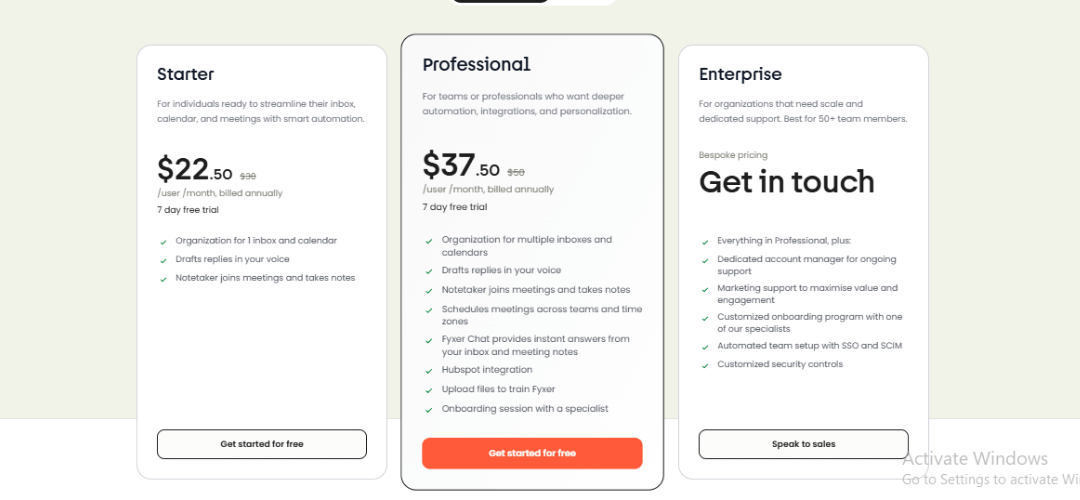
Fyxer operates on a monthly subscription model with three tiers. All plans include a free trial period and there is no permanent free plan. Pricing is per user per month, with an annual discount available on all tiers.
💰 Pricing Breakdown
| Plan | Price/Month | Best For | Key Features Included |
|---|---|---|---|
| Starter | $22.50 | Solo professionals | Email sorting, AI drafts, basic meeting notes, Gmail & Outlook |
| Professional | $37.50 | Executives & founders | All Starter + CRM sync, advanced summaries, doc upload, priority support |
| Enterprise | Contact Sales | Teams & companies | All Pro + multi-user, SSO, custom integrations, SLA, admin dashboard |
💸 Is It Worth the Cost?
At $37.50 per month, Fyxer Professional costs a fraction of a human VA ($800-$2,000 per month). For inbox sorting, email drafting, and meeting documentation specifically, the ROI is clear for any professional who values their time above $20 per hour. Versus AI competitors, Superhuman charges $30 per month but has zero meeting features. Otter.ai covers only meetings at $16-$30 per month. Fyxer’s dual-capability positioning justifies its price point for users who need both channels covered in one tool.
8. Strengths & Weaknesses
✅ Key Strengths
- AI drafting quality is best-in-class for personal tone matching
- Meeting recording and summaries work reliably across Zoom, Teams, and Meet
- Fast onboarding — AI delivers real value within 48 hours of first setup
- CRM integrations significantly reduce manual data entry for sales teams
- Non-disruptive — works inside Gmail and Outlook with no workflow change needed
❌ Key Weaknesses
- Not a full email client — depends entirely on Gmail or Outlook as the base layer
- No cross-platform automation — cannot trigger actions in Slack, Notion, or Asana
- Document upload is limited in the variety of supported file formats
- No native mobile app in 2026 — browser-based access only
- Enterprise pricing is opaque — a sales call is required for basic information
9. The Limitations of an Inbox-Only Assistant
Fyxer’s greatest constraint is its scope — it lives inside email and calendar, and only those two channels. Modern professional workflows increasingly span Slack, Notion, Asana, Linear, and multiple CRMs simultaneously, and Fyxer has no visibility into any of these platforms at present.
This means Fyxer cannot cross-reference a Slack conversation when drafting an email reply, cannot pull an open task from Asana into a meeting summary, and cannot trigger downstream workflow automations when a specific email arrives. For solo executives with email-centric workflows this is rarely a problem, but for team environments with diverse tooling it becomes a real bottleneck over time.
The practical recommendation is to treat Fyxer as a specialized communication AI — the best available at what it does — and pair it with a broader automation platform like Zapier or Make to cover the full workflow surface. This combination approximates genuine AI executive assistant coverage at a fraction of the cost of hiring a human VA.
10. Fyxer AI vs. Competitors
Below is a head-to-head comparison of Fyxer against the most common alternatives in 2026. Star ratings reflect capability strength in each specific category rather than overall product quality.
| Tool | Price/Mo | Email AI | Meeting AI | Calendar AI | Best For |
|---|---|---|---|---|---|
| Fyxer AI | $22–$38 | ★★★★★ | ★★★★☆ | ★★★☆☆ | Inbox + meetings combo |
| Superhuman | $30 | ★★★★☆ | ★☆☆☆☆ | ★★☆☆☆ | Ultra-fast inbox |
| Reclaim.ai | $12–$20 | ★★☆☆☆ | ★★★☆☆ | ★★★★★ | Calendar scheduling |
| Motion | $19–$34 | ★★☆☆☆ | ★★★☆☆ | ★★★★☆ | Task + calendar |
| Otter.ai | $16–$30 | ★☆☆☆☆ | ★★★★★ | ★☆☆☆☆ | Meeting transcription |
| Human VA | $800+ | ★★★★★ | ★★★★★ | ★★★★★ | Full assistant tasks |
11. Best Fyxer AI Alternatives
Not every professional needs exactly what Fyxer offers. Depending on your primary pain point — meetings, inbox speed, calendar management, or transcription accuracy — a different tool may serve you better. Here is a short overview of all top alternatives, followed by a detailed paragraph breakdown of each one.
- 🥇 Otter.ai — Best for meeting intelligence at scale
- 🥈 Fireflies.ai — Best for auto-recording simplicity
- 🥉 Rev.ai — Best for accurate live transcription
- ⚡ Superhuman — Best for ultra-fast inbox workflow
- 🧠 Reclaim.ai — Best for calendar and schedule automation
🥇 Otter.ai — Best for Meeting Intelligence at Scale
Otter.ai is the gold standard for meeting transcription and intelligence in 2026. It outperforms Fyxer on meeting-related features specifically, offering deeper analytics, more mature speaker identification, and a broader integration ecosystem covering Salesforce, Notion, Slack, and HubSpot.
Where Fyxer treats meetings as one feature among seven, Otter treats meetings as its entire product — which shows in the depth of what it offers. If meetings are your primary bottleneck rather than email, Otter is the stronger specialist choice. It also has a functional free plan and mobile apps on both iOS and Android, addressing two gaps that Fyxer currently has. Paid plans start at $16.99 per month.
🥈 Fireflies.ai — Best for Auto-Recording Simplicity
Fireflies.ai makes meeting recording completely effortless. It automatically joins every scheduled calendar event and records without any manual action required — there is no bot invite process, no setup per meeting, nothing. This zero-friction approach is its defining advantage over most other recording tools including Fyxer.
Its CRM sync pipeline is more mature than Fyxer’s, with reliable automatic logging to Salesforce and HubSpot after every call. AI-generated meeting chapters make transcript navigation fast, and team analytics give managers visibility into meeting patterns and action item completion rates across their organization. Free plan available, Pro from $18 per month per seat.
🥉 Rev.ai — Best for Accurate Live Transcription
Rev.ai delivers among the highest transcription accuracy rates available anywhere in 2026, particularly for specialized vocabulary in legal, medical, financial, and technical industries. If precision matters more to you than a full suite of productivity features — for example if you are in compliance, legal, or research — Rev.ai is the right choice.
It offers a human-reviewed transcription option for critical recordings where AI accuracy alone is not sufficient. The platform is API-first, making it easy to integrate into custom internal workflows rather than relying on a fixed interface. It supports 36+ languages with strong regional accent handling. Pricing starts at $0.25 per minute on a pay-as-you-go basis, with subscription plans also available.
⚡ Superhuman — Best for Ultra-Fast Inbox Workflow
Superhuman is a full email client replacement engineered entirely around speed and keyboard-driven efficiency. If you want the fastest possible inbox experience with AI writing assistance built in, Superhuman is the top choice in 2026. It is not an add-on layer like Fyxer — it completely replaces your email interface with a premium alternative.
AI Compose and AI Summarize are built directly into the email view, snooze and follow-up tracking are native, and the keyboard shortcut system allows experienced users to reach inbox zero in a fraction of the usual time. The significant trade-off is that Superhuman has no meeting features whatsoever. It also has no free plan and uses an invite-only onboarding process. Pricing is $30 per month.
🧠 Reclaim.ai — Best for Calendar & Schedule Automation
Reclaim.ai is purpose-built for intelligent calendar management — automatically defending focus time, scheduling tasks from your project tools, and optimizing your weekly schedule based on your stated priorities. It is not an email or meeting tool, but it covers the calendar intelligence gap that Fyxer currently does not address well.
It pulls tasks directly from Asana, Linear, Jira, and Todoist and finds time for them in your calendar automatically. When conflicts arise it reschedules intelligently rather than just flagging problems. Team-level scheduling coordination gives managers visibility into their team’s availability and workload distribution. Free plan available, Starter from $12 per month — making it an affordable complement to Fyxer for users who want both covered.
Quick Comparison: Fyxer vs. Alternatives
| Tool | Price/Mo | Email AI | Meeting AI | Mobile App | Free Plan |
|---|---|---|---|---|---|
| Fyxer AI | $22–$38 | ★★★★★ | ★★★★☆ | No | Trial only |
| Otter.ai | $17–$30 | ★☆☆☆☆ | ★★★★★ | Yes | Yes |
| Fireflies.ai | $18+ | ★☆☆☆☆ | ★★★★★ | Yes | Yes |
| Rev.ai | Pay/min | ★☆☆☆☆ | ★★★★★ | No | Pay-per-use |
| Superhuman | $30 | ★★★★☆ | ★☆☆☆☆ | Yes | No |
| Reclaim.ai | $12–$20 | ★★☆☆☆ | ★★☆☆☆ | Yes | Yes |
12. Moving Beyond Inbox Management
The next generation of AI executive assistants will connect all knowledge streams — email, meetings, documents, project tools, and team communication — into one unified intelligence layer. Fyxer currently covers email and meetings with genuine excellence, but the full vision of a truly integrated AI assistant remains beyond what any single tool delivers in 2026.
For organizations ready to push beyond inbox automation, the strongest approach is a layered stack: Fyxer for email and meetings, Reclaim.ai or Motion for calendar intelligence, and Zapier or Make for cross-platform workflow triggers. Together, these tools approximate comprehensive AI executive assistant coverage at a fraction of the cost of a human VA.
13. Verdict Summary
Fyxer AI earns a strong recommendation for executives, founders, and high-volume professionals. At $37.50/month it delivers compelling ROI versus any alternative — human or AI — for inbox and meeting management. It is not a complete workflow platform, but within its focused scope it is among the best tools available in 2026.
| Criteria | Score | Notes |
|---|---|---|
| Email AI Quality | ★★★★★ 5/5 | Best-in-class tone matching and auto-drafting |
| Meeting Summaries | ★★★★☆ 4/5 | Reliable and actionable, minor errors in noisy calls |
| Ease of Setup | ★★★★★ 5/5 | 15-minute onboarding, live value within 48 hours |
| Value for Money | ★★★★☆ 4/5 | Strong ROI at Pro tier; Starter feels limited |
| Integrations | ★★★☆☆ 3/5 | Good CRM sync, limited cross-platform scope |
| Overall | ★★★★☆ 4.3/5 | Highly recommended for its target audience |
14. Frequently Asked Questions
What is Fyxer AI?
Fyxer AI is an AI-powered executive assistant that integrates with Gmail and Outlook to automate email sorting, draft replies in your personal voice, record meetings, and generate structured summaries with action items.
Is Fyxer.ai free to use?
Fyxer offers a free trial period but has no permanent free plan. Paid plans start at $22.50 per month for the Starter tier as of 2026.
How much does Fyxer AI cost?
Starter is $22.50 per month and Professional is $37.50 per month. Enterprise pricing requires contacting the Fyxer sales team directly for a custom quote.
Does Fyxer AI integrate with CRMs?
Yes. Fyxer integrates natively with Salesforce and HubSpot on Professional and Enterprise plans, automatically logging email threads and meeting notes to the relevant contact records.
How does Fyxer AI handle data privacy?
Fyxer uses OAuth-based authorization with no credential storage on its servers. All data is encrypted in transit and at rest. Enterprise plans include additional data residency and compliance configuration options.
Is Fyxer AI good for inbox zero?
Yes. The sorting and auto-draft features are specifically designed to help users achieve inbox zero by dramatically reducing the time needed to triage and reply to emails each day.
Is Fyxer a full email client?
No. Fyxer is an inbox intelligence layer, not a replacement email client. It operates on top of your existing Gmail or Outlook account and does not change the interface you use to read email.
Does Fyxer AI reliably record meetings?
Yes — transcription accuracy sits between 92 and 95 percent for clear audio. It supports Zoom, Google Meet, and Microsoft Teams. Audio-only recording for phone calls is also supported.
What are the best alternatives to Fyxer AI?
Top alternatives include Otter.ai for meeting intelligence, Fireflies.ai for auto-recording, Superhuman for ultra-fast inbox workflow, Rev.ai for transcription accuracy, and Reclaim.ai for calendar and schedule automation.
Is Fyxer AI worth it in 2026?
Yes, for its target audience. The combination of AI email drafting and meeting summarization in one sub-$40 per month tool represents excellent measurable value for any professional whose time is worth more than $20 per hour.