
Some links on this page are affiliate links. If you buy through them, we may earn a commission at no extra cost to you.
· By Mariyem Akter
Quick answer: BreezeDoc is a lightweight e-signature and contract workflow tool from the AppSumo team that targets freelancers and small businesses with a Free tier and one-time lifetime Pro and Agency plans, letting clients sign without accounts and accept payments via Stripe or PayPal.
- Key takeaways: Free plan and one-time Pro and Agency deals make BreezeDoc cost-effective for solo operators.
- BreezeDoc bundles signing, templates, reminders, audit trails, and built-in payments for a single end-of-sale workflow.
- It is not a replacement for DocuSign or Adobe Sign where enterprise compliance, integrations, or region-specific e-signature frameworks matter.
What is BreezeDoc?
BreezeDoc is an AppSumo Original e-signature and document workflow app for sending, tracking, and collecting legally valid electronic signatures.
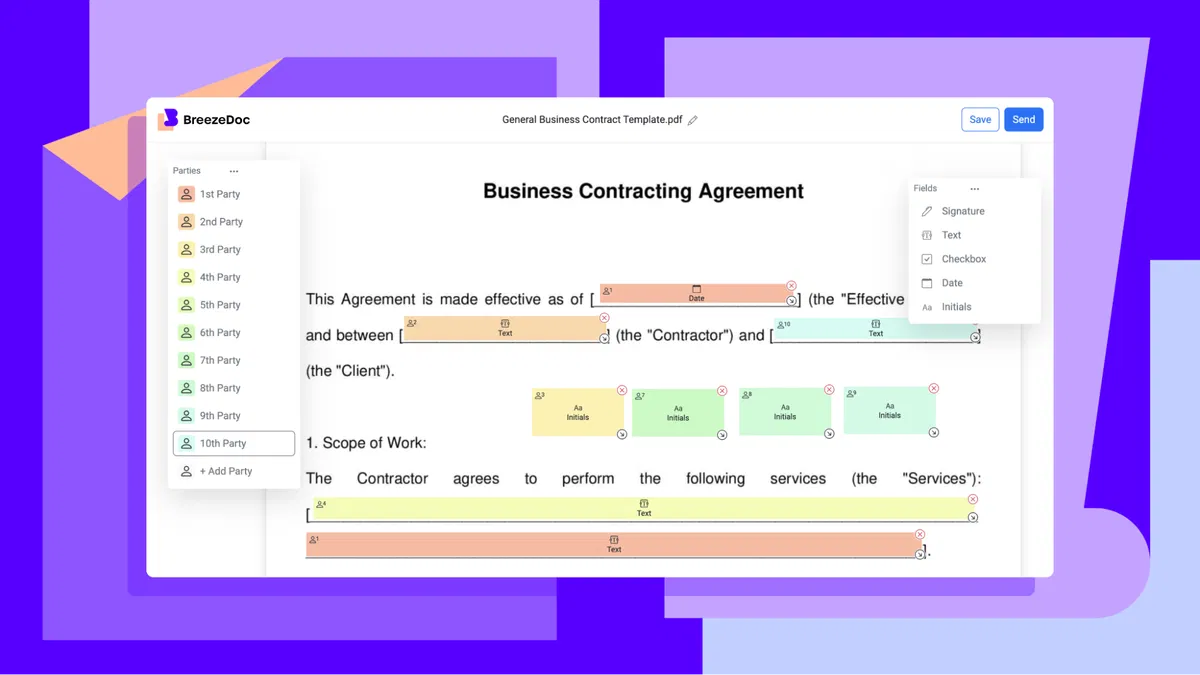
BreezeDoc was created by the AppSumo team to provide a simpler, lower-cost alternative to enterprise e-signature providers. The product accepts uploaded PDFs, lets you place signature, initial, and form fields, supports multiple signers with sequential or parallel signing flows, and delivers the signed PDF back to all parties. BreezeDoc also bundles template reuse, automated reminders, document expiration, and integrated payment collection through Stripe and PayPal so freelancers can go from proposal to payment inside one tool. The signing experience is designed so recipients do not need an account to sign, removing friction at the point of signature. For a direct comparison focused on signing differences, see our BreezeDoc vs DocuSign comparison for features and limits BreezeDoc vs DocuSign.
Who is BreezeDoc for?
BreezeDoc is aimed at freelancers, consultants, coaches, and small agencies who want a simple signing flow and low ongoing cost.
If you run a one-person business that sends NDAs, coaching agreements, freelance contracts, or small project proposals, BreezeDoc’s Free plan and one-time Pro or Agency lifetime options reduce recurring fees. The tool’s built-in invoicing via Stripe and PayPal is useful for solo service providers who want a single workflow from signed agreement to payment receipt. BreezeDoc is less suitable for large enterprises needing advanced compliance features, global e-notary support, or deep CRM and ERP integrations. For freelancers comparing low-cost alternatives and lifetime deals, our lifetime deal review hub covers when those deals make sense lifetime deal reviews.

What are BreezeDoc’s key features?
BreezeDoc provides document upload and field placement, templates, multi-signer flows, reminders, activity tracking, document expiration, invoicing, and API access on paid plans.
The core signing workflow supports PDF uploads with signature, initial, and text fields that you place where needed. BreezeDoc ships with several starter templates and allows you to save reusable templates, speeding repeat proposals and NDAs. Multi-signer support includes parallel and sequential signing, color-coded roles, and an audit trail that records document views, clicks, and signatures. Automated reminders reduce chasing clients, and document expiration creates urgency. Integrated payment collection via Stripe and PayPal lets you attach invoices to documents. API access requires a paid tier, which enables basic automation and template-driven sends. If you work with heavy PDF editing before signing, consider a PDF-focused tool; our UPDF review explains PDF workflows and compatibility issues UPDF reviews.
How much does BreezeDoc cost in 2026?
BreezeDoc offers a Free plan and one-time lifetime Pro and Agency plans, making it unusually cheap up front compared with monthly subscriptions.
According to AppSumo listings the pricing tiers commonly available are: Free with 10 documents per month, Pro (Individual) as a one-time purchase with 20 documents per month, and Agency as a one-time unlimited documents plan with white-labeling and team seats. The one-time Pro and Agency offers are typical of AppSumo Original products and can deliver large lifetime savings versus monthly tools. When you compare total cost, remember subscriptions like DocuSign or Adobe Sign often start near $15 to $23 per month, which can exceed a lifetime purchase over a year or two. For a broader list of DocuSign alternatives and subscription options, see our DocuSign alternatives guide DocuSign alternatives.
How does BreezeDoc compare to DocuSign, Adobe Sign, and HelloSign?
BreezeDoc is stronger on one-time cost, simplicity, and built-in payments, while DocuSign and Adobe Sign lead for enterprise integrations and compliance.
For freelancers and small teams, BreezeDoc’s lifetime pricing and integrated invoicing reduce friction and cost. DocuSign and Adobe Sign offer advanced features such as extensive platform integrations, global compliance attestation, and enterprise-grade SLAs that BreezeDoc does not match. HelloSign and Zoho Sign sit between these extremes with simpler subscriptions and useful integrations. If your decision hinges on CRM and real estate templates or closing workflows, look at dedicated comparisons such as Dotloop versus DocuSign for real-estate workflows Dotloop vs DocuSign and templates automation templates & automations.
| Product | Price range | Best for | Key strengths | Main limits |
|---|---|---|---|---|
| BreezeDoc | Free, $19 one-time Pro, $49 one-time Agency | Freelancers, solopreneurs | One-time pricing, payments, templates | Limited enterprise features, US-focused legal framing |
| DocuSign | Subscription, starts ~ $15/month | Enterprise, regulated industries | Integrations, compliance, global presence | Higher ongoing cost |
| Adobe Sign | Subscription, starts ~ $23/month | Enterprises using Adobe ecosystem | Document workflows, enterprise features | Complex pricing, steeper learning curve |
| HelloSign | Subscription, mid-range | Small teams, CRM workflows | Ease of use, integrations | Fewer payment features |
Which one fits you?
Pick the product that matches your document volume, integration needs, and willingness to trade recurring costs for platform breadth.
Profiles and recommendations:
- Solo freelancer sending 10–25 contracts/month: Choose BreezeDoc Pro, because the one-time fee and built-in Stripe or PayPal payments eliminate monthly costs and speed client onboarding.
- Small agency needing branding and multiple seats: Choose BreezeDoc Agency for white-labeling and team seats, or choose a subscription like HelloSign Business if you also need deep CRM connectors.
- Enterprise or regulated legal/finance teams: Choose DocuSign or Adobe Sign for advanced compliance, global attestations, and SLA-backed support.
- Creators who send proposals with heavy document editing: Use BreezeDoc for signing, paired with a PDF editor like UPDF or a proposal tool; our PandaDoc alternatives page helps decide proposal-specific options PandaDoc alternatives.
Decision rules:
- If you want no recurring fees and under 50 docs monthly, choose BreezeDoc because one-time pricing saves money.
- If you need enterprise integrations or country-specific e-signature attestations, choose DocuSign or Adobe Sign because they provide global compliance.
- If you need proposal-to-pay automation plus CRM hooks, consider PandaDoc alternatives or HelloSign because they have richer integrations.
Who should NOT use BreezeDoc?
Do not use BreezeDoc if you require enterprise-grade compliance, audited SLAs, or deep ERP/CRM integrations out of the box.
BreezeDoc’s strengths are simplicity and price, not enterprise governance. If your contracts require e-notarization, in-person witness flows, or region-specific legal modules beyond the U.S. E-Sign Act scope, choose an enterprise provider. Similarly, if you send hundreds to thousands of documents monthly and require guaranteed uptime and formal support SLAs, a subscription vendor like DocuSign or Adobe Sign is a safer bet. For teams heavily embedded in real-estate closing systems, review Dotloop and DocuSign integration options Dotloop integrations.
Hidden trade-offs and a decision framework for lifetime e-signature deals
Lifetime deals like BreezeDoc’s reduce recurring spend but can hide long-term trade-offs such as usage caps, fewer enterprise integrations, and uncertain long-term roadmap commitments.
Decision framework: estimate your five-year total cost of ownership and compare features you will need year two to five. For example, BreezeDoc’s one-time Agency fee removes monthly charges, but if your volume grows above the Pro limit of 20 documents per month, you must move to Agency or another provider. The Electronic Signatures in Global and National Commerce Act, the ESIGN Act of 2000 (U.S. Congress), gives electronic signatures legal validity in the United States, which is relevant for BreezeDoc’s U.S.-centric compliance claims. Use this three-step framework: 1) map required features now and in two years, 2) calculate five-year costs for lifetime versus subscription, 3) flag integration or compliance gaps that would force migration. For guidance on lifetime deals broadly, consult our lifetime deal analysis lifetime deal reviews. This framework prevents the typical mistake of buying lifetime access that later lacks needed integrations.
What setup checklist should you follow before sending your first BreezeDoc contract?
Complete these setup steps to avoid delays and signature friction.
- Confirm account type: Free, Pro, or Agency so you know document limits and branding options.
- Connect Stripe and PayPal accounts if you plan to collect payments from signatures.
- Create and upload your most-used contract as a template, adding signature, initial, and field roles.
- Set default email text and reminder cadence to reduce manual follow-up.
- Test a signing flow on desktop and a mobile device to confirm signature box sizing and the no-account experience.
- Review the audit trail and exported signed PDF to ensure timestamps and signer emails are captured.
What common mistakes do freelancers make with e-signature tools?
Freelancers often underconfigure templates, ignore document limits, and fail to test mobile signing, creating unnecessary friction and lost revenue.
Common mistakes and fixes:
- Not saving a template, then reinventing the layout each time. Fix: create a reusable template for every contract type.
- Skipping mobile testing and then losing clients who cannot sign from phones. Fix: always test signature boxes on small screens.
- Assuming lifetime includes unlimited sends without checking limits. Fix: verify Pro monthly document caps and upgrade to Agency if needed.
- Not connecting payments, then invoicing separately. Fix: link Stripe or PayPal to collect payment as part of the signing flow.
Does BreezeDoc have integrations and an API for automation?
BreezeDoc offers Stripe and PayPal payment integrations, and API access is available on paid plans to automate sends and templates.
Stripe and PayPal connect directly so you can attach invoices to signature requests. API access is gated behind Pro or higher, enabling simple automation such as programmatic template sends and webhook-based status updates. However, BreezeDoc does not match the breadth of enterprise connectors that DocuSign or Adobe Sign provide for CRMs, MLS systems, or title platforms. If you need deep real-estate integrations or MLS workflow automation, compare Dotloop and DocuSign integration guides to see the platform differences real estate pricing and integration comparison.
Are people happy with BreezeDoc and how reliable is it?
User feedback is generally positive for the price point, praising ease of use and rapid feature updates while calling out a few mobile and international limitations.
Reviewers on AppSumo and Trustpilot highlight BreezeDoc as a high-value option given its one-time pricing, but some early users reported mobile signature sizing issues and a desire for additional compliance features. The AppSumo team reported rapid product iteration after launch, which has closed many early gaps. For a broader view of how lifetime AppSumo products compare and alternatives to AppSumo deals, consult our AppSumo alternatives article AppSumo alternatives. Also, if you need a PDF editing workflow before sending, check our UPDF review for compatibility notes UPDF reviews.
Worked examples: cost and volume scenarios
Example: Solo creator sending 4 signed agreements a month.
If you send 4 agreements monthly, that is 48 documents a year. BreezeDoc Free at 10/month is too small, but a one-time Pro plan with a 20/month cap still fits if you stay under 20 monthly; otherwise the Agency plan removes limits. Compare costs: a $19 Pro one-time payment covers the first year and beyond, while a subscription at $15/month would cost $180 per year. Example: a two-person agency sending 80 documents a month. For 80 monthly sends, BreezeDoc Agency covers unlimited sends for a one-time fee, while subscriptions at $15 to $30 per user per month would cost several hundred to thousands yearly depending on seats. Use the five-year cost calculation from the lifetime decision framework to decide which path saves money.
Final verdict: Is BreezeDoc worth it for freelancers in 2026?
Yes for freelancers and small teams who prioritize low upfront cost, simplicity, and integrated payments; not for enterprises that need deep compliance and integrations.
BreezeDoc provides a clear value proposition for solo operators who want quick contract signing, templates, reminders, and Stripe or PayPal payments in one place. The Free plan lets you test the signing flow with real clients, while the one-time Pro and Agency options can eliminate recurring subscription costs. If your business needs advanced integrations, audited SLAs, or non-US legal attestations, consider enterprise providers such as DocuSign or Adobe Sign, or review the broader list of DocuSign alternatives to match specific needs DocuSign alternatives.
Practical checklist before you buy
- Confirm monthly document limits on Free and Pro plans.
- Test signing on desktop and mobile to catch signature box sizing issues.
- Connect Stripe or PayPal and run a test payment flow.
- Create your key templates and save them before sending live contracts.
- Decide whether you need white-labeling; if so, plan for the Agency purchase.
- Check international legal requirements if you work outside the United States.
Frequently Asked Questions
What is the cheapest eSignature software? BreezeDoc’s Free tier and one-time lifetime Pro and Agency offers make it among the cheapest for freelancers who want to avoid subscriptions.
Which eSignature platform is considered the best? DocuSign and Adobe Sign are industry leaders for enterprise features and compliance, while BreezeDoc and HelloSign are better choices for low-cost freelancer workflows.
What is the best software for e-signatures? The best software depends on needs: choose DocuSign for compliance, BreezeDoc for one-time pricing and payments, or PandaDoc/HelloSign for proposal and CRM workflows.
What is like Docusign but cheaper? BreezeDoc, HelloSign, SignWell, and Zoho Sign are commonly recommended lower-cost alternatives to DocuSign depending on required features and integrations.
Does BreezeDoc integrate with Stripe and PayPal? Yes, BreezeDoc supports Stripe and PayPal for collecting payments tied to signed documents so you can combine agreement and payment in one flow.
Can clients sign without an account? Yes, BreezeDoc allows signers to complete and return documents without creating an account, reducing friction during the conversion moment.
Bottom line: BreezeDoc is an excellent budget-focused signing tool for freelancers and small businesses who value one-time pricing, built-in payments, and simple templates. If you need enterprise integrations, advanced compliance, or global attestations, evaluate DocuSign and Adobe Sign and the broader DocuSign alternatives list to find the right fit DocuSign alternatives.
Additional resources for next steps: explore BreezeDoc vs DocuSign comparisons BreezeDoc vs DocuSign, AppSumo lifetime deal considerations lifetime deal reviews, or how proposal tools compare to signing-first workflows via our PandaDoc alternatives guide PandaDoc alternatives. If you handle heavy PDF edits before signing, check the UPDF reviews for compatibility UPDF reviews. For real-estate teams, consult Dotloop and DocuSign templates and integration guides templates & automations and integration options.
Internal reference links: compare BreezeDoc to enterprise workflows BreezeDoc vs DocuSign, review other low-cost e-signature options DocuSign alternatives, and evaluate lifetime offers with our AppSumo alternatives article AppSumo alternatives. For real-estate pricing context see real-estate pricing and the Dotloop vs DocuSign comparison Dotloop vs DocuSign.