
Managing repetitive tasks manually can slow down your team and reduce productivity. That’s why workflow automation platforms like Zapier have become essential for businesses, marketers, freelancers, and developers. Zapier connects thousands of apps, allowing you to automate everyday tasks without writing code.
While Zapier is one of the most popular automation tools, it isn’t the perfect solution for everyone. Many users start looking for Zapier alternatives because of its pricing, task limits, limited customization on lower plans, or the need for more advanced automation features. Others want better value, stronger AI capabilities, self-hosting options, or enterprise-grade workflow management.
The good news is that today’s automation software market offers plenty of excellent alternatives. Whether you’re a solo entrepreneur looking for an affordable solution or a large organization that needs complex workflow automation, there’s a platform that fits your requirements.
In this guide, we’ll compare the best Zapier alternatives based on features, pricing, integrations, ease of use, scalability, and overall value. By the end, you’ll have a clear understanding of which automation platform is the right choice for your business.
Quick Comparison: Best Zapier Alternatives
| Tool | Best For | Free Plan | Starting Price | AI Features | Overall Rating |
| Make | Visual workflow automation | ✅ | $10.59/month | Limited | ⭐⭐⭐⭐⭐ |
| Microsoft Power Automate | Microsoft ecosystem | ✅ | $15/user/month | Yes | ⭐⭐⭐⭐⭐ |
| n8n | Developers & self-hosting | ✅ | Free (Self-hosted) | Yes | ⭐⭐⭐⭐☆ |
| Pabbly Connect | Budget-conscious users | ❌ | $19/month | Limited | ⭐⭐⭐⭐☆ |
| Albato | SMB automation | ✅ | Affordable | Yes | ⭐⭐⭐⭐☆ |
| Activepieces | Open-source automation | ✅ | Free | AI-powered | ⭐⭐⭐⭐☆ |
| Integrately | One-click automation | ✅ | Affordable | Limited | ⭐⭐⭐⭐☆ |
| Workato | Enterprise automation | Demo | Custom Pricing | Advanced AI | ⭐⭐⭐⭐⭐ |
| IFTTT | Personal automation | ✅ | Affordable | No | ⭐⭐⭐☆☆ |
| Relay.app | Team collaboration | ✅ | Affordable | AI-enabled | ⭐⭐⭐⭐☆ |
| Bardeen | Browser automation | ✅ | Affordable | AI-powered | ⭐⭐⭐⭐☆ |
| UiPath | Robotic Process Automation | Trial | Custom Pricing | Advanced AI | ⭐⭐⭐⭐⭐ |
Why Look for Zapier Alternatives?
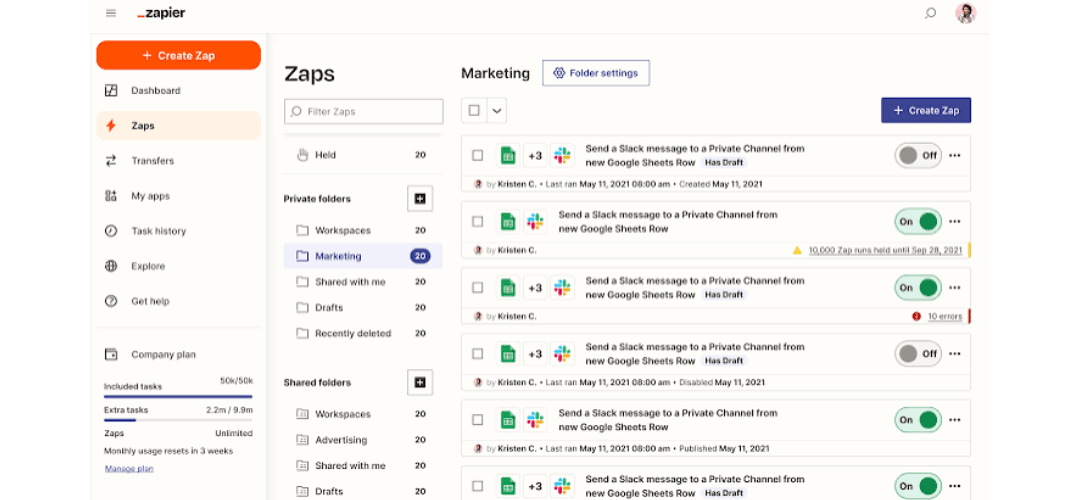
Zapier remains one of the industry’s leading automation platforms, but it isn’t always the best fit for every user or business. As your automation needs grow, you may find yourself looking for a platform that offers better pricing, more flexibility, or advanced workflow capabilities.
Here are some of the most common reasons users switch from Zapier.
Pricing Can Become Expensive
Zapier’s pricing works well for simple workflows, but costs can increase quickly as your automation needs expand. Businesses running thousands of tasks every month often discover that higher-tier plans become significantly more expensive than competing platforms.
Several alternatives offer unlimited workflows, more tasks, or lower pricing, making them attractive for growing businesses.
Task Limits
Most Zapier plans include monthly task limits. Every successful automation counts as a task, meaning active businesses can exceed their limits faster than expected.
If your company processes hundreds of customer inquiries, marketing campaigns, CRM updates, or eCommerce orders every day, task usage can increase rapidly.
More Advanced Workflow Builder
While Zapier focuses on simplicity, some users need more control over their automations.
Platforms like Make and n8n provide visual workflow builders with advanced branching, data mapping, variables, filters, loops, and custom logic. These features help create sophisticated workflows that go beyond basic app connections.
Better Value for Growing Businesses
Small businesses and startups often look for tools that deliver similar functionality at a lower cost.
Some Zapier competitors include more premium features in their entry-level plans, allowing businesses to automate more processes without upgrading immediately.
Self-Hosting and Privacy
Organizations with strict security or compliance requirements may prefer automation software they can host on their own infrastructure.
Open-source platforms like n8n and Activepieces provide self-hosting options, giving companies greater control over their data and workflows.
AI-Powered Automation
Artificial intelligence is becoming a major part of workflow automation.
Many modern platforms now include AI assistants, intelligent data processing, natural language workflow creation, and AI agents that help automate complex business processes more efficiently than traditional automation tools.
Enterprise Requirements
Large organizations often need:
- Advanced security controls
- Team collaboration
- Governance
- Audit logs
- Role-based permissions
- Custom integrations
- Enterprise support
While Zapier offers enterprise plans, platforms like Workato, Microsoft Power Automate, and UiPath are designed specifically for large-scale business automation.
1. Make
Best for: Visual workflow automation and advanced automation scenarios
Make (formerly Integromat) has become one of the strongest competitors to Zapier. Instead of creating simple linear automations, Make lets users build highly visual workflows that are easy to understand and customize.
Its drag-and-drop interface displays every step of an automation as a visual diagram. This makes it easier to build complex workflows involving multiple apps, conditional logic, routers, filters, and data transformations.
Compared to Zapier, Make offers significantly greater flexibility without requiring programming knowledge. Users can automate everything from lead generation and email marketing to CRM updates, accounting processes, and eCommerce operations.
Key Features
- Visual drag-and-drop workflow builder
- More than 2,000 app integrations
- Advanced filters and conditional logic
- Scheduling and webhook support
- Data transformation tools
- API connections
- Error handling and execution history
Pros
- Extremely flexible workflow builder
- Excellent value for money
- Powerful data mapping capabilities
- Suitable for beginners and advanced users
- Scales well for growing businesses
Cons
- Slight learning curve for first-time users
- Interface may feel overwhelming initially
Pricing
Make offers a generous free plan for beginners, while paid plans start at approximately $10.59 per month, making it more affordable than many comparable Zapier plans.
Best For
- Marketing agencies
- Growing businesses
- Operations teams
- Developers
- Advanced workflow automation
Zapier vs Make
If your workflows are simple and you prioritize ease of use, Zapier remains an excellent choice.
However, if you want more customization, visual workflow design, and better pricing as your automation grows, Make is often the stronger option.
Our Verdict
Make is arguably the closest direct competitor to Zapier. It delivers advanced automation capabilities without sacrificing usability, making it an excellent choice for businesses that expect their workflow complexity to increase over time.
2. Microsoft Power Automate
Best for: Businesses using Microsoft 365 and enterprise environments
Microsoft Power Automate is Microsoft’s cloud-based automation platform designed to connect applications, services, and business processes across the Microsoft ecosystem and beyond.
If your organization already relies on Microsoft 365, Teams, SharePoint, Outlook, Excel, Dynamics 365, or Azure, Power Automate integrates naturally into your existing workflows.
Unlike Zapier, which primarily targets general business automation, Microsoft Power Automate is built with enterprise productivity in mind. It supports cloud automation, desktop automation, robotic process automation (RPA), AI-powered document processing, and enterprise governance.
Key Features
- Deep Microsoft 365 integration
- AI Builder for intelligent automation
- Robotic Process Automation (RPA)
- Desktop automation
- Process mining
- Enterprise-grade security
- Hundreds of third-party connectors
Pros
- Excellent for Microsoft users
- Strong security and compliance
- Advanced enterprise automation
- AI-powered workflow capabilities
- Scalable for large organizations
Cons
- Less intuitive for beginners
- Works best within Microsoft’s ecosystem
- Some advanced features require premium licensing
Pricing
Microsoft Power Automate offers limited free capabilities, with paid plans typically starting around $15 per user per month, depending on the selected features.
Best For
- Enterprises
- IT departments
- Microsoft 365 users
- Large organizations
- Internal business automation
Zapier vs Microsoft Power Automate
Zapier is generally easier to learn and supports a broader range of consumer applications.
Power Automate excels when your organization already depends heavily on Microsoft’s business products and requires enterprise-grade automation.
Our Verdict
If your company runs on Microsoft technologies, Power Automate offers outstanding value and seamless integration. It’s one of the best enterprise-focused alternatives to Zapier available today.
3. n8n
Best for: Developers, technical teams, and businesses that want self-hosted automation
n8n has become one of the fastest-growing workflow automation platforms thanks to its open-source model and unmatched flexibility. Unlike many proprietary automation tools, n8n gives users complete control over where and how their workflows run.
One of its biggest advantages is self-hosting. Businesses with strict security, compliance, or data privacy requirements can deploy n8n on their own servers instead of relying on a third-party cloud platform.
Beyond self-hosting, n8n supports advanced workflow logic, custom JavaScript functions, API integrations, webhooks, AI models, and databases. This makes it an excellent choice for developers and technical teams building highly customized automation.
Key Features
- Open-source platform
- Self-hosted and cloud deployment
- Advanced workflow editor
- Custom code support
- AI workflow integrations
- Webhooks and APIs
- Extensive automation templates
Pros
- Full control over your data
- Highly customizable workflows
- Ideal for developers
- Strong community support
- Cost-effective for technical teams
Cons
- Steeper learning curve than Zapier
- Requires technical knowledge for self-hosting
- Not the easiest option for beginners
Pricing
The self-hosted version is free, while cloud-hosted plans are available for businesses that prefer managed infrastructure.
Best For
- Developers
- SaaS companies
- Technical startups
- Privacy-focused organizations
- Advanced automation projects
Zapier vs n8n
Zapier focuses on simplicity and ease of use, making it ideal for non-technical users.
n8n offers significantly greater flexibility, custom coding, and deployment options, making it a better fit for developers and organizations that need complete control over their automation environment.
Our Verdict
If flexibility, customization, and data ownership matter more than ease of use, n8n is one of the most powerful Zapier alternatives available. Its open-source foundation and growing ecosystem make it a compelling choice for modern businesses.
4. Pabbly Connect
Best for: Small businesses and budget-conscious users looking for unlimited automation
Pabbly Connect has gained popularity as one of the most affordable Zapier alternatives. Unlike many automation platforms that charge based on the number of tasks you use, Pabbly focuses on offering generous automation limits at competitive prices. This makes it especially attractive for businesses that run thousands of automated workflows every month.
The platform supports hundreds of popular applications, including Google Workspace, Shopify, WooCommerce, Stripe, Slack, HubSpot, Mailchimp, Facebook Lead Ads, and many more. It also includes webhooks, filters, routers, delays, schedulers, and API modules that help create more advanced workflows.
While Pabbly’s interface isn’t as polished as Zapier or Make, it delivers excellent value for users who prioritize affordability over design.
Key Features
- Multi-step workflow automation
- Hundreds of application integrations
- Webhooks and API support
- Filters, routers, and scheduling
- Instant triggers
- Built-in email parser
- Workflow history and logs
Pros
- Affordable pricing compared to Zapier
- Generous task limits
- Supports complex workflows
- One-time lifetime deals are occasionally available
- Easy migration from Zapier
Cons
- Smaller integration library than Zapier
- User interface feels dated
- Fewer pre-built automation templates
Pricing
Paid plans typically start around $19 per month, offering significantly higher task allowances than many competitors.
Best For
- Small businesses
- Freelancers
- E-commerce stores
- Marketing agencies
- Budget-conscious teams
Zapier vs Pabbly Connect
Zapier offers a smoother user experience and a larger app marketplace. However, if your primary concern is reducing automation costs while maintaining essential functionality, Pabbly Connect provides excellent value.
Our Verdict
Pabbly Connect is one of the best Zapier alternatives for businesses that process large numbers of automation tasks and want predictable pricing without sacrificing essential workflow features.
5. Albato
Best for: Growing businesses that want simple automation with competitive pricing
Albato is a cloud-based workflow automation platform designed to simplify business automation without overwhelming users. It offers a clean interface, straightforward workflow builder, and a growing library of integrations that covers CRM systems, marketing platforms, project management tools, payment processors, and communication apps.
One of Albato’s biggest strengths is its balance between ease of use and flexibility. Beginners can quickly build simple workflows, while advanced users can take advantage of custom webhooks, API integrations, and conditional logic.
Albato also provides migration assistance for businesses switching from Zapier, helping users recreate existing workflows with minimal disruption.
Key Features
- No-code automation builder
- Custom API integrations
- Webhooks
- Conditional logic
- Multi-step workflows
- Real-time synchronization
- Team collaboration features
Pros
- User-friendly interface
- Affordable subscription plans
- Reliable automation performance
- Strong customer support
- Easy Zapier migration
Cons
- Smaller integration ecosystem
- Advanced customization is more limited than Make or n8n
- Fewer enterprise-focused features
Pricing
Albato offers a free plan with paid subscriptions starting at competitive monthly rates based on task usage.
Best For
- Small businesses
- Marketing teams
- Sales teams
- Agencies
- CRM automation
Zapier vs Albato
Zapier still leads in overall integration count and marketplace maturity. Albato, however, provides better pricing for many growing businesses while maintaining an intuitive user experience.
Our Verdict
Albato is an excellent choice for businesses seeking affordable, reliable automation without the complexity of enterprise-grade platforms.
6. Activepieces
Best for: Open-source workflow automation with AI capabilities
Activepieces has quickly emerged as one of the most exciting open-source automation platforms. Built as a modern alternative to proprietary workflow tools, it combines flexibility, transparency, and affordability in a developer-friendly package.
Unlike many commercial automation platforms, Activepieces allows organizations to self-host their workflows while also offering cloud-hosted options for teams that prefer managed infrastructure.
Its growing collection of integrations, combined with AI-powered workflow capabilities, makes it an attractive option for businesses preparing for the next generation of automation.
Key Features
- Open-source platform
- Cloud and self-hosted deployment
- AI-powered workflow actions
- Drag-and-drop automation builder
- Webhooks
- Custom code steps
- Team collaboration
Pros
- Completely open source
- Strong AI integration support
- Self-hosting available
- Modern user interface
- Active developer community
Cons
- Smaller integration library than Zapier
- Rapidly evolving platform
- Some advanced features are still developing
Pricing
A free plan is available, while paid cloud plans are designed for teams requiring additional usage limits and collaboration features.
Best For
- Developers
- Startups
- Privacy-focused businesses
- AI workflow automation
- Technical teams
Zapier vs Activepieces
Zapier remains the easier option for beginners. Activepieces offers more flexibility, open-source transparency, and greater customization for technical users.
Our Verdict
If you want an automation platform that combines open-source freedom with modern AI capabilities, Activepieces is one of the strongest Zapier alternatives available today.
7. Integrately
Best for: Beginners who want one-click automation
Integrately focuses on making workflow automation as simple as possible. Instead of requiring users to build workflows from scratch, it provides thousands of ready-made automation templates that can be activated with minimal configuration.
This approach makes Integrately especially appealing to small businesses and non-technical users who want automation without spending hours learning complex workflow builders.
Although it doesn’t offer the same advanced customization as Make or n8n, Integrately covers most everyday business automation needs.
Key Features
- One-click automation templates
- Thousands of app integrations
- Multi-step workflows
- Conditional logic
- Webhooks
- API support
- Automation library
Pros
- Extremely beginner-friendly
- Fast workflow setup
- Large template collection
- Affordable pricing
- Clean interface
Cons
- Limited advanced workflow customization
- Fewer enterprise features
- Smaller developer ecosystem
Pricing
Integrately offers a free plan with paid subscriptions starting at affordable monthly rates.
Best For
- Beginners
- Freelancers
- Small businesses
- Marketing teams
- Sales automation
Zapier vs Integrately
Zapier provides more flexibility and advanced workflow options. Integrately wins when speed and simplicity are your highest priorities.
Our Verdict
Integrately is one of the easiest automation platforms to learn, making it an excellent Zapier replacement for users who want fast results with minimal setup.
8. Workato
Best for: Enterprise workflow automation and large organizations
Workato is widely recognized as one of the leading enterprise automation platforms. Designed for large organizations, it combines workflow automation, application integration, AI-powered processes, and robotic process automation into a single platform.
Unlike Zapier, which primarily serves small and medium-sized businesses, Workato focuses on complex enterprise environments where hundreds of applications, departments, and business processes need to work together securely.
Its enterprise-grade architecture includes governance controls, compliance features, advanced security, API management, and large-scale workflow orchestration.
Key Features
- Enterprise workflow automation
- AI-powered automation
- Robotic Process Automation (RPA)
- API management
- Advanced security controls
- Team collaboration
- Process orchestration
- Thousands of enterprise connectors
Pros
- Extremely powerful automation capabilities
- Enterprise-grade security
- Excellent scalability
- Advanced AI features
- Comprehensive governance tools
Cons
- Premium pricing
- Steeper learning curve
- More features than small businesses typically need
Pricing
Workato provides custom enterprise pricing based on business requirements and workflow complexity.
Best For
- Large enterprises
- IT departments
- Finance teams
- Healthcare organizations
- Global businesses
Zapier vs Workato
Zapier is significantly easier and more affordable for small businesses. Workato is purpose-built for enterprise automation where security, scalability, compliance, and advanced integrations are critical.
Our Verdict
Workato is among the most capable workflow automation platforms on the market. For enterprise organizations managing complex operations across multiple systems, it is one of the strongest long-term alternatives to Zapier.
9. IFTTT
Best for: Personal productivity, smart home automation, and simple app connections
IFTTT (If This Then That) is one of the oldest and most recognizable automation platforms. While Zapier primarily targets business workflows, IFTTT focuses on connecting everyday apps, smart home devices, social media platforms, and personal productivity tools.
Creating an automation—called an Applet—is straightforward. You simply choose a trigger and an action. For example, you can automatically save Instagram photos to Google Drive, turn on smart lights when you arrive home, or receive notifications when specific weather conditions are met.
Although IFTTT doesn’t offer the advanced workflow logic found in Zapier, Make, or n8n, it remains an excellent solution for users who need lightweight automation without complexity.
Key Features
- Thousands of consumer app integrations
- Smart home automation
- Mobile automation
- Social media workflows
- Voice assistant support
- Location-based triggers
- Easy Applet creation
Pros
- Extremely easy to use
- Excellent for personal automation
- Supports many IoT devices
- Affordable plans
- Quick setup process
Cons
- Limited business workflow capabilities
- Basic automation logic
- Fewer enterprise integrations
Pricing
A free plan is available, with paid plans offering additional Applets, faster execution, and premium integrations.
Best For
- Individuals
- Smart home users
- Content creators
- Personal productivity
- Simple automation tasks
Zapier vs IFTTT
Zapier is the better choice for business automation, CRM workflows, and professional integrations. IFTTT shines when automating personal tasks and connecting smart devices.
Our Verdict
If your focus is home automation or personal productivity rather than business processes, IFTTT remains one of the simplest and most reliable Zapier alternatives.
10. Relay.app
Best for: Team collaboration and AI-assisted workflow automation
Relay.app is a newer automation platform designed for teams that need automation without sacrificing human collaboration. Unlike traditional workflow builders that rely entirely on automated actions, Relay.app allows workflows to pause for approvals, reviews, or manual decisions before continuing.
This makes it particularly useful for marketing teams, HR departments, customer support, and project managers where people remain part of the process.
Relay.app also incorporates AI-powered workflow assistance, helping users automate repetitive tasks while maintaining visibility and control.
Key Features
- Human-in-the-loop workflows
- AI-assisted automation
- Visual workflow builder
- Team collaboration
- Multi-step automation
- Integrations with popular business apps
- Approval workflows
Pros
- Excellent for collaborative teams
- Modern interface
- AI-powered workflow suggestions
- Easy to build automations
- Strong approval process support
Cons
- Smaller integration library than Zapier
- Relatively new platform
- Limited enterprise features
Pricing
Relay.app offers a free plan for small teams, with paid plans designed for growing businesses.
Best For
- Marketing teams
- HR departments
- Agencies
- Project managers
- Collaborative workflows
Zapier vs Relay.app
Zapier focuses on fully automated workflows, while Relay.app excels at combining automation with human decision-making.
Our Verdict
Businesses that require approvals, reviews, or collaborative processes will appreciate Relay.app’s modern approach to workflow automation.
11. Bardeen
Best for: AI-powered browser automation and sales productivity
Bardeen takes a unique approach to workflow automation by operating directly inside your browser. Instead of connecting cloud applications through traditional workflows, it automates repetitive browser tasks using AI.
Sales teams, recruiters, marketers, researchers, and customer success professionals often spend hours copying information between websites and business applications. Bardeen helps eliminate these repetitive activities through browser automation and AI-powered actions.
It can scrape web pages, enrich lead data, summarize content, populate spreadsheets, generate emails, and automate research without requiring complicated workflow design.
Key Features
- AI-powered browser automation
- Web scraping
- Lead enrichment
- Workflow templates
- Chrome extension
- Data extraction
- AI assistants
Pros
- Excellent for repetitive browser tasks
- AI-powered productivity
- Saves significant manual work
- Beginner-friendly
- Growing automation library
Cons
- Browser-focused platform
- Smaller integration ecosystem
- Less suitable for enterprise workflow automation
Pricing
A free plan is available, with premium plans unlocking advanced AI features and higher usage limits.
Best For
- Sales teams
- Recruiters
- Marketers
- Researchers
- Business development
Zapier vs Bardeen
Zapier automates cloud applications, while Bardeen specializes in browser-based workflows powered by AI.
Our Verdict
If much of your daily work happens inside Chrome, Bardeen can automate tasks that traditional workflow platforms often cannot.
12. UiPath
Best for: Enterprise robotic process automation (RPA)
UiPath is one of the world’s leading robotic process automation platforms. Unlike Zapier, which focuses primarily on connecting cloud applications, UiPath automates complete business processes across desktop applications, legacy systems, websites, and enterprise software.
Organizations use UiPath to automate finance, healthcare, manufacturing, insurance, banking, customer service, and government operations.
The platform combines AI, machine learning, document understanding, process mining, and robotic automation to handle large-scale digital transformation initiatives.
Key Features
- Robotic Process Automation (RPA)
- AI-powered document processing
- Process mining
- Desktop automation
- API integrations
- Enterprise security
- Low-code development tools
Pros
- Industry-leading RPA platform
- Highly scalable
- Advanced AI capabilities
- Strong enterprise ecosystem
- Excellent compliance and governance
Cons
- Premium pricing
- Complex implementation
- More than most SMBs require
Pricing
UiPath provides enterprise pricing based on deployment size and automation requirements.
Best For
- Enterprises
- Healthcare
- Banking
- Manufacturing
- Government organizations
Zapier vs UiPath
Zapier is ideal for cloud-based business automation, while UiPath is designed for enterprise robotic process automation involving complex systems and large operational processes.
Our Verdict
For enterprise digital transformation projects, UiPath offers capabilities that extend far beyond traditional workflow automation platforms.
Feature Comparison Table
| Tool | Free Plan | Integrations | AI Features | Ease of Use | Best For |
| Make | ✅ | 2,000+ | Basic | ⭐⭐⭐⭐☆ | Advanced workflows |
| Microsoft Power Automate | ✅ | 1,000+ | Advanced | ⭐⭐⭐☆☆ | Microsoft ecosystem |
| n8n | ✅ | 500+ | Advanced | ⭐⭐⭐☆☆ | Developers |
| Pabbly Connect | ❌ | 1,000+ | Limited | ⭐⭐⭐⭐☆ | Budget users |
| Albato | ✅ | 800+ | Basic | ⭐⭐⭐⭐☆ | SMBs |
| Activepieces | ✅ | Growing | AI-powered | ⭐⭐⭐⭐☆ | Open source |
| Integrately | ✅ | 1,200+ | Limited | ⭐⭐⭐⭐⭐ | Beginners |
| Workato | Demo | Enterprise | Advanced | ⭐⭐⭐⭐☆ | Enterprises |
| IFTTT | ✅ | Consumer Apps | No | ⭐⭐⭐⭐⭐ | Personal use |
| Relay.app | ✅ | Growing | AI-powered | ⭐⭐⭐⭐☆ | Team workflows |
| Bardeen | ✅ | Browser Apps | Advanced | ⭐⭐⭐⭐☆ | Sales productivity |
| UiPath | Trial | Enterprise | Advanced | ⭐⭐⭐☆☆ | Enterprise RPA |
How to Choose the Right Zapier Alternative
The best automation platform depends on your business requirements, technical expertise, and budget. Consider these factors before making a decision.
Budget
If affordability is your priority, Pabbly Connect, Make, and Integrately offer excellent value for growing businesses.
Ease of Use
Beginners typically prefer Integrately, Zapier, or IFTTT because they require minimal technical knowledge.
Advanced Workflows
For complex automation involving APIs, variables, loops, and custom logic, Make and n8n are among the strongest choices.
AI Capabilities
Businesses exploring AI-driven automation should consider Workato, Bardeen, Activepieces, and Microsoft Power Automate.
Enterprise Requirements
Large organizations usually benefit from Workato, UiPath, or Microsoft Power Automate because of their governance, compliance, and scalability.
Self-Hosting
If privacy and data ownership are important, n8n and Activepieces provide flexible self-hosted deployment options.
Which Zapier Alternative Is Best?
There’s no single winner because every platform serves different users.
- Best Overall: Make
- Best Budget Option: Pabbly Connect
- Best for Beginners: Integrately
- Best for Developers: n8n
- Best Open-Source Platform: Activepieces
- Best for Microsoft Users: Microsoft Power Automate
- Best for Teams: Relay.app
- Best AI Productivity Tool: Bardeen
- Best Enterprise Automation: Workato
- Best Enterprise RPA: UiPath
- Best Personal Automation: IFTTT
Final Verdict
Zapier continues to be one of the most trusted workflow automation platforms, but it isn’t the ideal solution for every business. Pricing, task limits, customization needs, and enterprise requirements often lead users to explore other options.
If you want a feature-rich visual workflow builder, Make is one of the strongest alternatives. Developers and technical teams will appreciate n8n and Activepieces for their flexibility and self-hosting capabilities. Budget-conscious businesses can save money with Pabbly Connect or Integrately, while large enterprises may benefit more from Workato, Microsoft Power Automate, or UiPath.
Before choosing a platform, evaluate your expected task volume, required integrations, team size, security requirements, and long-term scalability. The right automation tool should not only streamline repetitive work today but also support your business as it grows.
Frequently Asked Questions
What is the best Zapier alternative?
For most businesses, Make is considered one of the best alternatives because it offers powerful visual workflows, competitive pricing, and advanced customization.
Is there a free alternative to Zapier?
Yes. Platforms like Make, n8n, Activepieces, Integrately, Microsoft Power Automate, and IFTTT all offer free plans with varying limitations.
Which Zapier alternative is best for beginners?
Integrately is one of the easiest platforms to learn thanks to its one-click automation templates and user-friendly interface.
Is Make better than Zapier?
It depends on your needs. Make offers greater workflow flexibility and advanced automation features, while Zapier is generally easier for beginners to use.
Which Zapier alternative is best for developers?
n8n is a top choice for developers because it supports self-hosting, custom code, APIs, and highly customizable workflows.
Which automation platform has the most integrations?
Zapier remains one of the leaders in total app integrations, but Make, Microsoft Power Automate, and Workato also provide extensive integration libraries.
What is the best enterprise alternative to Zapier?
Workato, Microsoft Power Automate, and UiPath are excellent enterprise solutions with advanced security, governance, and scalability.
Are open-source automation platforms reliable?
Yes. Tools like n8n and Activepieces have active communities, frequent updates, and offer reliable automation while giving businesses complete control over their infrastructure and data.