
The AI video generation landscape has changed dramatically in 2026. While Luma AI’s Dream Machine remains a popular choice for creators, it’s far from the only option — and for many use cases, it’s not even the best one. Whether you need longer clips, better creative control, AI avatars, open-source flexibility, or simply a more affordable plan, there is a powerful alternative built exactly for your workflow. In this guide, we have tested and reviewed the 10 best Luma AI alternatives available today, covering every type of creator from solo filmmakers to enterprise marketing teams.
What Is Luma AI?
Luma AI is an artificial intelligence platform best known for its Dream Machine model — a text-to-video and image-to-video generator capable of producing smooth, photorealistic video clips from simple prompts. Originally launched as a 3D object capture tool for iPhone users, Luma AI pivoted into generative video in 2024 and rapidly became one of the most discussed AI tools among creators, marketers, and AI enthusiasts worldwide.
Dream Machine allows users to describe a scene in plain language and receive a fluid, realistic video clip within minutes. The platform is web-based, requires no technical setup, and offers a generous free tier for new users. Its key strengths include fast generation speeds, natural motion rendering, physics-aware video output, and a simple interface that anyone can use without prior AI experience.
Despite these strengths, Luma AI carries several well-documented limitations. Active creators hit credit limits quickly, clips are capped at around 5 to 10 seconds, there are no built-in editing tools, camera movements cannot be directed, and there is no option to run Luma AI locally. Business users who need AI avatars or talking-head video for presentations and marketing campaigns will also need to look elsewhere. This guide is for content creators, social media marketers, indie filmmakers, developers, and business teams who want a Luma AI alternative that better fits their needs.
Why People Are Searching for Luma AI Alternatives in 2026
The demand for Luma AI alternatives has grown significantly in 2026, driven by a combination of platform limitations and the rapid improvement of competing tools. Here are the most common reasons creators are making the switch:
- Rising subscription costs: Active creators burn through monthly credits quickly, and upgrading to paid tiers adds up fast — especially for teams producing video content at scale.
- Short video clip limits: Luma AI’s 5 to 10 second clip cap is a major bottleneck for anyone working on product demos, explainer videos, or social content that requires longer sequences.
- No built-in editing tools: Luma AI generates clips but offers no timeline, trimming, or post-production features. Creators must export to a separate editing tool for every project.
- Limited creative control: You cannot specify camera angles, direct motion paths, or maintain character consistency across multiple clips — a critical limitation for narrative video work.
- No open-source or self-hosted option: Privacy-conscious creators and developers have no way to run Luma AI on their own hardware, which is a dealbreaker for many enterprise and research use cases.
- No AI avatar support: Business users who need presenter-style or talking-head video for training content, sales material, or corporate communications must use a completely different tool.
- Demand for stronger AI features: Competing platforms now offer script-to-video workflows, automatic voiceover, multi-scene generation, and real-time avatar cloning — features that Luma AI simply does not have.
What Makes the Best Luma AI Alternative?
With so many AI video tools now on the market, it is important to know what to look for before making a decision. Here are the key criteria we used to evaluate each platform in this guide:
- Video quality and realism: Does the tool produce smooth, photorealistic video that holds up under scrutiny? We looked at motion quality, lighting accuracy, and visual consistency.
- Clip duration and output length: Can it generate videos longer than 10 seconds? The best alternatives offer clips ranging from 30 seconds to several minutes.
- Creative control: Does the platform allow you to specify camera movements, shot types, character appearance, or scene composition?
- AI avatar and talking head support: For business and marketing use cases, avatar-based video generation is a major differentiator.
- Built-in editing and post-production: The best tools include timeline editors, voiceover tools, subtitle generation, and export options — not just raw clip generation.
- Pricing and free plan availability: We evaluated the cost-to-value ratio of each platform, including the generosity of free tiers and the fairness of paid plans.
- Open-source or self-hosted options: For developers and privacy-focused users, local deployment is a critical feature.
- Ease of use: Even powerful tools need to be accessible. We prioritized platforms with clean interfaces and minimal technical setup.
Best Luma AI Alternatives at a Glance (Comparison Table)
| Tool | Best For | Free Plan | Starting Price | Standout Feature |
| Runway ML | Professional Editing | Yes | $15/mo | Advanced video editor |
| Kling AI | Long-Form Video | Yes | $8/mo | Up to 3-min clips |
| Pika Labs | Quick Creative Clips | Yes | $8/mo | Fast generation |
| Sora by OpenAI | Cinematic Video | No | $20/mo | Cinematic realism |
| Synthesia | AI Avatars & Business | No | $22/mo | 160+ AI avatars |
| HeyGen | Talking Head Video | Yes | $29/mo | Real-time avatar cloning |
| Stable Video Diffusion | Open-Source | Free | Free/Self-hosted | Fully local & private |
| Invideo AI | Social Media & Marketing | Yes | $20/mo | Text-to-video with voiceover |
| Haiper AI | Free Fast Generation | Yes | Free | Unlimited free tier |
| Minimax (Hailuo AI) | Realistic Motion | Yes | $9/mo | Character consistency |
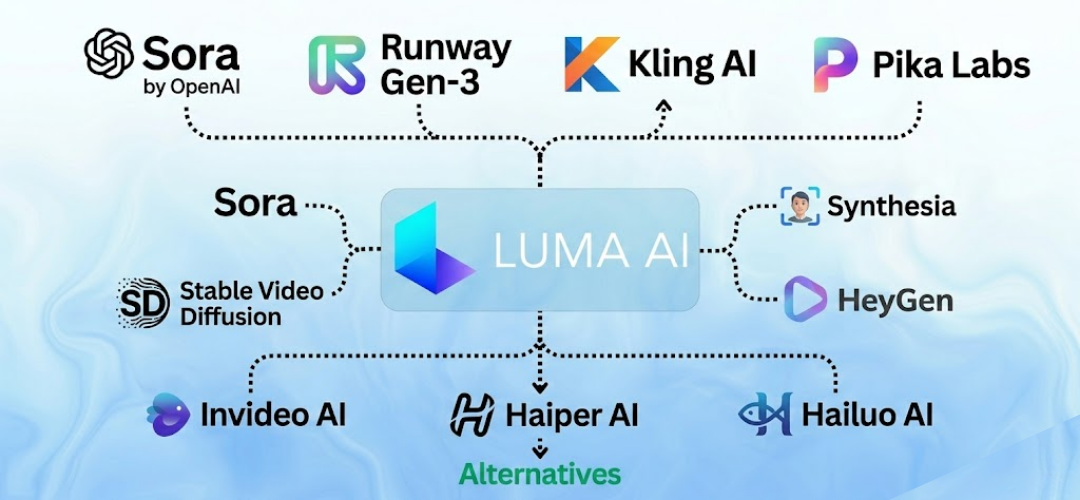
Top 10 Best Luma AI Alternatives & Competitors
1. Runway ML – Best for Professional AI Video Editing
Why It’s a Good Luma AI Alternative
Runway ML is one of the most feature-complete AI video platforms available in 2026. Unlike Luma AI, which generates clips and leaves you to handle the rest, Runway combines AI video generation with a full post-production suite. It is the go-to choice for professional filmmakers, video editors, and creative studios who need more than just raw generation.
Key Features
- Gen-3 Alpha text-to-video and image-to-video generation
- Built-in timeline editor with keyframing and masking
- Motion brush for directing object and camera movement
- Green screen removal, inpainting, and frame interpolation
- Up to 16 seconds per clip with high resolution output
Integrations
Runway integrates with Adobe Premiere Pro, Final Cut Pro, and supports direct export to major cloud storage platforms including Google Drive and Dropbox.
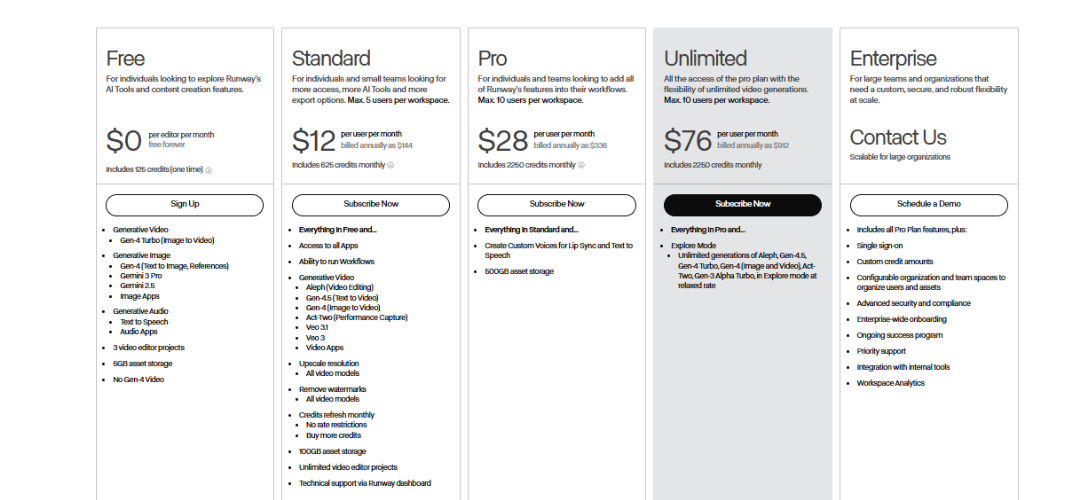
Pricing
Runway offers a free plan with limited credits. Paid plans start at $15 per month for the Standard tier, with Pro plans available at $35 per month for heavy users and teams.
Pros and Cons
- Pros: Most complete editing suite of any AI video tool, excellent motion control, trusted by professional studios
- Cons: Free tier credits are limited, learning curve for advanced features, higher cost than basic alternatives
2. Kling AI – Best for Long-Form AI Video Generation
Why It’s a Good Luma AI Alternative
Kling AI, developed by Kuaishou Technology, directly addresses one of Luma AI’s biggest weaknesses: short clip duration. Kling can generate video clips up to 3 minutes long, making it an outstanding choice for product videos, explainers, and narrative content that needs more than 10 seconds to tell a story.
Key Features
- Text-to-video and image-to-video generation up to 3 minutes
- High-fidelity motion with realistic physics simulation
- Camera movement controls including pan, zoom, and orbit
- Character consistency tools across multiple clips
- 720p and 1080p output options
Integrations
Kling AI is primarily a standalone web platform. It supports direct video downloads and integrates with standard creative workflows through manual export.
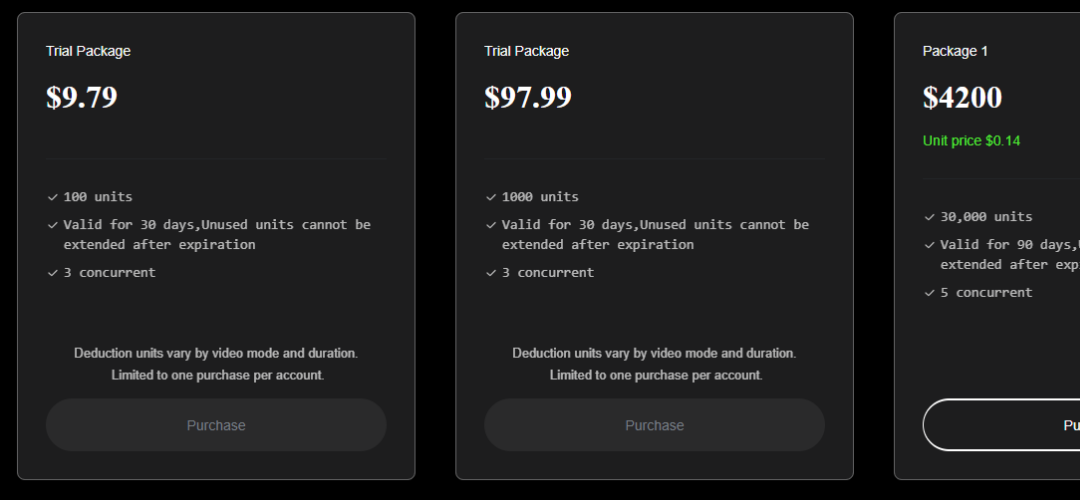
Pricing
Kling AI offers a free tier with daily credits. Paid plans start at approximately $8 per month, making it one of the most affordable options for long-form generation.
Pros and Cons
- Pros: Long clip duration, good camera control, affordable pricing, strong motion realism
- Cons: Less polished interface than Runway, no built-in editing suite, slower generation speed at higher quality settings
3. Pika Labs – Best for Quick Creative Video Clips
Why It’s a Good Luma AI Alternative
Pika Labs is a fast, accessible AI video generator that excels at producing creative short clips for social media, content marketing, and rapid prototyping. It is arguably the most direct competitor to Luma AI in terms of use case, but with a more responsive interface and a stronger community around creative prompting.
Key Features
- Text-to-video, image-to-video, and video-to-video transformation
- Pikaffects for creative visual effects like explosions, melts, and morphs
- Extend video functionality to add seconds to existing clips
- Aspect ratio control for Reels, TikTok, YouTube Shorts, and widescreen
- Sound effects and audio generation built in
Integrations
Pika Labs operates as a web platform and Discord bot. It supports standard video exports compatible with all major editing tools.
Pricing
Pika Labs offers a free plan with monthly credits. Paid plans start at $8 per month, offering more credits and higher resolution output.
Pros and Cons
- Pros: Fun creative effects, good for social content, fast generation, affordable
- Cons: Clips limited to a few seconds, less photorealistic than Runway or Sora, limited camera control
4. Sora by OpenAI – Best for Cinematic Text-to-Video
Why It’s a Good Luma AI Alternative
Sora by OpenAI represents the highest ceiling in AI video generation quality available to consumers in 2026. Its cinematic realism, accurate physics, and understanding of complex prompts make it the best choice for creators who prioritize visual quality above all else.
Key Features
- Up to 20 seconds of photorealistic video from text prompts
- Storyboard mode for multi-scene video planning
- Remix and blend tools for combining existing video with AI generation
- Consistent world and character generation across scenes
- 1080p output with accurate lighting and shadow rendering
Integrations
Sora is available through ChatGPT Plus and Pro subscriptions. It integrates into OpenAI’s broader ecosystem but does not currently offer direct API access for video generation.
Pricing
Sora is available to ChatGPT Plus subscribers at $20 per month with usage limits, and to Pro subscribers at $200 per month with higher generation allowances.
Pros and Cons
- Pros: Unmatched visual quality, best physics simulation, trusted OpenAI infrastructure
- Cons: Expensive, no free tier, limited creative controls compared to Runway, no avatar features
5. Synthesia – Best for AI Avatars & Business Video
Why It’s a Good Luma AI Alternative
Synthesia is the leading AI video platform for business communication, offering over 160 AI-generated avatars that can deliver any script in over 130 languages. If you need presenter-style video for training, onboarding, marketing, or internal communications, Synthesia is in a completely different category from Luma AI.
Key Features
- 160+ diverse AI avatars with natural lip-sync and expression
- Script-to-video generation in 130+ languages
- Custom avatar creation from your own footage
- Branded video templates and screen recording integration
- SCORM export for eLearning and LMS platforms
Integrations
Synthesia integrates with PowerPoint, Google Slides, Canva, and major LMS platforms including Workday Learning and Cornerstone OnDemand.
Pricing
Synthesia starts at $22 per month for the Starter plan. Business and Enterprise plans are available with custom pricing for larger teams.
Pros and Cons
- Pros: Best AI avatar quality, multilingual support, excellent for business content, LMS integrations
- Cons: Not designed for creative or cinematic video, expensive for solo creators, avatars can feel synthetic
6. HeyGen – Best for AI Talking Head & Marketing Video
Why It’s a Good Luma AI Alternative
HeyGen has rapidly become the preferred tool for marketers, sales teams, and content creators who need fast, personalized talking-head video. Its real-time avatar cloning and video translation features make it one of the most commercially useful AI video tools available in 2026.
Key Features
- Instant avatar creation from a 2-minute video sample
- Video translation with lip-sync in 40+ languages
- Personalized video generation for sales outreach at scale
- Interactive avatar for website and app embedding
- Screen recording with AI presenter overlay
Integrations
HeyGen integrates with HubSpot, Salesforce, Zapier, and major video hosting platforms including YouTube and Wistia.
Pricing
HeyGen offers a free plan with limited credits. Paid plans start at $29 per month for the Creator tier, with Team and Enterprise plans for larger organizations.
Pros and Cons
- Pros: Real-time avatar cloning, excellent video translation, strong CRM integrations, great for personalized outreach
- Cons: Higher price point, avatar quality varies with source footage quality, not suited for cinematic or creative video
7. Stable Video Diffusion – Best for Open-Source AI Video
Why It’s a Good Luma AI Alternative
Stable Video Diffusion from Stability AI is the leading open-source option for AI video generation. If you want full data privacy, local deployment, and the freedom to customize and fine-tune the model, no other tool in this list comes close. It is completely free to run on your own hardware.
Key Features
- Fully open-source model available on Hugging Face and GitHub
- Image-to-video generation with high motion fidelity
- Local deployment on consumer GPU hardware (NVIDIA recommended)
- Community fine-tunes available for specific styles and domains
- API integration options for developer workflows
Integrations
Stable Video Diffusion integrates with ComfyUI, Automatic1111, and other popular open-source AI pipelines. API integration is available through Stability AI’s platform.
Pricing
Stable Video Diffusion is completely free to self-host. Cloud-based access through Stability AI’s API is available at pay-per-generation pricing.
Pros and Cons
- Pros: Completely free, fully private, highly customizable, strong developer community
- Cons: Requires technical setup, GPU hardware needed for local use, no built-in interface or editing tools
8. Invideo AI – Best for Social Media & Marketing Teams
Why It’s a Good Luma AI Alternative
Invideo AI is designed for content creators and marketers who need to produce polished, publish-ready video at scale. Its text-to-video workflow goes beyond raw generation — it includes scripting, voiceover, stock footage, subtitles, and branding tools all in one platform.
Key Features
- Full text-to-video workflow from script to finished video
- AI voiceover generation in 20+ languages and accents
- Access to 16 million+ stock video clips and images
- Automatic subtitle and caption generation
- Team collaboration tools with shared asset libraries
Integrations
Invideo AI integrates with YouTube, TikTok, Instagram, and supports direct publishing workflows. It also connects with Google Drive and Dropbox for asset management.
Pricing
Invideo AI offers a free plan with watermarked exports. Paid plans start at $20 per month for the Plus tier, removing watermarks and increasing generation limits.
Pros and Cons
- Pros: Complete production workflow, huge stock library, multi-language voiceover, great for teams
- Cons: AI-generated clips less cinematic than Runway or Sora, interface can feel overwhelming for new users
9. Haiper AI – Best for Fast & Free AI Video Generation
Why It’s a Good Luma AI Alternative
Haiper AI is one of the most generous free AI video generators available in 2026. Backed by former Google DeepMind researchers, it produces surprisingly high-quality results at no cost, making it an excellent starting point for creators exploring AI video without a budget commitment.
Key Features
- Text-to-video and image-to-video with unlimited free generations
- Video repainting for style and content transformation
- Fast generation speeds, typically under 60 seconds
- HD output quality on the free tier
- Regular model updates from the DeepMind-backed research team
Integrations
Haiper AI is a standalone web platform. Generated videos can be downloaded and used in any external editing or publishing workflow.
Pricing
Haiper AI is currently free to use with generous daily generation limits. Premium tiers with higher resolution and priority processing are available at competitive pricing.
Pros and Cons
- Pros: Genuinely free, fast generation, good quality for the price, backed by serious research team
- Cons: Less creative control than premium alternatives, shorter clip durations, no editing tools
10. Minimax (Hailuo AI) – Best for Realistic Motion & Character Video
Why It’s a Good Luma AI Alternative
Minimax, also known as Hailuo AI in international markets, has earned a reputation for producing some of the most realistic human motion and facial expressions of any AI video tool. For creators working with character-driven content, product demonstrations featuring people, or emotionally expressive scenes, Minimax delivers results that rival much more expensive platforms.
Key Features
- Industry-leading human motion and facial expression rendering
- Text-to-video and image-to-video up to 6 seconds at high quality
- Character consistency tools for multi-clip projects
- Director mode for specifying character actions and camera behavior
- Fast cloud-based generation with queue priority on paid plans
Integrations
Minimax operates as a standalone web and API platform. Its API is available for developers looking to integrate realistic video generation into their own applications.
Pricing
Minimax offers a free tier with daily credits. Paid plans start at approximately $9 per month, offering increased credit limits and priority generation.
Pros and Cons
- Pros: Best-in-class human motion, strong facial expressions, affordable, good API access
- Cons: Shorter clip duration, primarily focused on human subjects, less versatile for abstract or landscape scenes
How to Choose the Best Luma AI Alternative for Your Needs
Best for Independent Filmmakers
If you are an independent filmmaker looking for the highest quality output and the most creative control, Runway ML is your best option. Its combination of AI generation, motion brush, and built-in editing tools gives you a true production environment rather than just a clip generator.
Best for Social Media Creators
For creators producing content for Instagram Reels, TikTok, and YouTube Shorts, Pika Labs and Invideo AI are the strongest choices. Both offer fast generation, social-format support, and affordable pricing that works for individual creators.
Best for Business & Marketing Teams
Business teams producing training videos, product demos, and customer-facing content should look at Synthesia or HeyGen. Both platforms are purpose-built for professional business video, with avatar support, multilingual capability, and integrations with CRM and LMS platforms.
Best Free Option
Haiper AI offers the most generous free tier in the AI video space today. For creators who want to experiment without spending anything, it provides surprisingly good quality at no cost. Kling AI and Pika Labs also have solid free plans worth exploring.
Best for Privacy & Offline Use
If data privacy and local deployment are your priorities, Stable Video Diffusion is the only true answer. It is fully open-source, runs entirely on your own hardware, and sends no data to external servers.
Best for AI Avatars & Presenter Videos
For AI avatar and talking-head video, Synthesia leads the field in quality and language support, while HeyGen is the better choice for personalized sales and marketing video with real-time avatar cloning.
How to Switch from Luma AI (Step-by-Step)
Switching from Luma AI to a new platform is straightforward since Luma AI generates standalone video files rather than a complex project structure. Here is how to make the transition smoothly:
- Step 1 – Export and save your Luma AI clips: Download all generated videos from your Luma AI account before canceling or switching. Store them in an organized folder structure with descriptive file names.
- Step 2 – Choose your new platform: Use the comparison table and use-case recommendations in this guide to identify the alternative that best fits your workflow and budget.
- Step 3 – Set up your new account: Most platforms offer free trials or free tiers. Create your account and spend time with the interface before committing to a paid plan.
- Step 4 – Re-create your key prompts: Your Luma AI text prompts will work on most competing platforms. Test them on your new tool and refine based on how the model interprets your descriptions.
- Step 5 – Integrate with your editing workflow: If your new platform includes built-in editing tools like Runway ML, explore these features before defaulting to your existing external editor.
Conclusion:
The AI video generation space has grown remarkably in 2026, and Luma AI now faces serious competition across every segment of the market. Here is a quick summary of our top picks by use case:
No single platform is perfect for every creator. The right choice depends entirely on what you need to make — and how much you are willing to spend making it. We recommend starting with a free trial of your top one or two choices from this list before committing to a paid plan. If you found this guide helpful, share it with a fellow creator who is also exploring the growing world of AI video generation.
Frequently Asked Questions
What is the best free Luma AI alternative?
Haiper AI is the most generous free Luma AI alternative available in 2026, offering unlimited daily generations with HD quality output. Pika Labs and Kling AI also offer solid free tiers worth exploring before committing to a paid plan.
Is Runway ML better than Luma AI?
For professional creators who need editing tools, camera control, and longer clip duration, yes — Runway ML is significantly more capable than Luma AI. For casual users who just want to generate quick clips, Luma AI’s simplicity may still be preferable.
What is the best Luma AI alternative for business video?
Synthesia is the best Luma AI alternative for business video production, offering 160+ AI avatars, 130+ language support, and integrations with major LMS and CRM platforms. HeyGen is the better choice specifically for personalized marketing and sales video.
Can I run a Luma AI alternative locally on my own hardware?
Yes. Stable Video Diffusion is a fully open-source model that can be run locally on NVIDIA GPU hardware. It requires technical setup but offers complete privacy and no ongoing subscription costs.
Which Luma AI alternative supports the longest video output?
Kling AI currently supports the longest clip duration, with the ability to generate videos up to 3 minutes long from a single prompt. This makes it the best choice for explainer videos, product demos, and any content that requires more than 10 seconds.
Is Sora by OpenAI a good Luma AI alternative?
Sora produces the highest quality cinematic video of any AI tool available today, but it is expensive and lacks the creative control features found in Runway ML. It is best suited for creators who prioritize visual quality over workflow features and have a ChatGPT Plus or Pro subscription.