
This in-depth LastPass Review covers everything you need to know before choosing this password manager in 2026 — from core features and pricing to security history and real user ratings. Whether you are new to password managers or switching from another tool, this review gives you the full picture.
LastPass remains one of the most widely used password managers globally, trusted by millions of individuals and businesses. In this LastPass Review, we break down its strengths, weaknesses, and how it compares against top alternatives so you can make an informed decision.
Quick Summary
| Category | Details | Rating |
|---|---|---|
| Product | LastPass Password Manager | — |
| Overall Rating | Excellent password manager with strong features | ★★★★☆ 4.4/5 |
| Free Plan | Yes — 1 device type only | ★★★☆☆ 3.0/5 |
| Starting Price | $3 / month (Premium) | ★★★½☆ 3.5/5 |
| Encryption | AES-256, Zero-Knowledge architecture | ★★★★★ 5.0/5 |
| Ease of Use | Clean UI, beginner-friendly setup | ★★★★½ 4.5/5 |
| Dark Web Monitoring | Yes — Free + Paid plans | ★★★★☆ 4.0/5 |
| Autofill Accuracy | Reliable across browsers and mobile apps | ★★★★☆ 4.0/5 |
| Business Features | Teams ($4/user) & Business ($7/user) | ★★★★½ 4.5/5 |
| Customer Support | Chatbot-heavy; live chat can be slow | ★★★☆☆ 3.0/5 |
| Security Record | 2022 breach — encrypted vaults not exposed | ★★½☆☆ 2.5/5 |
| Best For | Budget users, families, SMBs | — |
1. What Is LastPass?
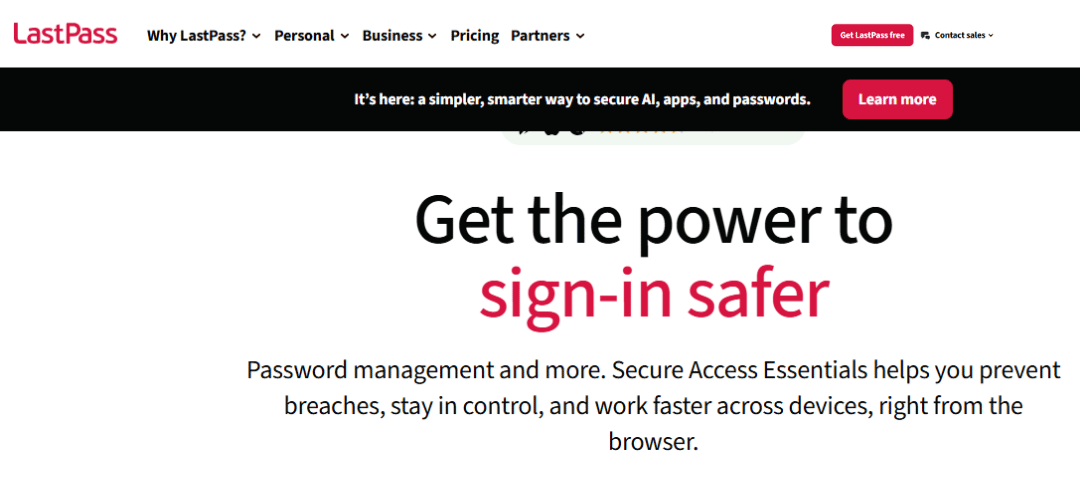
LastPass is a cloud-based password manager that securely stores, generates, and auto-fills passwords across all your devices. Founded in 2008 and later spun off as an independent company from GoTo (formerly LogMeIn), LastPass operates on a zero-knowledge encryption model, meaning only you can access your vault data.
It is available as a browser extension, desktop app, and mobile app for iOS and Android. This LastPass Review examines whether it still delivers on that promise in 2026.
2. How We Test & Rate LastPass
Our LastPass Review is based on hands-on testing across Windows, macOS, iOS, Android, and browser extensions (Chrome, Firefox, Edge, Safari). We evaluate password managers on five core criteria:
- Security & Encryption: encryption standards, zero-knowledge model, breach history
- Features: depth and usefulness of core and bonus tools
- User Experience: ease of setup, interface quality, autofill accuracy
- Pricing: value for money across all plan tiers
- Support: availability, quality, and speed of customer service
3. Getting Started Installation
Setting up LastPass takes under five minutes and is beginner-friendly from the first screen.
- Go to lastpass.com and click Get LastPass Free
- Create your account with a strong master password (12+ characters, symbols, numbers)
- Install the browser extension for Chrome, Firefox, Edge, Safari, or Opera
- Download the mobile app for iOS or Android
- Import existing passwords from your browser or another manager via CSV
4. Pros & Cons of LastPass
| PROS | CONS |
| ✓ Generous free plan with unlimited password storage | ✗ 2022 data breach damaged user trust significantly |
| ✓ Clean, intuitive interface on all platforms | ✗ Free plan limited to one device type only |
| ✓ AES-256 encryption with zero-knowledge model | ✗ Password sharing requires a LastPass account |
| ✓ Free dark web monitoring included | ✗ Customer support is chatbot-heavy and slow |
| ✓ Emergency access for trusted contacts | ✗ No offline-only vault option |
| ✓ Supports passkeys and passwordless login | ✗ SSO locked behind expensive Business plan |
| ✓ Robust business plan with 100+ security policies | ✗ Premium price increase upset long-term users |
5. LastPass Plans & Pricing
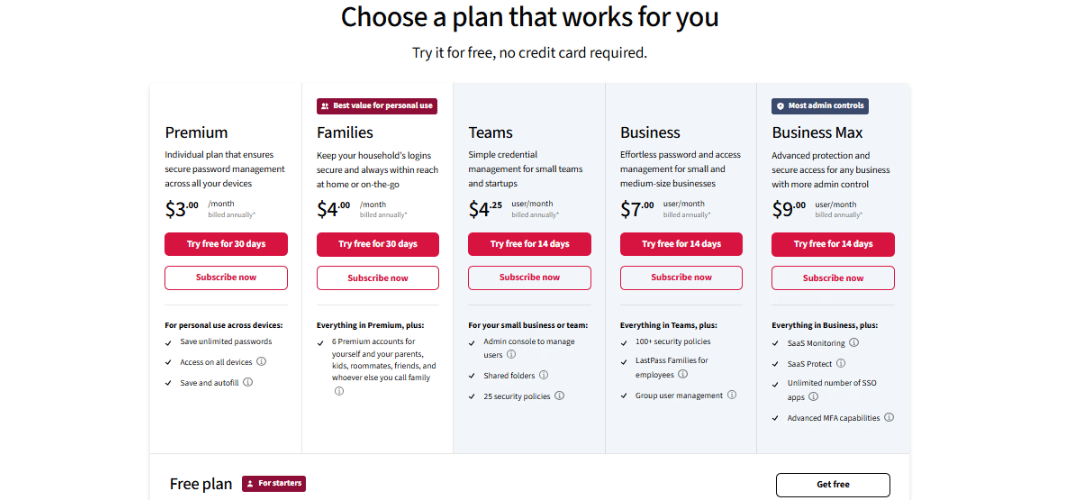
LastPass offers five plan tiers from a free personal plan to an enterprise Business plan. A 30-day free trial is available for Premium and Business plans with no credit card required. All paid plans require annual billing.
| Plan | Price | Users | Key Features |
|---|---|---|---|
| Free | $0 / month | 1 | Unlimited passwords, 1 device type, dark web monitoring |
| Premium | $3 / month | 1 | All devices, emergency access, advanced MFA, 1GB storage |
| Families | $4 / month | Up to 6 | 6 vaults, family dashboard, unlimited shared folders |
| Teams | $4 / user/mo | Up to 50 | Admin console, shared folders, reporting |
| Business | $7 / user/mo | Unlimited | SSO, 100+ policies, advanced MFA, SCIM, Families add-on |
6. Core Features
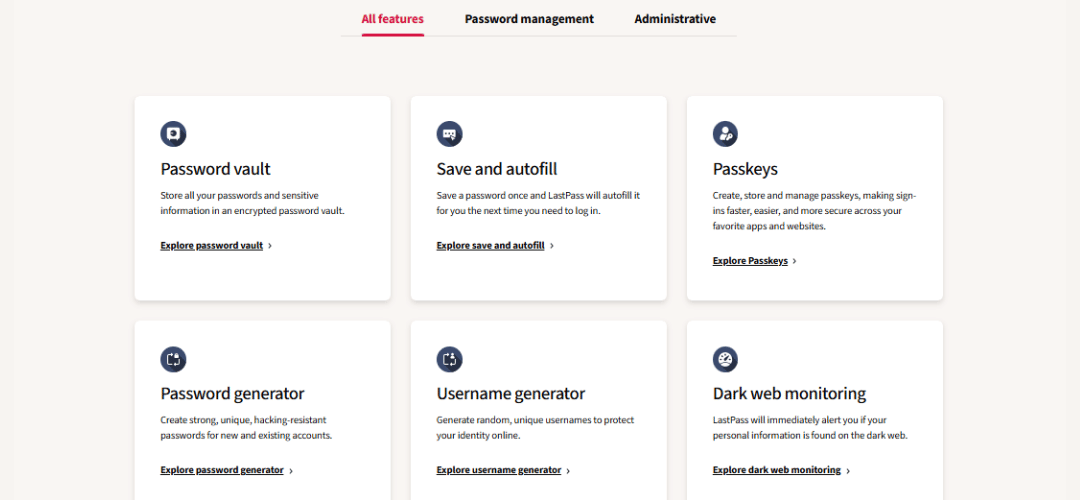
8.1 Password Generator
LastPass includes a built-in password generator accessible from the extension, vault, or any password field. You can customize length (up to 99 characters), toggle uppercase, lowercase, numbers, and symbols, and generate pronounceable or random passwords.
8.2 Autofill & Credential Capture
LastPass auto-detects login fields and offers to save credentials on first use. Its distinctive red-box highlighting shows which fields it will populate. Autofill works across browsers and mobile apps, handling most login scenarios accurately.
8.3 Form Filling & Storage
Beyond passwords, LastPass stores identities (name, address, phone), credit cards, and bank account details. These auto-fill on e-commerce and form pages. Multiple identities and cards can be stored and switched between easily.
8.4 Password Sharing / Sharing Center
- Share individual passwords or entire folders with other LastPass users
- Free plan: share with 1 person; Premium: unlimited sharing
- Business plan: group-based sharing with granular access controls
- Limitation: recipients must have a LastPass account
8.5 Secure Vault & Secure Notes
- Store sensitive text data: Wi-Fi passwords, licenses, SSH keys, insurance info
- AES-256 encrypted, same protection as regular passwords
- Premium users: get 1GB encrypted file storage
- Offline cached copy available on every connected device
8.6 Security Dashboard & Password Strength Report
The Security Dashboard gives an overall security score based on vault health. It flags weak, reused, old, and compromised passwords. Fixing issues is fast — one click takes you to the relevant account. The score updates in real time as you improve your vault.
8.7 Dark Web Monitoring
- Monitors email addresses against known data breach databases
- Sends real-time alerts if your credentials appear in a breach
- Available on Free plan (limited) and fully on Premium+
- Integrated directly into the Security Dashboard
8.8 Emergency Access / Digital Legacy
LastPass lets you designate a trusted contact who can request vault access in an emergency. You set a waiting period (1–30 days) during which you can deny the request. If you do not respond within that window, access is granted automatically — critical for digital estate planning.
8.9 Passkeys Support
LastPass supports passkeys — the modern FIDO2/WebAuthn-based replacement for passwords. You can store and sync passkeys across devices, managed from the same vault interface as regular passwords.
8.10 Passwordless Login
With the LastPass Authenticator app, you can log into your vault without typing your master password by approving a push notification. Available on Premium and above.
8.11 Importing & Exporting Passwords
- Import from: Chrome, Firefox, Edge, 1Password, Dashlane, Bitwarden, KeePass, and more via CSV
- Export vault: as encrypted or unencrypted CSV
- Important: delete exported files immediately after use for security
7. Business-Specific Features
LastPass Business is built for teams needing centralized control, compliance, and scalability. The admin console gives IT managers full visibility and control over the organization’s password health.
- Admin Console: centralized user, group, and policy management
- 100+ security policies: password complexity, MFA enforcement, session timeout controls
- SSO integration: MS Entra ID (Azure AD), Okta, Google Workspace, and more
- SCIM provisioning: automated user onboarding and offboarding
- SaaS usage monitoring: shadow IT detection and app visibility
- Audit logs & reporting: detailed logs for compliance and security teams
- Adaptive MFA: risk-based authentication for enterprise environments
- Families add-on: free Families plan included for all Business employees
8.Best Alternatives to LastPass
If you are reconsidering LastPass after the 2022 breach or simply want to explore other options, here are the top alternatives worth trying:
- Bitwarden: Open-source, free on all devices, fully audited, self-hosting available. Best LastPass alternative for value and transparency.
- 1Password: Premium experience, no free plan, zero breach history, excellent for families and teams. Best for users who want peace of mind.
- Dashlane: Built-in VPN, dark web monitoring, polished design. Best all-in-one security suite but the most expensive option here.
- NordPass: Minimalist design, XChaCha20 encryption, backed by NordVPN team. Good for privacy-focused users who prefer simplicity.
- Keeper: Military-grade security, excellent compliance tools, great for regulated industries. Better enterprise option than LastPass.
- Proton Pass: Privacy-first, open-source, built by the Proton team. Ideal for users already using ProtonMail or ProtonVPN.
- RoboForm: Best-in-class form filling, affordable, solid offline support. Great for users who regularly fill complex web forms.
| Alternative | Best For | Free Plan | Starting Price |
|---|---|---|---|
| Bitwarden | Value & transparency | Yes (unlimited) | $1/month |
| 1Password | Premium & families | No | $2.99/month |
| Dashlane | All-in-one security | No | $4.99/month |
| NordPass | Simplicity & privacy | Yes (limited) | $1.49/month |
| Keeper | Business & compliance | No | $2.92/month |
| Proton Pass | Privacy-first users | Yes | $3.99/month |
| RoboForm | Form filling | Yes | $1.66/month |
9. LastPass vs Competitors
LastPass vs 1Password
1Password has no free plan but offers a cleaner interface, zero breach history, and excellent family and team features. It costs slightly less at $2.99/month. For privacy-first users willing to pay, 1Password is the stronger choice overall.
LastPass vs Bitwarden
Bitwarden is open-source, fully audited, and offers unlimited passwords free on all devices — which LastPass no longer does. It is the best LastPass alternative for value and transparency. LastPass is easier to use for non-technical beginners.
LastPass vs Dashlane
Dashlane includes a built-in VPN and live dark web monitoring, making it an all-in-one security suite. However, it costs $4.99/month with no free plan. LastPass delivers better value for users who only need core password management features.
LastPass vs NordPass
NordPass uses XChaCha20 encryption and has a minimalist, polished design backed by the NordVPN team. It lacks some advanced features like emergency access. LastPass wins on feature depth and business functionality for team environments.
LastPass vs Keeper
Keeper has a stronger security track record, excellent compliance tools, and powerful enterprise features. It starts at $2.92/month. LastPass is more affordable for individuals; Keeper is the better option for compliance-heavy organizations.
LastPass vs RoboForm
RoboForm is industry-leading for form filling and is available at a lower price point. LastPass offers a better free tier, more modern UI, and stronger dark web monitoring. Both are solid; the choice depends on your primary use case.
LastPass vs Proton Pass
Proton Pass is a newer, privacy-first manager built by the ProtonMail team and is open-source. It is ideal for users already in the Proton ecosystem. LastPass has a much deeper feature set, but Proton Pass has stronger privacy credentials overall.
LastPass vs Enpass
Enpass offers local-only vault storage with no cloud dependency, making it ideal for users who refuse to trust any cloud service. LastPass is more feature-rich with better cross-device sync. Enpass suits advanced users; LastPass suits everyday users.
Quick Comparison Table
| Feature | LastPass | 1Password | Bitwarden | Dashlane | Keeper |
|---|---|---|---|---|---|
| Free Plan | Yes (limited) | No | Yes (full) | No | No |
| Paid Price | $3/mo | $2.99/mo | $1/mo | $4.99/mo | $2.92/mo |
| Open Source | No | No | Yes | No | No |
| Dark Web Monitor | Yes | No | No | Yes | Yes |
| Emergency Access | Yes | No | Yes | Yes | Yes |
| Passkeys | Yes | Yes | Yes | Yes | Yes |
| Business Plans | Yes | Yes | Yes | Yes | Yes |
| Breach History | 2022 | None | None | None | None |
What to Look for in a Password Manager
- AES-256 or XChaCha20 encryption
- Cross-platform support
- MFA options
- Transparent audit history
- Competitive pricing
10. Security & Privacy
10.1 Encryption Architecture
LastPass uses AES-256 bit encryption with PBKDF2 SHA-256 hashing at 100,100 iterations and a unique salt per user. The zero-knowledge model means your master password is never transmitted to or stored on LastPass servers. Only you can decrypt your vault.
10.2 How LastPass Stores Your Data
LastPass stores an encrypted vault copy on its servers and maintains a local encrypted cache on each device for offline access. If you forget your master password, recovery options include SMS, biometric authentication, or hints. If all recovery options fail,recovered without the master password.
10.3 Two-Factor Authentication (2FA) & MFA
| 2FA Method | Free | Premium | Business |
|---|---|---|---|
| LastPass Authenticator App | Yes | Yes | Yes |
| Google / Microsoft Authenticator | Yes | Yes | Yes |
| YubiKey (Hardware Key) | No | Yes | Yes |
| Adaptive MFA (Risk-based) | No | No | Yes |
| 30-day Trusted Device Bypass | Yes | Yes | Yes |
9.4 Biometric Login
- Touch ID / Face ID supported on iOS and macOS
- Fingerprint authentication on Android
- PIN code fallback option on mobile devices
9.5 LastPass Privacy Policy
LastPass collects usage metadata (login frequency, device type) but never vault content. It does not sell personal data to advertisers. Data is stored on servers in the US and EU. You can request full data deletion at any time.
9.6 Third-Party Security Audits
LastPass is SOC 2 Type II certified, GDPR and CCPA compliant, and runs an active bug bounty program through HackerOne. Regular third-party penetration tests are conducted annually.
9.7 The 2022 Data Breach (+ 2015 Breach)
In August and November 2022, attackers accessed LastPass development systems and later exfiltrated encrypted vault data and unencrypted metadata (URLs, email addresses, billing info) from a third-party cloud provider. Vault contents remained AES-256 encrypted and were not exposed in plain text.
- Compromised: encrypted vault data, URLs, email addresses, billing info, IP addresses
- NOT compromised: master passwords or unencrypted password content
- Linked crimes: cryptocurrency wallet thefts totaling tens of millions of dollars
- Response: new CISO hired, infrastructure overhauled, PBKDF2 iterations increased to 600,000 for new accounts
- 2015 breach: email addresses and password hints exposed; vaults were not accessed
11.Platform Compatibility
| Platform | Support Level |
|---|---|
| Chrome / Firefox / Edge / Safari / Opera | Full browser extension support |
| Windows | Extension + desktop app |
| macOS | Extension + desktop app |
| Linux | Browser extension only |
| iOS | Full app with biometric login |
| Android | Full app with biometric login |
| Free Plan Restriction | 1 device type only (mobile OR desktop, not both) |
12. Mobile App Experience
The LastPass mobile apps for iOS and Android are polished and feature-complete, consistently rated above 4.5 stars on both app stores. Both support biometric login, OS-level autofill within apps and browsers, and full vault access.
- iOS: Integrates with iOS Passwords autofill, Face ID/Touch ID support
- Android: Full autofill in apps and browsers, fingerprint unlock
- Biometric: Instant vault unlock with fingerprint or face recognition
- PIN fallback: 4–6 digit PIN if biometrics are unavailable
13. LastPass Passkeys
Passkeys replace passwords with cryptographic key pairs stored on your device, offering phishing-resistant authentication. LastPass is among the few password managers with full passkey storage and sync built in. When a supported website offers passkey registration, LastPass intercepts and saves it automatically — just like a regular password.
- Compatible with: FIDO2/WebAuthn standard websites
- Synced across: all LastPass-connected devices automatically
- Managed from: the same vault interface alongside regular passwords
- Browser support: Chrome, Edge, Firefox, Safari (with extension)
14. Customer Support
LastPass offers multiple support channels, though availability depends on plan tier. Business users get priority support with faster response times.
- Help Center: extensive documentation, FAQs, and troubleshooting guides
- 24/7 Chatbot: automated bot handles common queries instantly
- Live Agent Chat: available for paid plans; wait times can be lengthy
- Community Forum: active peer support community
- Email Support: available for all paid plans
- Phone Support: not available on any plan
15. G2 / Gartner / User Ratings & Reviews
| Platform | Score | Number of Reviews |
|---|---|---|
| G2 | 4.2 / 5 | 6,800+ reviews |
| Gartner Peer Insights | 4.4 / 5 | 1,200+ reviews |
| App Store (iOS) | 4.7 / 5 | 210,000+ ratings |
| Google Play (Android) | 4.5 / 5 | 180,000+ ratings |
What Users Love
- Easy to use, especially for non-technical users
- Reliable autofill across most websites and mobile apps
- Generous free plan compared to most competitors
- Dark web monitoring catches breaches early and notifies quickly
Common Complaints
- 2022 breach history makes many users reluctant to fully trust the platform
- Free plan device restriction forces paid upgrade for multi-device users
- Customer support is slow and relies heavily on chatbots
- Password sharing requires recipients to have a LastPass account
16. Recent Improvements to LastPass (2025–2026)
- Passkey storage and sync added across all major browsers and platforms
- Passwordless login expanded to desktop platforms via push notification
- PBKDF2 iterations increased to 600,000 for new accounts as post-breach security hardening
- New CISO and security leadership team appointed following 2022 breach fallout
- Admin Console redesigned with improved reporting and audit log features
- Mobile apps updated with faster biometric unlock and improved autofill accuracy
17. Is Deleting Your LastPass Account Easy?
Yes, account deletion is straightforward but permanent. Export your vault before proceeding.
- Log into your vault at lastpass.com
- Click your profile icon and go to Account Settings
- Scroll to the bottom and click Delete or Reset Account
- Export your vault data first if you want to keep your passwords as a backup
- Confirm deletion — all data is permanently erased and cannot be recovered
LastPass purges all encrypted vault data from its servers within 30 days of account deletion.
18. Interface & User Experience (UX)
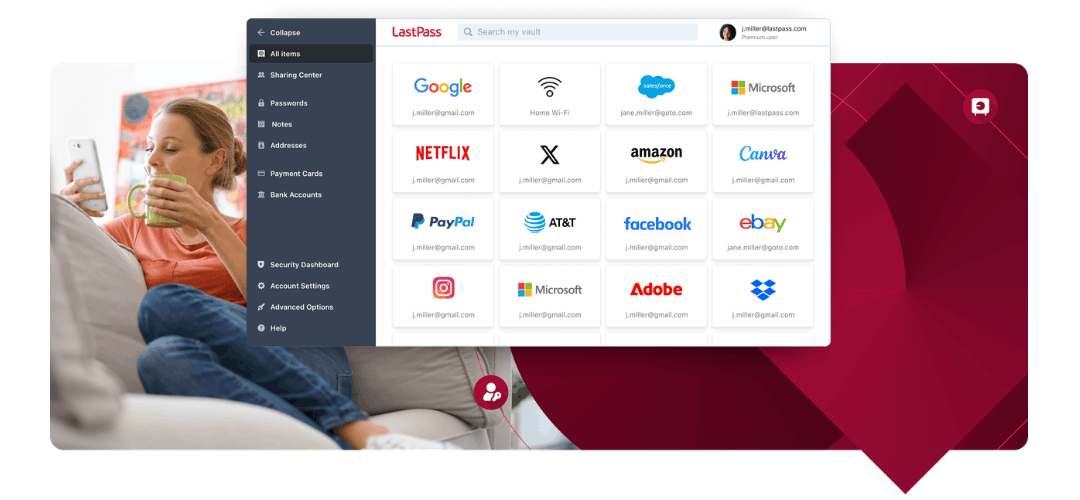
LastPass has a clean, modern interface that makes navigating your vault effortless. The Web Vault is organized into clear sections: Passwords, Secure Notes, Addresses, Payment Cards, and Bank Accounts.
- Web Vault: Clean sidebar navigation, fast search, easy to organize
- Browser Extension: Non-intrusive, works across all major browsers
- Mobile App: Biometric login, card-based layout, smooth autofill
- Offline Access: Local encrypted cache available on all devices
19. Who Should Choose LastPass?
LastPass is an excellent fit for budget-conscious individuals who want a capable free password manager, families needing shared vault management, and small-to-medium businesses requiring centralized password control. It is especially well-suited for users who work across multiple browsers and devices.
Best For
- Budget users who want a capable free password manager
- Families needing shared vault management across six members
- Small businesses requiring admin controls without enterprise-level cost
Not Recommended For
- Users who cannot overlook
- Enterprises needing
- Users who want
20. Final Verdict — Should You Use LastPass?
LastPass remains a feature-complete, user-friendly password manager with a generous free tier and strong business tools. The core product is well-built, autofill is reliable, and the cross-platform experience is smooth. This LastPass Review concludes that it is still a solid choice for most users in 2026 with one important caveat.
The 2022 data breach is a legitimate and serious concern. While vault content remained encrypted, the exposure of metadata was significant. Users who prioritize security reputation may prefer Bitwarden or 1Password.
20. Frequently Asked Questions (FAQs)
Is LastPass safe to use again?
Yes, with caution. Post-breach security improvements are significant and vault contents remain encrypted. Users with strong, unique master passwords are well-protected by the zero-knowledge model.
Is the free plan enough for personal use?
For basic use, yes — unlimited password storage and dark web monitoring are included. However, the restriction to one device type (mobile OR desktop) is a significant limitation for most users today.
How does LastPass protect data during breaches?
LastPass uses AES-256 encryption and zero-knowledge architecture. Even if attackers access servers, they only get encrypted data they cannot read without your master password.
Can you recover your account if the master password is lost?
Partially. Recovery options include SMS and biometric authentication. If all recovery options fail, the account is wiped and reset. Vault data cannot be recovered without the master password — this is by design.
What MFA types does LastPass support?
LastPass supports authenticator apps (LastPass, Google, Microsoft), hardware keys (YubiKey) on Premium+, and adaptive risk-based MFA on Business plans.
Is LastPass better than 1Password?
For free users, LastPass wins. For premium users who prioritize security reputation and design quality, 1Password is the better choice with a cleaner record.
Where does LastPass store passwords?
Passwords are stored in an AES-256 encrypted vault on LastPass servers, with a locally cached encrypted copy maintained on each of your connected devices.
What are the business-specific features of LastPass?
LastPass Business includes an admin console, 100+ security policies, SSO with major identity providers, SCIM provisioning, audit logs, adaptive MFA, and a free Families plan for all employees.
Is LastPass worth paying for?
At $3/month for Premium, yes. It unlocks all-device access, advanced MFA, emergency access, and 1GB file storage — strong value compared to most competitors at this price point.
What are the main cons of LastPass?
The 2022 breach history, free plan device restriction, password sharing limited to LastPass users only, and chatbot-heavy customer support are the primary drawbacks to be aware of.
Did LastPass get hacked in 2022?
Yes. Attackers exfiltrated encrypted vault data and unencrypted metadata from a third-party cloud provider. Vault contents remained AES-256 encrypted and were not exposed in plain text.
What is better than LastPass?
Bitwarden (for value and open-source code), 1Password (for premium experience), and Dashlane (for all-in-one features) are the top alternatives depending on your priorities.
How trustworthy is LastPass?
Despite the breach, LastPass has made meaningful security improvements. Its zero-knowledge encryption means vault contents remain protected. Trustworthiness ultimately depends on your personal risk tolerance.
Can a non-LastPass user receive a shared password?
No. Password recipients must have a LastPass account (free or paid). This is a notable limitation compared to competitors that support secure link-based sharing with non-users.