
If you’ve ever landed a great client, only to watch the momentum die while you wait for them to print, sign, scan, and email a contract back you already understand the pain that BreezeDoc was built to fix.
BreezeDoc review, we’ll cover everything you need to know: what it is, how it works, its features, pricing, real user pros and cons, and how it stacks up against giants like DocuSign. By the end, you’ll know exactly whether BreezeDoc deserves a spot in your business toolkit.
What Is BreezeDoc?
BreezeDoc is an electronic signature and document management tool built by the AppSumo team the same team behind popular tools like SendFox and KingSumo. It was created by the AppSumo team, led by David Kelly, to solve a very specific pain point: getting legally binding signatures without paying a fortune every month.
The idea is simple: stop overpaying for enterprise tools you don’t need. BreezeDoc is a clean, affordable DocuSign alternative offered as a lifetime deal, covering document signing, templates, and team workflows for contracts and proposals.
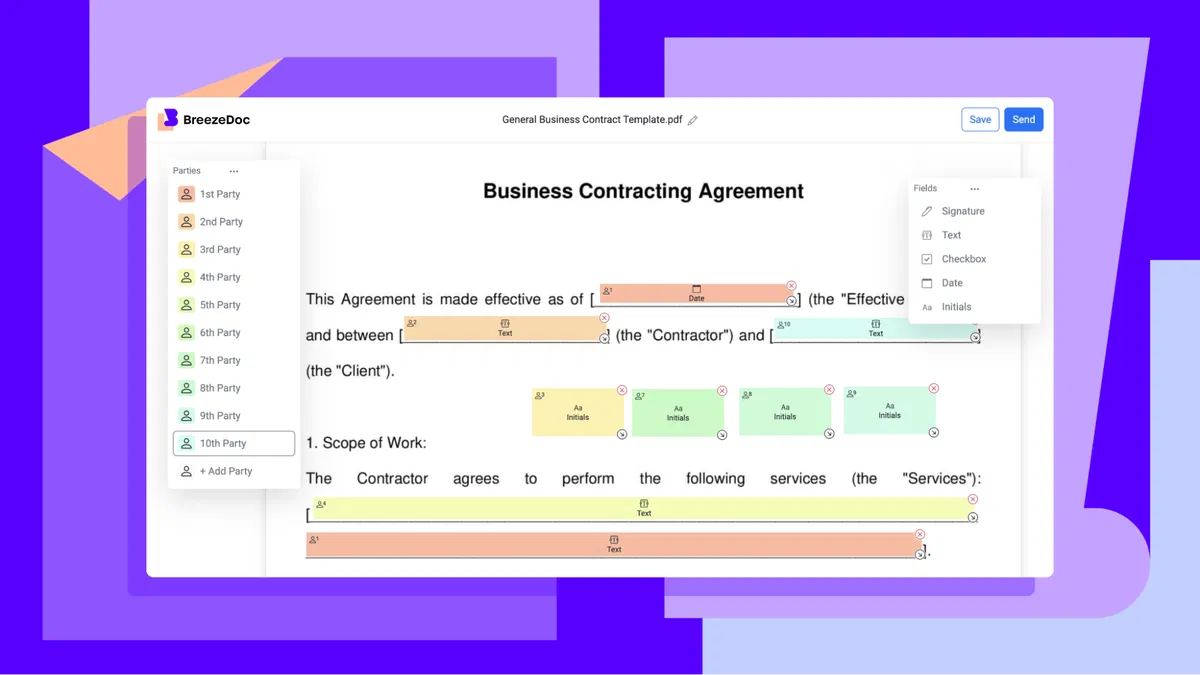
At its core, BreezeDoc handles the entire end-of-sale workflow for freelancers, consultants, and small business owners. You upload your document, add signature and form fields, send it to your client, and they sign it on any device in seconds no account required on their end.

Who Is BreezeDoc For?
BreezeDoc is laser-focused on a specific audience: contractors, freelancers, and small businesses who need to execute documents quickly and easily, with a super simple interface and pre-made templates to get started right away. BreezeDoc
It is not designed for large enterprises with complex compliance needs or heavy integrations. But if you’re sending NDAs, project agreements, onboarding contracts, or coaching agreements on a regular basis, BreezeDoc is squarely built for you.
Key Features of BreezeDoc
1. Document Uploading & E-Signing
The core workflow couldn’t be simpler. You upload a PDF, assign signature fields to the relevant parties, and send it off for signing — and BreezeDoc handles the entire workflow from upload to delivering the signed PDF. toolsbattle Clients can sign from any device, with no login or account needed.
2. Templates
One of BreezeDoc’s biggest time-saving features is its template system. BreezeDoc ships with four built-in templates — a general business contract, a business coaching agreement, an NDA, and a marketing project agreement. These are well-structured starting points with plenty of form fields already in place, so you can customize and send them quickly.
More importantly, you can build your own templates. Upload any PDF, assign standard signature fields and party roles, save it, and reuse it every time. Each new document starts with the same layout — you just update the names, hit send, and you’re done.
3. Multi-Signer Support
Need multiple people to sign the same document? BreezeDoc handles that natively. It allows users to collect signatures from one or multiple signers seamlessly, with features like marking signatures, initials, and text boxes. toolsbattle Each party is color-coded for clarity, and you can set sequential or parallel signing order.
4. Automated Reminders & Notifications
Chasing clients to sign is one of the most frustrating parts of the contracting process. BreezeDoc takes care of it automatically. The tool lets you send automatic reminder emails to signers who haven’t completed the document yet, and once everyone has signed, it automatically delivers the finished document to all parties. Trustpilot
5. Real-Time Activity Tracking
You always know where your document stands. BreezeDoc now includes a new activity page for better tracking, so you can see exactly when a recipient opened, clicked, or signed the document. This audit trail also serves as legal evidence of consent.
6. Built-In Invoicing with Stripe & PayPal
This is where BreezeDoc separates itself from most e-signature tools. You can connect your Stripe and PayPal accounts to let clients pay faster and more flexibly — managing contracts and payments in a single platform. BreezeDoc For freelancers, this means going from signed contract to paid invoice without switching tools.
7. Document Expiration
A newer feature that many users have requested: BreezeDoc now includes document expiration, so you can set time-limited offers like “this proposal expires in 7 days,” adding urgency and professionalism to your contracts.
8. Legal Compliance & Audit Trail
BreezeDoc is built with legal validity in mind. It was designed with the U.S. E-Sign Act in mind, featuring an activity log and audit trail, unique document links, and defined email send capability Trustpilot — all the elements needed to make your signatures legally binding.
BreezeDoc Pricing Plans
One of the biggest selling points of BreezeDoc is its pricing model. BreezeDoc uses a lifetime access model — pay once for Pro ($19) or Agency ($49) and use the features forever, with no recurring charges. AppSumo
Here’s a breakdown of the current plans:
| Plan | Price | Documents/Month | Key Features |
|---|---|---|---|
| Free | $0 | 10/month | Core signing, templates, BreezeDoc branding |
| Pro (Individual) | $19 one-time | 20/month | Reminders, custom emails, reduced branding, API access |
| Agency | $49 one-time | Unlimited | No branding, custom logo, up to 10 team members, all features |
Paying $49 once instead of $20+ per month for DocuSign is a compelling proposition, especially for freelancers and small businesses who need a reliable signing tool without enterprise-level overhead.
All paid plans come with a 60-day money-back guarantee — so if BreezeDoc doesn’t meet your needs, you can contact support for a full refund. AppSumo
BreezeDoc Pros
✅ Unbeatable pricing. A one-time payment of $19–$49 versus $15–$50/month from DocuSign or Adobe Sign is a no-brainer for most solo operators and small teams.
✅ Dead simple to use. BreezeDoc is praised for its ease of use, with a seamless document signing process and exceptional value for money. There’s virtually no learning curve.
✅ No account needed for signers. Clients can sign from any device without creating an account — reducing friction at the most critical moment of the sale.
✅ Built-in invoicing. Most e-signature tools stop at the signature. BreezeDoc lets you collect payment right inside the same platform.
✅ Rapid product improvement. The AppSumo team released 150+ new features, updates, and fixes in 2025 alone showing a strong commitment to keeping the product current and competitive.
✅ Trusted team behind it. Being an AppSumo Original means it was created by a trusted team with exceptional support and long-term stability baked in from day one.
BreezeDoc Cons
❌ Mobile signature sizing issues. Some users have encountered issues with signature box sizing on mobile devices , which can occasionally frustrate signers on smartphones.
❌ Language limitations. Default templates are in English only. While you can upload your own in any language, the existing templates are not directly editable, though you can translate them using tools like ChatGPT and re-upload. BreezeDoc
❌ Branding on lower tiers. The Free and Pro plans include BreezeDoc branding on outgoing documents and emails. You’ll need the Agency plan ($49) to fully remove branding and upload a custom logo. AppSumo
❌ Document limits can feel restrictive. If your business sends more than 20 documents per month regularly, the Pro plan may feel tight. You’d need the Agency plan for unlimited sends.
❌ Primarily US-focused. The legal framework is built around the U.S. E-Sign Act. International users should verify local legal requirements before relying on BreezeDoc for compliance-sensitive documents.
❌ No API on the Free plan. API access requires at least the Pro tier, which may matter for developers wanting to automate workflows.
BreezeDoc vs. Competitors
| Feature | BreezeDoc | DocuSign | Adobe Sign | HelloSign |
|---|---|---|---|---|
| Pricing Model | One-time lifetime | Monthly subscription | Monthly subscription | Monthly subscription |
| Starting Price | Free / $19 lifetime | ~$15/month | ~$23/month | ~$15/month |
| Templates | 50+ pre-built + custom | Yes | Yes | Yes |
| Multi-Signer | Yes | Yes | Yes | Yes |
| Built-in Invoicing | ✅ Yes | ❌ No | ❌ No | ❌ No |
| Document Expiration | ✅ Yes | ✅ Yes | ✅ Yes | ✅ Yes |
| White-Label | Agency Plan only | Enterprise only | Enterprise only | Business+ only |
| Ease of Use | ⭐⭐⭐⭐⭐ | ⭐⭐⭐ | ⭐⭐⭐ | ⭐⭐⭐⭐ |
| Best For | Freelancers, solopreneurs | Enterprise | Enterprise | Small teams |
The value gap is clear. For freelancers and small businesses that send contracts regularly, the lifetime deal offers significant savings compared to monthly e-signature subscriptions that can cost $15–45 per month.
Real User Reviews
BreezeDoc has received a mix of reviews on AppSumo, with the consensus leaning positive — especially considering the price point.
Many reviewers consider it a “blue-chip” AppSumo deal built by a trusted team with exceptional support, calling the $49 unlimited Agency plan one of the highest-value deals on the entire platform.
Some early negative reviews pointed to the tool being “too simple” or lacking pro features. However, those early criticisms are now largely outdated, as the BreezeDoc team has shipped over 150 updates and fixes, turning it into a far more mature and feature-rich platform than it was at launch. Power users in legal and finance fields have noted a few niche requests — such as blue ink options for signatures, which are common in banking — but overall, the trajectory of the product has won over most skeptics.
Who Should Buy BreezeDoc?
Buy BreezeDoc if you are:
- A freelancer, consultant, or coach who sends contracts regularly
- A small agency looking for a white-label signing tool
- Someone tired of paying monthly fees for basic e-signature functionality
- A solopreneur who wants to combine contract signing and payment collection in one place
Skip BreezeDoc if you are:
- A large enterprise with complex compliance, audit, or integration requirements
- Someone sending 50+ documents per month on a tight budget (though the Agency plan covers unlimited)
- Operating outside the US and needing tools specifically designed for your jurisdiction’s e-signature law
Final Verdict
BreezeDoc earns a strong 8.2 out of 10. It’s exactly the kind of lifetime deal that makes sense — a clean, focused tool that solves a real problem at a price that’s hard to argue with.
If you’re a freelancer or small business owner who is still emailing PDFs back and forth waiting for scanned signatures, BreezeDoc is a no-brainer upgrade. The free plan lets you test it risk-free, and the $19 Pro plan offers more value than most tools charge per month.
The built-in invoicing, reusable templates, automatic reminders, and real-time tracking make it a complete end-of-sale workflow tool — not just a signing button. And with 150+ updates shipped in 2025 alone, it’s clear the team is actively invested in making it better.
Bottom line: For the price, BreezeDoc is one of the smartest investments a freelancer or small business can make in 2026.
Frequently Asked Questions
Is BreezeDoc free? Yes. BreezeDoc offers a free plan with up to 10 documents per month. Paid plans start at a one-time fee of $19.
Is BreezeDoc legally binding? Yes. BreezeDoc is built in compliance with the U.S. E-Sign Act and includes audit trails, unique document links, and verified email delivery as supporting evidence.
How does BreezeDoc compare to DocuSign? BreezeDoc is simpler, more affordable, and includes built-in invoicing that DocuSign lacks. DocuSign offers more advanced enterprise features, but for freelancers and small businesses, BreezeDoc delivers most of what’s needed at a fraction of the cost.
Does BreezeDoc work outside the US? Yes, but its legal framework is built around U.S. law. International users should consult local regulations to ensure compliance.
Can multiple people sign a BreezeDoc document? Yes. BreezeDoc supports unlimited recipients per document on all plans, with both sequential and parallel signing modes available.