
AI-powered social media tools are no longer a luxury; they’re quickly becoming the default for anyone serious about growing online. But with dozens of tools flooding the market, choosing the right one can feel overwhelming, especially when two products look similar on the surface.
Replyguy vs Powerin is one of those comparisons that seems straightforward at first glance. Both automate social media engagement using AI, both help you get noticed, and both promise to save you hours of manual work. But dig a little deeper and you’ll find two tools built for very different audiences, platforms, and goals.
This guide breaks down exactly how Replyguy vs Powerin differ across features, pricing, platform support, automation quality, and ideal use cases so you can pick the right tool without wasting money on the wrong one.
What Is Replyguy?
Replyguy is an AI-powered social media monitoring and engagement tool built primarily around lead generation. It works by scanning Reddit and Twitter (X) for conversations that include your target keywords, then automatically drafting contextually relevant replies that weave in a natural mention of your product or brand.
The idea is simple: instead of waiting for potential customers to find you, Replyguy puts you inside the conversations they’re already having. The AI reads full threads, understands context, and generates replies that sound human not like a bot plugging a product.
Every AI-generated reply goes into an approval queue first. You review, edit, approve, or reject before anything goes live. This keeps you in full control while the automation handles the discovery and drafting work.
Replyguy is a favourite among indie hackers, solopreneurs, SaaS founders, and DTC brands that want to generate leads from high-intent Reddit threads and Twitter discussions without hiring a social media team.
Core strengths:
- Keyword-based conversation monitoring across Reddit and Twitter
- Human-sounding, context-aware reply generation
- Full approval queue before posting
- Built-in keyword suggestion using AI
- Residential proxies and real browser sessions for safer automation
What Is Powerin?
Powerin is an AI comment automation tool designed for LinkedIn and Twitter. Rather than responding to mentions of your brand, it proactively comments on posts published by your target creators or posts containing your chosen keywords and hashtags getting your profile in front of their audiences.
The platform uses advanced natural language processing to generate comments that sound on-brand, industry-appropriate, and genuinely relevant to each post. You can customise tone, language, emoji usage, and even restrict commenting to specific time zones and business hours.
Powerin’s primary audience is the professional and B2B world. Founders, sales development reps, LinkedIn creators, coaches, and consultants use it to build visibility, grow their network, and attract inbound interest without spending hours manually scrolling through LinkedIn feeds.
A Chrome extension makes it easy to manage automation directly from the browser, and a statistics dashboard lets you track how your engagement is performing over time.
Core strengths:
- Auto-comments on LinkedIn and Twitter posts
- Target up to 50 creators and 3 keywords/hashtags
- NLP-based comments that match brand tone and industry context
- Timezone filters, language matching, and safe-content filters
- 5-day free trial with full access

Replyguy vs Powerin Quick Comparison
| Feature | Replyguy | Powerin |
| Platforms | Reddit, Twitter/X | LinkedIn, Twitter/X |
| Core Function | Reply to keyword mentions | Auto-comment on posts |
| Lead Generation | ✅ Primary focus | ✅ Secondary benefit |
| Human Approval Queue | ✅ Yes | ✅ Manual mode available |
| Keyword Targeting | ✅ Yes | ✅ Yes |
| Creator Targeting | ❌ No | ✅ Up to 50 creators |
| LinkedIn Support | ❌ No | ✅ Yes |
| Reddit Support | ✅ Yes | ❌ No |
| Free Trial | Limited | 5-day full access |
| Starting Price | ~$49/mo | ~$19/mo |
| Best For | Product promotion, lead gen | B2B visibility, network growth |
| Chrome Extension | ❌ | ✅ Yes |
| Analytics Dashboard | Basic | Full statistics dashboard |
Platform Support Where Can You Use Them?
Platform support is where Replyguy vs Powerin diverge most sharply, and it’s the single most important factor when deciding between the two.
Replyguy operates on Reddit and Twitter/X. Reddit is particularly powerful for product discovery it’s home to niche communities of high-intent buyers actively discussing problems your product might solve. Twitter adds reach across a broader, more public audience. If your target customer spends time on Reddit, Replyguy is one of very few tools built specifically for that environment.
Powerin operates on LinkedIn and Twitter/X. LinkedIn is the dominant platform for B2B lead generation, with research consistently showing that it drives more than 80% of social media leads in the B2B space. If your audience is professionals, decision-makers, or enterprise buyers, LinkedIn is where the real money is and Powerin is purpose-built for it.
The takeaway: your platform choice should be driven entirely by your audience. Consumer-facing products with communities on Reddit → Replyguy. B2B products targeting professionals on LinkedIn → Powerin Both active on Twitter → either works, though with different engagement mechanics.
Core Features Compared
Keyword and Creator Targeting
Both tools use keyword targeting as their discovery engine, but they apply it differently.
Replyguy monitors Reddit and Twitter for any mention of your chosen keywords, then identifies conversations where your product could be naturally referenced. The AI helps you identify the best keywords based on your product description, so setup is fast even if you’re not sure where to start.
Powerin goes a step further by adding creator targeting on top of keyword targeting. You can target up to 50 specific LinkedIn or Twitter creators, and Powerin will comment on their posts within 15 minutes of publication. This is a powerful feature for brands that want to consistently show up in the comment sections of industry influencers and thought leaders building visibility with their existing audiences.
AI Reply and Comment Quality
Both tools invest heavily in making their AI output sound human. Spammy, templated responses are a death sentence on both Reddit and LinkedIn, so the quality of the generated content is non-negotiable.
Replyguy reads full conversation threads before generating a reply, which gives the AI enough context to craft something that fits naturally into the discussion. The goal is always to be helpful first and mention your product second an approach that reduces the risk of being flagged as spam.
Powerin uses NLP to analyse each post’s content, tone, industry context, and even the author’s writing style before generating a comment. It supports multiple languages and lets you set custom tones (professional, friendly, witty) that reflect your brand voice. The AI also avoids commenting on political, discriminatory, or sensitive content a critical safeguard for LinkedIn professionals.
Edge: Tie. Both tools produce solid, contextually aware output. Powerin offers more tone customisation; Replyguy offers stronger conversational context awareness.
Automation Controls and Account Safety
Both tools take account safety seriously, but approach it differently.
Replyguy uses residential proxies and real browser sessions to reduce detection risk. Notably, the platform recommends creating a dedicated Twitter account for automation rather than using your primary account a transparent acknowledgement that automation carries inherent risk on X.
Powerin is designed to comply with LinkedIn’s policies by mimicking human behaviour, limiting comment frequency, and ensuring variety in generated comments. It avoids rapid engagement patterns that could trigger LinkedIn’s spam detection and continuously updates its algorithms to stay within platform guidelines. Its safe-content filters automatically skip political, tragic, or sensitive posts.
Important caveat for both: No automation tool can guarantee zero account risk. Reddit has strict rules about self-promotion, and LinkedIn’s 2026 algorithm actively scans for unnatural engagement patterns. Both tools mitigate risk neither eliminates it entirely.
Customisation and Brand Voice
Replyguy customisation happens at the project level. You describe your product, set your keywords, and the AI uses that context to shape replies. The control is functional but not granular.
Powerin offers significantly more customisation depth. You can set specific tones, enable or disable emoji usage, restrict to certain languages, apply timezone-based scheduling (commenting only during local business hours), and even tailor comments by vertical or industry. This level of control is critical for B2B brands where a single off-tone comment could undermine months of relationship building.
Edge: Powerin, for significantly more customisation options.
Analytics and Reporting
Replyguy provides basic engagement tracking enough to know that replies are being sent and accepted. It doesn’t currently offer deep performance analytics or lead attribution.
Powerin includes a full statistics dashboard showing how your automated engagement is translating into profile views, follower growth, and connection requests. This makes it easier to optimise your targeting strategy over time and demonstrate ROI to stakeholders.
Pricing Comparison
Replyguy Pricing
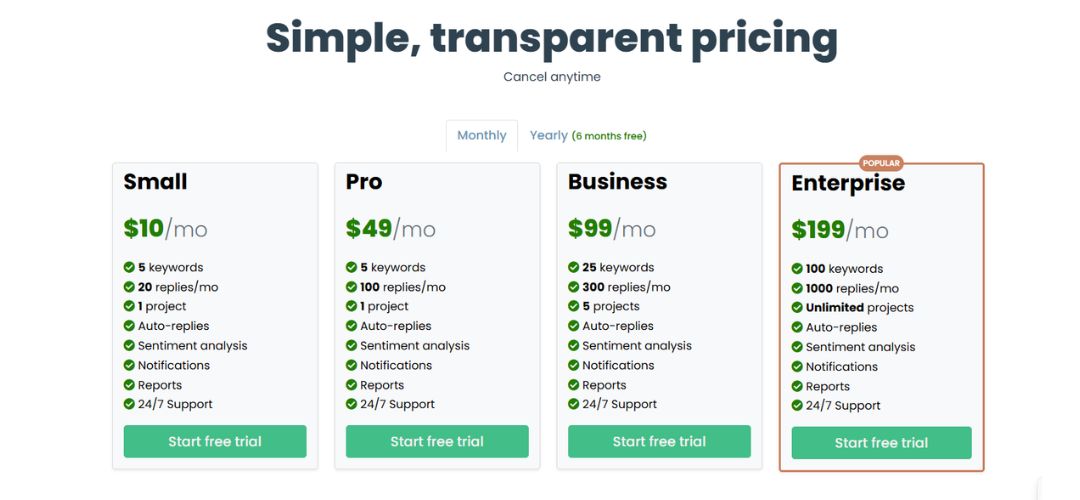
Replyguy’s pricing scales from a starter tier aimed at individual founders up to an agency plan at approximately $499/month. The higher tiers include more keyword projects, more replies per month, and multi-account support. The agency plan is designed for teams managing multiple brands simultaneously.
For solo operators testing the waters, the starter plan is a reasonable entry point. For agencies, the jump to $499 is steep though Replyguy users report it pays for itself quickly if the lead generation side is working.
Powerin Pricing
Powerin starts at approximately $19/month for the Starter plan, scaling up to around $59/month for the Corporate plan. A 5-day free trial gives you full access to comment automation across both keyword and creator targeting before committing to a paid plan. An annual billing option reduces the monthly cost by 20%, and Powerin has previously offered a lifetime deal through AppSumo.
Compared to Replyguy, Powerin is significantly more affordable at entry level making it a lower-risk starting point for founders and freelancers testing automation for the first time.
Which Offers Better ROI?
This depends entirely on what you’re measuring. If you’re tracking direct product leads, Replyguy’s Reddit + Twitter approach is purpose-built for that outcome. If you’re measuring brand visibility, inbound connections, and top-of-funnel interest on LinkedIn, Powerin delivers clear, trackable results.
For pure cost efficiency, Powerin’s lower entry price and free trial give it a clear edge for those just getting started.
Ease of Use and Setup
Neither tool requires technical skills to get started, and both can be set up within minutes.
Replyguy setup flow: create a project → describe your product → add or confirm suggested keywords → set up your reply preferences → activate. The AI then monitors conversations and surfaces opportunities in your dashboard queue. You review and approve before anything posts.
Powerin setup flow: sign up → connect LinkedIn and/or Twitter profiles → select target creators or keywords → configure tone, language, and scheduling → activate. The Chrome extension provides an additional access point for managing the tool directly from your browser without logging into a separate dashboard.
Both tools are genuinely beginner-friendly. Powerin has a slight edge in configuration depth, but this is a feature rather than a friction point for users who want precise control.
Who Should Use Replyguy?
Replyguy is the right choice if:
- Your target customers are active on Reddit in niche subreddits discussing the problem your product solves
- You sell a consumer product, SaaS tool, or digital service where word-of-mouth in communities drives adoption
- Your primary KPI is direct lead generation and product mentions
- You want a hands-off system that monitors conversations 24/7 and surfaces pre-drafted replies for your approval
- You’re an indie hacker or early-stage founder doing scrappy, high-volume outreach across Reddit and Twitter
Replyguy is less suitable if your audience lives primarily on LinkedIn or if your goal is building long-term professional authority rather than immediate product traction.
Who Should Use Powerin?
Powerin is the right choice if:
- Your audience is professionals, executives, or B2B decision-makers on LinkedIn
- You’re a founder, coach, consultant, or SDR trying to build visibility without spending hours manually engaging
- You want to grow your LinkedIn network by consistently showing up in the comments of relevant creators and conversations
- You manage multiple brands or clients and need scalable, brand-safe automation with customisable tone
- You need a tool that is transparent about LinkedIn compliance and offers built-in safeguards
Powerin is less suitable if Reddit is a core part of your distribution strategy or if your product is aimed at consumer communities rather than professional networks.
Can You Use Both?
Yes and for some businesses, using Replyguy vs Powerin together makes strategic sense.
If you operate in a space where your audience spans both consumer communities (Reddit) and professional networks (LinkedIn), running both tools in parallel gives you coverage across the full funnel. Replyguy handles bottom-of-funnel discovery on Reddit, where high-intent buyers are actively seeking solutions. Powerin builds top-of-funnel awareness and authority on LinkedIn, warming up prospects before they ever see a cold outreach message.
The replyguy vs powerin decision only becomes an either/or question if budget is the primary constraint.
Top Replyguy Alternatives
If you’re looking for Replyguy alternatives, there are several strong AI and social media engagement tools that can help you grow faster. Some focus on automation, while others provide better analytics or multi-platform management. Choosing the right tool depends on whether you want targeted replies, bulk engagement, or full social media control. Below are five great options to consider.
1. Hootsuite
Hootsuite is a complete social media management platform that allows you to schedule posts, monitor conversations, and engage with your audience from one dashboard. Unlike Replyguy, it doesn’t rely heavily on AI-generated replies, but it gives you full control over interactions across platforms like Twitter, Facebook, and LinkedIn.
One of its best features is real-time monitoring through streams, where you can track keywords, mentions, and hashtags. This helps you find relevant conversations and respond manually with better context. Hootsuite also includes analytics tools to measure engagement and improve strategy over time.
It’s ideal for businesses and agencies that want an all-in-one solution rather than just reply automation.
2. Sprout Social
Sprout Social is a premium tool focused on smart engagement and detailed analytics. It offers a unified inbox that gathers all messages, comments, and mentions into one place, making it easy to manage conversations efficiently.
Compared to Replyguy, Sprout Social focuses more on structured engagement instead of automated replies. However, its analytics capabilities are much stronger, allowing users to track performance and audience behavior. It also supports team collaboration, so multiple users can handle conversations without confusion.
This tool is best for brands that want a data-driven approach to social media growth and long-term engagement.
3. Buffer
Buffer is a simple and user-friendly platform designed for scheduling posts and managing engagement. It’s perfect for beginners or small businesses that want a clean and easy workflow.
Unlike Replyguy, Buffer does not focus on AI reply generation. Instead, it helps users stay consistent with posting and basic audience interaction. The platform also provides analytics to show how your content performs, helping you improve over time.
Buffer is affordable and easy to use, making it a great choice if you prefer simplicity over complex automation tools.
4. SocialBee
SocialBee focuses on content organization and automation rather than direct reply generation. It allows users to categorize posts and create a balanced content schedule across multiple platforms.
One standout feature is its category-based scheduling system, which helps maintain a consistent posting strategy without manual effort. While it doesn’t replace Replyguy’s engagement automation, it supports long-term growth by keeping your content active and visible.
SocialBee is ideal for marketers who want to focus on content strategy while still maintaining steady engagement.
5. Agorapulse
Agorapulse is a powerful social media management tool with a strong focus on engagement. It features a unified inbox where you can manage all messages, comments, and mentions in one place.
Unlike Replyguy, it doesn’t automate replies heavily, but it ensures that no interaction is missed. It also provides detailed reporting and analytics to help you understand your performance. Team collaboration features make it easy to assign tasks and manage conversations efficiently.
Agorapulse is best for businesses that want organized, reliable engagement with strong reporting features.
Top Powerin Alternatives
If you’re looking for Powerin alternatives, there are several AI tools that offer similar or better features like automated engagement, content creation, and lead generation. Some tools focus on LinkedIn growth, while others provide multi-platform support with analytics and smarter targeting. Below are five strong alternatives you can use instead of Powerin.
1. Taplio
Taplio is a powerful LinkedIn-focused tool designed for personal branding and lead generation. It helps users create posts, schedule content, and analyze performance in one place. Unlike Powerin, which mainly automates comments, Taplio focuses more on overall growth strategy.
It also provides AI content suggestions and access to viral post ideas, making it easier to create engaging content. With built-in analytics, you can track what works and improve your LinkedIn presence over time.
Taplio is best for creators and professionals who want long-term growth instead of just automated engagement.
2. Predis.ai
Predis.ai is an AI-powered tool that helps generate social media content, captions, and hashtags. It also predicts post performance before publishing, allowing users to optimize their strategy in advance.
Compared to Powerin, Predis.ai focuses more on content creation rather than comment automation. However, it helps improve reach and engagement by suggesting better content ideas and posting strategies.
This tool is ideal for marketers and brands who want smarter content planning with AI support.
3. Highperformr.ai
Highperformr.ai is built to turn your audience into a growth engine. It helps you create content, manage engagement, and grow your social presence with AI-driven insights.
Unlike Powerin’s fully automated commenting system, Highperformr focuses on strategic growth and audience building. It provides tools for content generation, scheduling, and engagement tracking.
This makes it a good option for businesses that want both content and engagement in one platform.
4. MagicPost
MagicPost is an AI tool designed to create high-performing LinkedIn posts quickly. It helps users write engaging content that stands out and attracts attention.
While Powerin automates comments, MagicPost focuses on content quality. It helps users build authority and visibility through better posts instead of relying on automated engagement.
It’s best for creators who want to grow organically through strong content rather than automation.
5. Replai
Replai is one of the closest alternatives to Powerin, as it focuses on generating replies for platforms like Twitter and LinkedIn.
However, unlike Powerin, it usually suggests replies instead of posting them automatically. This gives users more control over what gets published, which can reduce risk and improve authenticity.
Replai is ideal if you want AI-assisted engagement but still prefer manual control over your interactions.
Final Verdict: Replyguy vs Powerin
At the core, Replyguy vs Powerin are solving different problems which means comparing them head-to-head is less useful than understanding which one aligns with your specific goals.
Choose Replyguy if you want to generate product leads by inserting yourself into existing conversations on Reddit and Twitter. It’s a scrappy, effective tool for founders doing direct response marketing in communities.
Choose Powerin if you want to build professional authority, grow your LinkedIn network, and create consistent top-of-funnel visibility among B2B audiences. It’s more affordable, more customisable, and better suited to long-term brand building.
If budget allows, the smarter play is running both covering Reddit’s high-intent communities with Replyguy while Powerin builds your professional presence on LinkedIn. Combined, they give you a full-funnel engagement engine that works around the clock.
Frequently Asked Questions
Is Replyguy safe to use on Twitter? Replyguy uses residential proxies and real browser sessions to minimise detection risk. However, the platform itself recommends using a dedicated Twitter account for automation rather than your primary one. No automation tool can guarantee zero risk of account restrictions on X.
Does Powerin work on Reddit? No. Powerin is built for LinkedIn and Twitter/X only. If Reddit is part of your strategy, Replyguy is the better fit.
Can I use Replyguy vs Powerin together? Yes. If your audience spans both Reddit/Twitter and LinkedIn, using both tools in parallel gives you cross-platform coverage. They don’t overlap in functionality or platform, so there’s no redundancy.
Is Powerin compliant with LinkedIn’s terms of service? Powerin designs its algorithms to mimic human behaviour, limit comment frequency, avoid spam patterns, and skip sensitive content. That said, any automated commenting tool operates in a grey area relative to LinkedIn’s ToS. Powerin takes meaningful steps to minimise risk, but users should understand automation is never fully risk-free on any platform.
Which tool is better for beginners? Both are beginner-friendly. Powerin’s lower entry price (~$19/month) and 5-day free trial make it slightly more accessible for first-time users. Replyguy is equally easy to use but has a higher starting price and no free trial on most plans.
Does Replyguy support LinkedIn? No. Replyguy currently supports Reddit and Twitter/X only.
Conclusion
The replyguy vs powerin comparison ultimately comes down to one question: where does your audience actually spend time? If they’re in Reddit communities discussing problems your product solves, Replyguy is a direct line to high-intent leads. If they’re LinkedIn professionals who need to know your name before they’ll ever buy from you, Powerin is the smarter investment.
Both tools are well-built, genuinely useful, and capable of delivering real results when used correctly. Pick the one that matches your platform, your audience, and your growth goal and if you can run both, do it.