
Choosing the right web hosting provider can make or break your website’s success. From loading speed and uptime to pricing and customer support, every small detail directly affects your traffic, SEO rankings, and overall user experience.
Two of the most popular budget-friendly hosting companies today are Hostinger vs Namecheap. While both offer affordable plans and beginner-friendly tools, they focus on slightly different strengths.
Hostinger is known for its cheap yet high-performance hosting, fast LiteSpeed servers, and modern custom dashboard. On the other hand, Namecheap started as a domain registrar and still shines when it comes to low-cost domains, free WHOIS privacy, and simple hosting solutions.
Quick Summary
Both Hostinger vs Namecheap are affordable and beginner-friendly, but they are built for different purposes. Hostinger focuses on fast servers, better uptime, and more free features, which makes it perfect for websites, blogs, and WordPress users.
Namecheap started as a domain registrar, so it shines in cheap domain pricing, free WHOIS privacy, and domain management tools. Their hosting works fine, but it’s not as fast or powerful as Hostinger.
So, if your goal is to run a website, Hostinger is usually the smarter choice.
If your goal is to buy domains, Namecheap makes more sense.
| Need | Best Choice | Simple Reason |
| Cheapest hosting | Hostinger | Lower price + more resources |
| Fast loading website | Hostinger | LiteSpeed + built-in cache |
| WordPress sites | Hostinger | Optimized setup tools |
| Free domain + SSL | Hostinger | Included in most plans |
| Cheap domain names | Namecheap | Lower registration cost |
| Free WHOIS privacy | Namecheap | Always free |
| Beginners | Hostinger | Easy custom dashboard |
| Domain investors | Namecheap | Bulk domain tools |
Company Background
Before jumping into pricing, speed tests, and features, it’s important to understand one key thing: Hostinger vs Namecheap are built for different purposes. Even though both offer hosting and domains, their core strengths are not the same. One focuses more on fast, affordable hosting, while the other is stronger in domain registration and management. So choosing the right provider becomes much easier when you know what each company does best.
What is Hostinger?
Hostinger is a performance-focused web hosting provider trusted by millions of users worldwide. It has built a strong reputation by offering very low prices without compromising speed or reliability.
What makes Hostinger stand out is its focus on simplicity and performance. Instead of using traditional cPanel, it created its own custom dashboard called hPanel, which is cleaner, faster, and easier for beginners to use. You can install WordPress, set up emails, or launch a website in just a few clicks.
Under the hood, Hostinger uses LiteSpeed servers and built-in caching, which helps websites load faster and handle more visitors smoothly. That’s why many bloggers, freelancers, and small businesses prefer Hostinger for everyday hosting.
Why people choose Hostinger
- Affordable plans for beginners
- Fast loading websites
- Free domain and SSL included
- Simple dashboard (no technical skills needed)
- Great for WordPress and business sites
- Very cheap starter plans
- Optimized WordPress hosting
Where it falls short
- Renewal prices are higher after the first term
- Advanced users may miss traditional cPanel
What is Namecheap?
Namecheap, as the name suggests, started primarily as a domain registrar. Over time, it became one of the most popular platforms for buying and managing domain names at very low prices. Its biggest advantage is free lifetime WHOIS privacy protection, something many other providers charge extra for. This makes Namecheap extremely attractive for domain investors and users who register multiple domains. Besides domains, Namecheap also offers shared hosting, WordPress hosting, email hosting, and SSL certificates. While their hosting is reliable and beginner-friendly, it doesn’t focus heavily on performance like Hostinger. Instead, it focuses more on affordability and simplicity.
Why people choose Namecheap
- Cheap domain registrations
- Free domain privacy
- Easy DNS and domain tools
- Good for managing many domains
- Simple hosting for small sites
Where it falls short
- Average speed compared to premium hosts
- Fewer free hosting features
- Not ideal for high-traffic or heavy websites
Pricing Plans Comparison
Pricing is often the biggest deciding factor when choosing a hosting provider. But many beginners make one common mistake — they only look at the starting price and ignore what’s actually included. A plan may look cheap at first, but later you may have to pay extra for things like SSL, backups, domains, or security features. That’s why the real value for money matters more than just the price tag. Both Hostinger and Namecheap are known for budget-friendly hosting. However, their pricing strategy is different:
Shared Hosting Pricing
Shared hosting is ideal for blogs, portfolios, and small business websites. Most users will start here.
| Feature | Hostinger | Namecheap |
| Starting price | Very low | Low |
| Free domain | ✅ Included | ❌ Not included |
| Free SSL | ✅ Yes | ✅ Yes |
| Storage | More SSD space | Limited |
| Bandwidth | Higher | Moderate |
| Server speed | LiteSpeed (faster) | Apache (average) |
| Overall value | ⭐⭐⭐⭐⭐ | ⭐⭐⭐⭐ |
With Hostinger, you get more storage, better speed, and a free domain at almost the same price. If you had to buy these separately, you’d pay extra with most hosts.
WordPress Hosting Pricing
If you’re planning to use WordPress (which most people do), optimized hosting makes a big difference in speed and SEO.
| Feature | Hostinger | Namecheap |
| WordPress install | 1-click | 1-click |
| Performance tools | LiteSpeed cache | Basic caching |
| Free domain | ✅ | ❌ |
| Backups | Included | Limited |
| Optimization | Built-in | Minimal |
| Speed | Faster | Moderate |
Hostinger’s WordPress plans are specially optimized. Your site loads faster, ranks better on Google, and handles more visitors smoothly.
VPS Hosting Pricing
VPS hosting is for advanced users, gaming servers, and larger websites that need more power.
| Feature | Hostinger | Namecheap |
| Price | Affordable | Slightly higher |
| RAM/CPU | More resources | Average |
| Performance | Strong | Good |
| Scalability | Easy upgrades | Limited options |
| Control | Full root access | Limited |
Hostinger provides better hardware specs at a lower price, which means smoother performance and more flexibility.
Domain Pricing
Domains are Namecheap’s strongest area.
| Feature | Hostinger | Namecheap |
| .com price | Good | Cheaper |
| WHOIS privacy | Paid/limited | ✅ Free forever |
| Bulk domains | Basic | Excellent tools |
| Domain control | Simple | Advanced DNS tools |
Namecheap includes free lifetime privacy protection, which many providers charge extra for. This alone saves money every year.
H3: Renewal Costs
Here’s something most reviews don’t mention clearly — renewal pricing. Almost all hosting companies offer heavy discounts for the first year, then increase prices later.
- Hostinger → Low intro price, higher renewal
- Namecheap → More stable but still increases
Performance Tests
| Performance Factor | Hostinger | Namecheap | Winner |
|---|---|---|---|
| Uptime | 99.9%+ | 99.8–99.9% | Hostinger |
| Server response | Faster | Moderate | Hostinger |
| Page load time | ~1–2s | ~2–3s | Hostinger |
| Traffic handling | High | Medium | Hostinger |
| Server tech | LiteSpeed | Apache | Hostinger |
When it comes to web hosting, performance is not just a “nice feature” it’s the foundation of your website’s success. You can get the cheapest hosting plan available, but if your site loads slowly or goes offline often, visitors will leave before your page even opens. And worse, Google will rank your site lower.
Uptime Test Results
Uptime means how often your website stays online and accessible to visitors. Even small downtime can hurt your website. For example:
- 99% uptime = ~7 hours downtime per month
- 99.9% uptime = ~40 minutes downtime
- 99.99% uptime = only a few minutes
Hostinger
Hostinger performs very well in uptime tests. Their servers stay online consistently with 99.9%+ uptime, and downtime is very rare. Pages also respond quickly when users click, meaning the server starts loading almost instantly. This is mainly because of:
- Modern data centers
- LiteSpeed servers
- Better resource allocation
Namecheap
Namecheap also offers decent uptime and is stable for small websites. However, during peak hours or higher traffic, some users may notice slower response times.
Website Speed Test
Speed is one of the biggest ranking factors for Google. A slow website can:
- Reduce SEO ranking
- Increase bounce rate
- Decrease sales
- Frustrate users
So even a small speed difference can have a big impact.
Why Hostinger is Faster
Hostinger uses LiteSpeed web servers, which are much faster than traditional Apache servers.
Benefits include:
- Faster page loading
- Built-in caching
- Better WordPress optimization
- Lower CPU usage
- More visitors handled at once
This means your site feels smooth and loads quickly even with images or plugins.
Namecheap Speed
Namecheap mainly uses Apache-based servers, which are stable but older technology. They work fine for small or basic websites, but performance can drop when:
- Traffic increases
- Pages become heavier
- Multiple plugins run
Stress Testing Results
Stress testing shows what happens when many visitors come at the same time. This is important for:
- Viral blog posts
- Online stores
- Promotions
- Ads traffic
- Black Friday sales
Hostinger
Hostinger handles traffic spikes very well. Even when many users visit simultaneously:
- Pages stay stable
- Speed remains consistent
- No major crashes
Thanks to better server resources and caching, performance stays smooth.
Namecheap
Namecheap works fine for low to medium traffic. But during heavy load:
- Speed may drop
- Response time increases
- Occasional slowdowns happen
HServer Technology
Sometimes performance differences come from technology, not price.
Hostinger uses:
- LiteSpeed web servers
- SSD storage
- Built-in caching
- Multiple global data centers
- Cloud-based infrastructure
Namecheap uses:
- Apache servers
- Standard optimization
- SSD storage
- Fewer advanced performance tools
| Performance Area | Winner |
| Uptime stability | Hostinger |
| Server response time | Hostinger |
| Website speed | Hostinger |
| Traffic handling | Hostinger |
| Server technology | Hostinger |
Features Comparison
Features determine what you can actually do with your hosting account. Hostinger focuses on giving users performance-focused tools, while Namecheap keeps things simple and traditional.
Hostinger includes LiteSpeed servers, built-in caching, free CDN integration, backups, one-click WordPress installation, email accounts, and staging tools on many plans. These features help websites load faster and make management easier. The custom hPanel also centralizes everything in one clean dashboard, reducing confusion for beginners.
Namecheap uses cPanel, which many users already know. It offers essential tools such as file management, email setup, domain management, and basic backups. For simple websites, this works fine. But advanced optimization tools are fewer, and you may need third-party plugins to match Hostinger’s performance features.
If you only need the basics, both providers will work. But if you want built-in speed and convenience features without extra setup, Hostinger clearly provides more out of the box.
| Feature | Hostinger | Namecheap | Winner |
| Free domain | ✅ Included | ❌ Not included | Hostinger |
| Free SSL | ✅ Yes | ✅ Yes | Tie |
| Storage | More SSD space | Limited | Hostinger |
| Bandwidth | Higher | Moderate | Hostinger |
| Backups | Weekly/Daily | Limited/paid | Hostinger |
| Email accounts | Free | Free/limited | Hostinger |
| CDN | Built-in | Limited | Hostinger |
| Website builder | Included | Basic | Hostinger |
| WordPress optimization | Advanced | Basic | Hostinger |
| Control panel | hPanel (easy) | cPanel (classic) | Depends |
| Domain privacy | Paid/limited | ✅ Free | Namecheap |
Ease of Use Comparison: Which Platform Is Easier
Registration and Creating a New Account
Namecheap
Signing up is straightforward with a standard form, optional domain bundling, and clear pricing. The process is simple but has more upsell options that can be confusing for beginners.
Hostinger
Registration is very beginner-friendly with a clean signup flow and minimal distractions. Plans are clearly presented, and the onboarding is designed to get you into the dashboard fast.
User Interface – Client Area & Dashboard
Hostinger
Has a custom hPanel that’s clean, modern, and tailored for beginners. Most tools (email, domains, support) are easy to locate.
Namecheap
Uses a more traditional interface. It’s functional and familiar (especially for domain buyers), but can feel cluttered for first-time hosting users.
Hosting Setup – Creating a WordPress Website
Hostinger
Setup is very easy — has a guided WordPress installation wizard and optional pre-built starter sites. Perfect for beginners.
Namecheap
WordPress setup is reasonably simple, especially with EasyWP, but not as streamlined as Hostinger’s guided process.
Hosting Management
Hostinger
Hosting management (backups, SSL, caching, staging, PHP settings) is easy to find and adjust in the dashboard.
Namecheap
Basic management tools are available, but advanced features are less intuitive and sometimes deeper in menus.
Pros and Cons
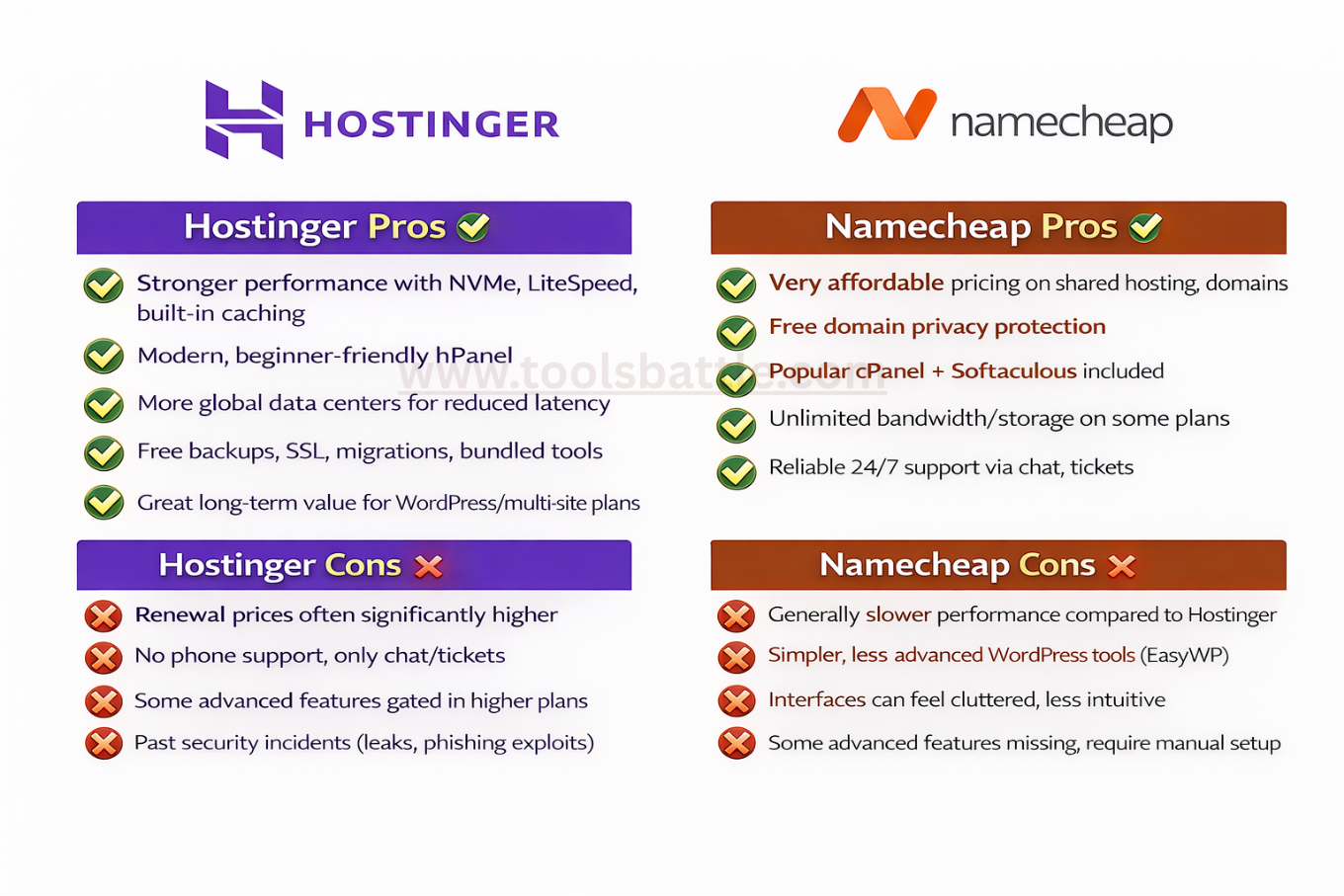
Here’s a clear, balanced breakdown of the strengths and weaknesses for Hostinger and Namecheap based on performance comparisons, feature sets, pricing, and user reviews:
Hostinger Pros ✔️
- Stronger performance with faster page loading thanks to NVMe storage, LiteSpeed servers, and built-in caching.
- Modern, beginner-friendly dashboard (hPanel) makes site management easier.
- More data centers around the world, which helps reduce latency.
- Includes useful features like free daily/weekly backups and many bundled tools (AI website builder, free SSL, free migrations).
- Better long-term value for WordPress and multi-site hosting plans.
Hostinger Cons ❌
- Renewal prices are often significantly higher than initial sign-up rates.
- No phone support — only live chat/ticket support.
- Some advanced features are gated behind higher-tier plans.
- Past security incidents include leaks and phishing exploits (not unique but worth noting for awareness).
Namecheap Pros ✔️
- Very affordable pricing, especially on shared hosting and domain renewals.
- Free domain privacy protection with many domains.
- Includes popular cPanel + Softaculous, which many users already know.
- Unlimited bandwidth and storage on some plans.
- Reliable 24/7 support via chat and tickets.
Namecheap Cons ❌
- Generally slower performance compared to Hostinger’s optimized stack.
- WordPress hosting tools (EasyWP) are simpler and less feature-rich than Hostinger’s WordPress ecosystem.
- Interfaces can feel more cluttered and less intuitive for beginners.
- Some advanced features (like staging, auto-updates) are missing or require manual setup.
Privacy and Security Comparison
Security is something many people ignore at the beginning, but it becomes extremely important once your website starts growing. A single hack, malware attack, or data loss can damage your business, hurt your SEO rankings, and destroy user trust. That’s why choosing a hosting provider with strong built-in security features is just as important as pricing or performance. A good host should protect your website automatically with SSL, backups, firewalls, and privacy tools so you don’t have to worry about technical protection. Both Hostinger vs Namecheap offer basic security, but the level of protection and included features are slightly different. Let’s compare them closely.
Hostinger Security & Privacy
Hostinger focuses heavily on built-in protection, which makes it a strong choice for beginners who don’t want to manage security manually. Most plans include a free SSL certificate, which encrypts your website data and shows the secure padlock in browsers. This not only protects visitors but also improves SEO rankings. In addition, Hostinger provides automatic weekly or daily backups, allowing you to restore your site quickly if something goes wrong. They also use firewalls, DDoS protection, and malware scanning to keep servers safe from attacks. Because many of these features are included for free, users don’t need to buy extra security add-ons. Overall, Hostinger offers a complete “set it and forget it” security system that works well for most websites.
Namecheap Security & Privacy
Namecheap also provides essential security features such as free SSL certificates and basic server protection, which is enough for small websites. However, some advanced tools like frequent backups or premium protection may require higher plans or paid add-ons. Where Namecheap really stands out is domain privacy. They offer free lifetime WHOIS privacy protection with every domain, which hides your personal information from the public database. Many other registrars charge extra for this service, so this can save money if you manage multiple domains. While Namecheap’s hosting security is reliable, it doesn’t feel as comprehensive or automated as Hostinger’s all-in-one approach.
Which One Offers Better Protection?
When comparing overall safety, both platforms cover the basics, but their strengths are different. Hostinger provides stronger hosting security with automatic backups, malware protection, and better server-level defense, making it ideal for active websites and businesses. Namecheap, on the other hand, shines in domain privacy and protection for personal information. If your main goal is to secure your website and prevent downtime or hacks, Hostinger offers more complete protection. If you care most about domain privacy and managing multiple domains cheaply, Namecheap has the advantage. For most website owners, Hostinger delivers better all-around security and peace of mind.
| Feature | Hostinger | Namecheap | Winner |
| Price | Competitive introductory pricing with long-term plans; slightly higher renewals | Lower starting price for basic hosting | 🟢 Namecheap (cheaper entry) |
| Speed | Faster performance with more data centers and optimized stack | Decent performance, but generally slower | 🟢 Hostinger (faster load times) |
| Support | 24/7 live chat + fast response | 24/7 live chat + ticket support | 🟢 Hostinger (generally faster support) |
| Security | Free SSL, automated backups, proactive tools | Free SSL, good security, manual setup | 🟢 Hostinger (more built-in protection) |
| Ease | Modern custom dashboard (hPanel), beginner-friendly | Traditional cPanel, user-friendly for domain users | 🟢 Hostinger (simpler UI for beginners) |
Use Case Based Recommendations
| Use Case | Best Choice |
|---|---|
| Beginners | Hostinger |
| WordPress | Hostinger |
| Bloggers | Hostinger |
| Gaming servers | Hostinger VPS |
| Small business | Hostinger |
| Cheap domains | Namecheap |
| Domain investors | Namecheap |
| Bulk registrations | Namecheap |
After comparing pricing, performance, features, security, and support, one thing becomes clear — there is no single “perfect” host for everyone. The right choice depends on what you actually need. Some users only want cheap domains, while others need fast hosting for blogs, business websites, or online stores. That’s why instead of saying one provider is perfect for all situations, it’s smarter to choose based on your specific use case. Both Hostinger vs Namecheap are good platforms, but they serve slightly different audiences. Let’s break it down in simple terms so you can quickly decide which one fits you best.
Best for Beginners & First-Time Users
If you are new to hosting, Hostinger is easier to use. Its modern hPanel dashboard is clean and simple, so you can install WordPress and launch your site in minutes. Namecheap’s cPanel works fine but feels more technical for beginners. For a smooth start, Hostinger is the better choice.
Best for Bloggers & WordPress Sites
Speed matters for SEO and user experience. Hostinger uses LiteSpeed servers and built-in caching, which makes websites load faster. Namecheap is stable but slightly slower. For blogs and WordPress sites, Hostinger performs better.
Best for Small Businesses & Online Stores
Business websites need strong uptime and reliability. Hostinger offers better performance, free backups, and stronger security, which helps keep your site safe and online. For serious business use, Hostinger is the safer option.
Best for Domain Buyers & Investors
If your main focus is domains, Namecheap is the winner. They offer cheaper domain prices and free lifetime WHOIS privacy. Managing multiple domains is easier and more affordable with Namecheap.
Best for Developers & Advanced Users
Advanced users who prefer traditional tools may like Namecheap’s cPanel. However, Hostinger VPS plans offer better performance for the price. Choose based on whether you want simplicity (Hostinger) or traditional control (Namecheap).
Best for WordPress
Hostinger is clearly stronger for WordPress websites. It uses LiteSpeed servers, built-in caching, and optimized settings that help pages load faster and improve SEO. WordPress installation also takes just one click. Namecheap supports WordPress, but performance and optimization are more basic. For blogs or content sites, Hostinger delivers better speed and stability.
Best for Gaming Servers
Gaming servers need more power, better uptime, and strong VPS performance. Hostinger’s VPS plans offer more CPU, RAM, and faster speeds at lower prices, which makes them more suitable for gaming or heavy traffic projects. Namecheap VPS works fine, but it usually offers fewer resources for the same cost. For gaming or high-performance tasks, Hostinger is the smarter choice.
Best for Small Business
Small business websites need reliability, security, and good support. Hostinger provides faster performance, free backups, and stronger built-in security, which helps keep your site online and protected. Even small downtime can affect sales, so stability matters a lot. For business use, Hostinger feels more dependable overall.
Customer Support Comparison
No matter how good a hosting provider is, problems can still happen. Your website might go down, WordPress may show errors, or you might simply need help setting something up. During these moments, fast and helpful customer support becomes extremely important. Waiting hours for a reply can cost you visitors, sales, and even search engine rankings. That’s why reliable support is not just a bonus feature it’s a necessity. Both Hostinger vs Namecheap offer customer assistance through live chat and knowledge bases, but the overall experience and response speed can feel slightly different depending on the situation. Let’s see how they compare in real-world use.
Hostinger Support Experience
Hostinger provides 24/7 live chat support, which means you can contact them anytime, day or night. One of the biggest advantages is their quick response time. In most cases, you are connected to an agent within a few minutes, and the support team usually gives clear and beginner-friendly instructions. They don’t just send technical replies; they often guide you step-by-step, which is very helpful for new users. Hostinger also has a well-organized knowledge base filled with tutorials, screenshots, and guides that explain common tasks like installing WordPress, fixing errors, or managing emails. Because of this combination of fast chat and helpful documentation, most issues can be solved quickly without much stress.
Namecheap Support Experience
Namecheap also offers 24/7 live chat and ticket-based support, and their team is generally polite and knowledgeable. They handle most domain and hosting issues effectively, especially questions related to domain management and DNS settings. However, response times can sometimes be slightly slower during busy hours, and explanations may feel more technical compared to Hostinger. For experienced users, this isn’t a problem, but beginners might need extra clarification. Their knowledge base is helpful but not always as beginner-focused or detailed. Overall, Namecheap support is reliable, but it may not feel as fast or guided as Hostinger’s approach.
Which One Offers Better Support?
When comparing both services, the difference mostly comes down to speed and beginner-friendliness. Hostinger tends to respond faster and explains solutions in simpler language, which makes it easier for non-technical users to follow. Namecheap still provides solid assistance, especially for domain-related issues, but the experience can feel slightly less smooth for complete beginners. If you expect to need frequent help or prefer quick, step-by-step guidance, Hostinger is likely the better choice. For basic support and domain management, Namecheap is still dependable. Overall, Hostinger takes a small lead in customer support thanks to faster responses and clearer communication.
Server Locations Comparison
Server location affects how quickly your website loads for visitors. The closer the server is to your audience, the better the speed.
Hostinger operates multiple data centers across the USA, Europe, Asia, and other regions. This global network allows users to choose a server near their target market. For international websites, this flexibility improves performance significantly.
Namecheap has fewer server locations, mainly focused on the USA and UK. While still fine for Western audiences, users in Asia or other regions may experience slightly slower speeds.
If your visitors are global, Hostinger provides better coverage and faster connections worldwide.
Alternatives You Can Consider
While Hostinger vs Namecheap are excellent budget-friendly choices, they are not the only options in the market. Depending on your needs, you might find other hosting providers that better match your project, especially if you want premium performance, managed services, or advanced features.
For example, Bluehost is a popular beginner-friendly host officially recommended for WordPress users. It offers simple setup and decent support, making it a good alternative for first-time website owners. If you want stronger performance and more premium features, SiteGround is known for excellent speed, security, and customer service, although it costs more than Hostinger or Namecheap.
Developers or growing businesses may prefer A2 Hosting, which focuses heavily on speed and performance optimization. And if you want fully managed WordPress hosting with top-tier performance and automatic management, Cloudways offers flexible cloud hosting with advanced control, though it’s more suitable for experienced users.
Conclusion
After comparing pricing, performance, features, ease of use, security, and customer support, one thing is clear — both providers are good, but they serve different needs.
If your main goal is to build a fast, reliable, and professional website, Hostinger is the better overall choice. It offers stronger performance, faster loading speeds, more free features, and a modern dashboard that makes everything simple for beginners. Whether you’re starting a blog, running a business site, or creating a WordPress project, Hostinger gives you better value for your money and a smoother experience.
On the other hand, Namecheap is still an excellent option if your focus is mainly domain registration. Their cheaper domain pricing and free lifetime WHOIS privacy make them perfect for buying and managing multiple domains. For small or basic websites, their hosting is decent, but it doesn’t match Hostinger’s speed and optimization.
FAQs
- Is Hostinger faster than Namecheap?
Yes — most performance reviews show Hostinger generally delivers faster page loading and more consistent response times thanks to optimized caching and a larger global data center network. Namecheap’s speed is decent, but tends to lag behind Hostinger, especially under traffic spikes. - Which is cheaper long term?
Which is cheaper long term depends on how you look at it: Namecheap’s base renewal prices for basic plans are usually lower than Hostinger’s, but Hostinger often includes more features (like daily backups, SSL, and performance tools) that can make its plans more cost-effective over time. - Can I migrate later?
Yes — both Hostinger and Namecheap offer free or assisted website migrations if you move from another provider. - Which is better for WordPress?
Hostinger’s WordPress plans generally offer better value and performance for growing sites, with optimized tooling and easier setup. Namecheap’s EasyWP is simple and budget-friendly, but it’s more limited (e.g., supports only one site per plan). - Are renewals expensive?
Yes — Hostinger’s renewal prices are typically higher than the introductory rates and often higher than Namecheap’s. Namecheap’s renewals, especially on shared hosting, tend to stay lower. - Is Namecheap only good for domains?
No — Namecheap is well-known for domain registration, but its hosting (shared, managed WordPress, VPS, etc.) is also solid, reliable, and affordable. However, its hosting performance isn’t as strong as Hostinger’s. - Is Hostinger reliable for business sites?
Yes — Hostinger offers strong uptime guarantees and performance features like caching and automated backups, making it a good choice for business or larger sites. - How do Hostinger and Namecheap’s renewal prices compare?
Hostinger’s renewal rates for shared hosting and managed WordPress can be significantly higher than their introductory prices. Namecheap’s renewals are usually cheaper, though they may lack some advanced features included by default with Hostinger. - Between Hostinger and Namecheap, which is better for WordPress hosting?
For most users, Hostinger’s WordPress hosting (with caching and performance tools) offers more value and scalability than Namecheap’s EasyWP, especially for growing blogs or business sites. - How do the control panels compare between Hostinger and Namecheap?
Hostinger uses hPanel, a custom, beginner-friendly control panel with built-in tools and optimization features. Namecheap typically uses cPanel, an industry standard that’s powerful but can be more complex for beginners. - Are there hidden costs with Namecheap or Hostinger?
Both are fairly transparent:
- Hostinger’s main “hidden” pain point is the jump in renewal prices after the initial term.
- Namecheap may require extra purchases (like paid SSL after the first year on some plans) or additional services for email/features not included in the base package.
- What is the disadvantage of Hostinger?
The biggest downsides for Hostinger are its comparatively high renewal costs and occasional complexity around long-term pricing tiers — plus no phone support (but live chat is available). Its pricing structure and term requirements can be confusing.