
Dub AI is made for creators, marketers, and teams that want to turn one video into multiple languages without hiring voice actors. Most dub reviews focus on speed, translation, and voice dubbing, but the real value depends on how clean the final video sounds.
The short answer: Dub AI is useful for fast multilingual content, but it should not be treated as a perfect replacement for human localization. It works best for YouTube videos, tutorials, product demos, ads, and short educational clips.
Quick Summary
This table gives you the fast buying answer before the full review. It focuses on the points that matter most before paying.
| Point | Details |
| Best For | AI video dubbing, translation, voiceover |
| Main Users | Creators, marketers, educators, agencies |
| Starting Price | Around $29 to $39/month on public listings |
| Main Strength | Fast multilingual video dubbing |
| Main Weakness | Needs human review for accuracy |
| Best Use Case | YouTube, ads, tutorials, course videos |
| Avoid If | You need studio-level dubbing |
| Verdict | Useful for fast AI dubbing, not perfect localization |
What Is Dub AI?
Dub AI is an AI dubbing and video translation tool. It helps users translate spoken video into another language and generate a new voice track.
The tool is useful when you want to repurpose one video for different audiences. Public listings show Dub AI pricing around $29 to $39/month, but pricing should be checked on the official checkout page before buying.
What Makes Dub AI Different?
Dub AI is different because it focuses on speed and simple video localization. Instead of hiring translators, voice actors, and editors, users can create a dubbed version faster.
This makes it attractive for creators and small teams. The trade-off is quality control. You still need to review the translation, timing, tone, and voice output before publishing.
Key Features
Dub AI’s main value comes from saving time. These features matter most if you publish videos often and want to test new language markets.
AI Video Dubbing
Dub AI can create dubbed versions of videos in another language. This helps creators turn one original video into multiple language versions.
It works best for short videos, explainer clips, product demos, and educational content where speed matters more than cinematic voice acting.
Voice Translation
The tool translates spoken content and creates a new voiceover. This helps viewers understand the same message in their own language.
Still, the translated script should be checked. AI may miss slang, humor, technical terms, or cultural meaning.
Voice Cloning Style Output
AI dubbing tools often try to keep the speaker’s voice close to the original. This makes the dubbed video feel more natural than a generic robotic voice.
For casual content, this can work well. For emotional stories, legal content, or brand campaigns, human review is still needed.
Fast Editing Workflow
Dub AI reduces the time needed to create multilingual video versions. Uploading, translating, dubbing, and exporting can happen much faster than manual production.
This is helpful for creators who post often. It also helps marketers test new countries before investing in professional localization.
Creator-Friendly Setup
Dub AI is easier for non-technical users than a full production workflow. You do not need a studio, voice actor, or full editing team to start.
That makes it useful for YouTubers, coaches, course creators, SaaS brands, and small agencies.
Dub AI Pricing
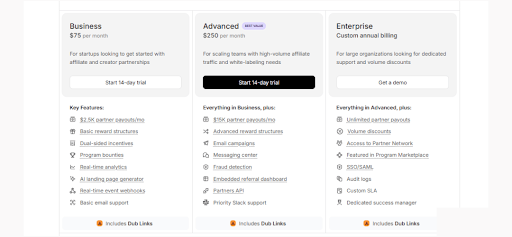
Dub AI pricing can vary by source and plan limits. Some public software listings show paid plans starting around $29 to $39/month.
Use this table as a practical guide, not a final checkout quote. Always confirm limits like minutes, languages, watermark, exports, and voice cloning before paying.
| Deal Type | Price Range | Example |
| Free access | Listed on some directories | Test basic dubbing before upgrading |
| Starter plan | Around $29 to $39/month | Entry-level AI dubbing |
| Creator plan | Around $99/month on some listings | More video minutes and creator use |
| Growth plan | Around $399/month on some listings | Higher-volume dubbing workflow |
| Enterprise | Custom pricing | Teams with larger localization needs |
Accuracy and Quality Warning
AI dubbing sounds impressive, but it is not always publish-ready. This is the section many dub reviews do not explain clearly.
Before publishing, check pronunciation, speaker timing, translated meaning, background noise, and emotional tone. For ads, legal content, medical content, or paid campaigns, review is not optional.
Pros and Cons
Dub AI is useful, but it is not perfect. This table shows the real buying picture.
| Pros | Cons |
| Saves time on video dubbing | Output may need editing |
| Useful for multilingual content | Translation may miss context |
| Good for creators and marketers | Not ideal for premium dubbing |
| Faster than hiring voice actors | Voice emotion can feel uneven |
| Helps test new language markets | Pricing limits must be checked |
| Good for short-form content | Long videos may need more review |
Who Actually Gets Value From Dub AI?
Dub AI gives the most value to users who need fast multilingual video versions. It is best when speed, testing, and reach matter more than perfect studio quality.
Best fit for:
- YouTube creators
- Course creators
- SaaS demo videos
- Product explainers
- Marketing agencies
- Coaches and educators
- Short-form video teams
Think twice before buying if you need:
- Film-level dubbing
- Perfect lip-sync
- Legal translation accuracy
- Medical content translation
- Emotional voice acting
- Complex multi-speaker scenes
Best Dub AI Alternatives
Dub AI is useful, but alternatives may fit better depending on your budget, quality needs, and video workflow.
| Platform | Best For | Key Edge Over Dub AI |
| Dubverse | Budget AI dubbing | Lower-cost dubbing and subtitle tools |
| Rask AI | Business localization | 135+ languages and structured workflow |
| HeyGen | Creator videos | Video translation with lip-sync features |
| ElevenLabs | Voice quality | Strong AI voice and dubbing studio |
| Synthesia | Corporate training | AI avatars plus multilingual video tools |
Rask AI lists a free trial and Creator pricing from $33/month when billed annually. HeyGen offers a free plan for up to 3 videos per month and paid Creator pricing from $29/month. ElevenLabs offers a free plan and paid plans from $6/month, with dubbing studio access in paid tiers.
Final Verdict of Dub Reviews
Dub AI is worth considering if you need fast AI dubbing for tutorials, YouTube videos, course clips, ads, and product demos. It can help you reach new audiences without building a full localization team.
But it is not a perfect replacement for human dubbing. The best workflow is simple: generate the dub, review the translation, fix timing issues, then publish.
FAQs
Which video types work best with Dub AI?
Dub AI works best with tutorials, talking-head videos, product explainers, educational clips, podcasts, and short marketing content. Clean voice audio usually gives the best dubbing result.
Does Dub AI support multiple speakers in one video?
Yes, but multi-speaker videos may need extra review. Speaker transitions, timing, and voice separation are harder for AI tools than single-speaker content.
How important is the original audio quality?
Very important. Poor microphones, background noise, overlapping voices, or echo can reduce translation and dubbing accuracy.
Can Dub AI help grow international audiences?
Yes. Many creators use AI dubbing tools to test videos in Spanish, Hindi, French, Portuguese, and other languages without recording new versions manually.
Is Dub AI useful for faceless YouTube channels?
Yes. AI dubbing can help faceless channels repurpose narration-based videos into multiple languages faster than manual voiceover workflows.
What is the smartest way to test Dub AI before scaling?
Start with one short high-performing video. Compare watch time, retention, comments, and engagement from the dubbed version before translating your full content library.