
Still chasing clients down for signatures on paper contracts or worse, sending PDFs back and forth over email hoping they figure out how to sign them? If you’ve been stuck in that loop, you’re not alone. Getting documents signed is one of those small but painful bottlenecks that costs businesses hours every week.
Two tools that can fix this are BreezeDoc vs DocuSign but they couldn’t be more different in their approach, their price, and who they’re built for. In this guide, we break down both tools head-to-head so you can decide which one actually fits your needs and budget.
What Is BreezeDoc?
BreezeDoc is an electronic signature software built by AppSumo Originals the same in-house product team behind tools like SendFox and KingSumo. Launched in April 2024 and founded in Austin, Texas, it was created specifically to give freelancers, consultants, and small business owners a simpler and far more affordable way to get documents signed.
The core workflow is refreshingly simple: upload a PDF (or start from a template), add signature fields and form elements via drag-and-drop, assign recipients, and send. Once sent, BreezeDoc handles automated reminders, tracks activity in real time, and delivers the fully signed document when all parties are done.
What truly sets BreezeDoc apart is its pricing model. There is no monthly subscription. You pay once and own it forever making it one of the rare e-signature tools that won’t slowly drain your budget month after month.
Since launch, over 18,000 users have joined the platform and sent more than 27,000 documents. The team has been actively shipping updates, releasing 150+ new features, improvements, and fixes just in the first year of operation alone.
What Is DocuSign?
DocuSign is the undisputed industry standard for electronic signatures. It is used by companies of all sizes from solo operators to Fortune 500 enterprises to sign, send, and manage agreements from any device, anywhere in the world.
Founded in 2003 and now publicly traded, DocuSign has become so synonymous with e-signatures that many people simply say “DocuSign it” the way others say “Google it.” Its reputation is backed by decades of legal use, enterprise-grade security, a vast integration library, and advanced workflow features that go far beyond basic signing.
In recent years, DocuSign has expanded well beyond e-signatures into what it calls Intelligent Agreement Management (IAM) an AI-powered platform for automating workflows, analyzing contracts, and managing agreements at scale. For enterprise teams, this is a powerful proposition. For a freelancer who just needs clients to sign an NDA, it can feel like overkill.
DocuSign’s pricing follows a traditional subscription model, billed monthly or annually per user.

Feature-by-Feature Comparison
| Feature | BreezeDoc | DocuSign |
|---|---|---|
| Pricing Model | One-time lifetime payment | Monthly/annual subscription |
| Starting Price | Free (2 docs/month) | Free (3 sends/month) |
| Paid Plans | $19 (Pro) / $49 (Agency) one-time | $15–$65+/user/month |
| Ease of Use | Beginner-friendly | Complex, enterprise-oriented |
| Templates | ✅ Free pre-built templates | ✅ Advanced templates |
| Multi-signer Support | ✅ Yes | ✅ Yes |
| Real-time Tracking | ✅ Yes | ✅ Yes |
| Automated Reminders | ✅ Yes (Pro+) | ✅ Yes |
| Invoicing / Payments | ✅ Yes (Stripe integration) | ✅ Yes (Business Pro+) |
| White-labeling | ✅ Agency plan | ✅ Higher tiers |
| Third-party Integrations | Limited | Extensive (Salesforce, Microsoft, etc.) |
| API Access | ✅ Yes (Agency plan) | ✅ Yes (Business Pro+) |
| Bulk Send | ❌ Not available | ✅ Business Pro |
| Advanced Auth (SMS, ID) | ❌ Not available | ✅ Add-on ($0.40–$2.50+) |
| Legal Compliance | eIDAS & ESIGN Act | Full enterprise compliance |
| Audit Trail | ✅ Yes | ✅ Yes |
| Team Members | Up to 10 (Agency) | Unlimited (per-user pricing) |
1. Pricing
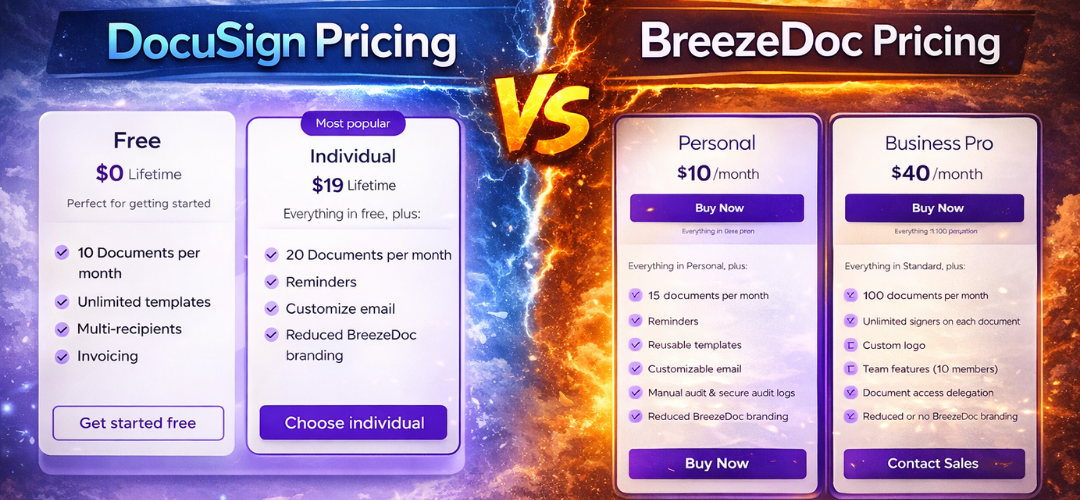
This is where the two tools diverge most dramatically. BreezeDoc offers three plans all structured as one-time lifetime purchases with no recurring charges. The Free plan gives you 2 documents per month, which genuinely works for solopreneurs who only send occasional contracts. The Pro plan ($19 one-time) bumps you to 20 documents per month and adds automated reminders and multi-recipient support. The Agency plan ($49 one-time) unlocks unlimited documents, team collaboration for up to 10 members, white-labeling, API access, and custom email templates.
DocuSign’s pricing works entirely differently. The Personal plan starts at $15/month (or $10/month billed annually) but limits you to just 5 envelopes per month meaning at maximum usage, you’re paying $120/year to send 60 documents. The Standard plan runs $45/month and gives teams 100 envelopes per user per year. The Business Pro plan reaches $65/month and adds bulk send, payment collection, and PowerForms. Enterprise pricing is custom and negotiated separately.
For a small business owner comparing the two over three years: BreezeDoc costs a flat $49 total. DocuSign’s Standard plan costs $1,620 over the same period for the same core use case.
2. Ease of Use
BreezeDoc was built with simplicity as its north star. The dashboard is clean, uncluttered, and easy to navigate from day one. Most users report being able to send their first document within 10 minutes of signing up no training needed.
DocuSign, by contrast, is a mature enterprise platform that has added features and complexity over two decades. Its power is also its complexity. For users who only need to send a freelance contract or a coaching agreement, the interface can feel unnecessarily heavy. Navigating account settings, template organization, and workflow configuration often requires time and patience.
If you’re onboarding a non-technical team member, BreezeDoc will have them signing documents in minutes. DocuSign may require a proper walkthrough.
3. Templates and Document Fields
Both tools offer templates and a solid set of signing fields. With BreezeDoc, you can add signatures, initials, text boxes, date fields, and checkboxes directly to any uploaded PDF. Pre-built, verified templates are also included at no extra cost, letting you jump-start common contracts like freelance agreements, NDAs, and service contracts.
DocuSign offers a more robust template system, especially on higher-tier plans. You can build advanced forms with conditional logic, attachment requests, and pre-filled fields. For businesses with complex, branching documents, DocuSign’s template engine is significantly more powerful.
4. Tracking and Notifications
BreezeDoc includes real-time activity tracking on all plans. You can see when a recipient opened the document, clicked fields, and completed signing. Activity logs can be exported as PDFs for your records. Automated reminders kick in every three days (up to three times) on Pro and Agency plans.
DocuSign provides similar real-time tracking but with more granular audit trails, advanced notification settings, and enterprise-grade reporting. For teams managing hundreds of contracts simultaneously, DocuSign’s tracking tools are more sophisticated.
5. Integrations
This is a clear win for DocuSign. It integrates natively with Salesforce, Microsoft 365, Google Drive, Slack, and hundreds of other platforms. For businesses that run their operations inside a CRM or a productivity suite, this connectivity is genuinely valuable.
BreezeDoc’s integration footprint is much smaller. It connects with Stripe for payment collection after signing, and offers API access on the Agency plan but deep CRM or productivity integrations are not yet available. If your workflow depends on automatic data syncing between your e-signature tool and your CRM, this is a real limitation to consider.
Pricing Deep Dive
Here’s a direct comparison of what you pay over time:
| Plan | BreezeDoc (Lifetime) | DocuSign (Annual) |
|---|---|---|
| Entry Level | Free (2 docs/month) | Free (3 sends/month) |
| Basic Paid | $19 one-time (20 docs/month) | $120/year (5 docs/month) |
| Team / Mid Tier | $49 one-time (unlimited docs, 10 users) | $300–$540/year per user |
| Enterprise | N/A | Custom |
The math is stark. For a freelancer or small team with a moderate document volume, BreezeDoc pays for itself almost immediately. The question is simply whether the missing enterprise features matter to you.
It’s also worth noting that BreezeDoc includes a 60-day money-back guarantee twice the industry standard. This means you can try the paid plans risk-free for two months before committing.
DocuSign does offer a free trial on paid plans, and annual subscribers receive a 30-day refund window.
Who Should Use BreezeDoc?
BreezeDoc is purpose-built for a specific type of user, and it serves that user exceptionally well. If any of the following describe you, BreezeDoc is likely the right choice:
- Freelancers and solopreneurs who send contracts, NDAs, or coaching agreements a few times a month and don’t want a recurring SaaS bill eating into their margin.
- Small business owners who want a clean, simple tool that gets the job done without a learning curve or complex setup.
- Consultants and agencies who need to send branded documents to clients and want to collect signatures — and optionally invoices — in one place.
- Budget-conscious teams who want predictable, one-time pricing instead of monthly subscriptions that compound over time.
- AppSumo users who already trust the team’s track record with tools like SendFox and KingSumo.
One real user described BreezeDoc this way: “I needed document software that was easy to use, intuitive, and affordable… now I have everything stored in one place with the security features I need and no monthly bill. That is huge for me as I may only send out a couple of documents a month.”
Who Should Use DocuSign?
DocuSign is the better choice when your needs go beyond the basics:
- Mid-size and enterprise teams that send hundreds of contracts per month and need advanced workflow automation, conditional routing, and team administration tools.
- Regulated industries such as healthcare, real estate, financial services, and legal where enterprise-grade compliance certifications (HIPAA, FERPA, SOC 2) are non-negotiable.
- Salesforce-heavy organizations where native CRM integration is critical to operations.
- Companies needing advanced authentication, such as SMS verification or government ID checks, for high-stakes documents.
- Businesses where brand recognition matters to signers DocuSign’s name alone builds trust in certain professional contexts.
- Teams managing complex agreement lifecycles who benefit from DocuSign’s newer IAM platform for AI-powered contract analysis and workflow automation.
BreezeDoc Limitations to Know
BreezeDoc is a newer, growing platform. Before purchasing, it’s fair to be aware of what it doesn’t yet do well:
- Occasional bugs with templates: Some users have reported that field positions can shift when editing saved templates, causing frustration on repeated use.
- BreezeDoc branding in outgoing emails: On lower-tier plans, recipients see BreezeDoc’s logo in emails, which can appear unprofessional for white-label use cases. White-labeling is available only on the Agency plan.
- No folder or organizational system: There is currently no way to organize documents or templates into folders or categories inside the dashboard.
- Limited integrations: As noted, BreezeDoc doesn’t yet connect to major CRMs or productivity suites natively.
- No bulk send feature: If you need to send the same document to hundreds of signers simultaneously, BreezeDoc can’t do this DocuSign can.
- Still in active development: The platform has shipped over 150 features in its first year, which is a positive sign but also means some rough edges remain.
Verdict: BreezeDoc vs DocuSign
BreezeDoc wins on: Price, simplicity, lifetime value, ease of onboarding, and suitability for freelancers and small businesses.
DocuSign wins on: Enterprise features, integrations, compliance certifications, team scalability, and brand trust.
The honest answer is that these tools aren’t really competing for the same customer. BreezeDoc is the 80/20 solution it handles the core e-signature workflow that 99% of small businesses actually need, at a fraction of the cost. DocuSign is the full-suite enterprise platform for teams that need the other 20%.
If you’re a freelancer, consultant, or small business owner who sends contracts on a regular basis and wants to stop paying a monthly SaaS tax, BreezeDoc is a smart, low-risk buy especially with its 60-day refund guarantee.
If you’re running a team of 50 people, managing complex legal workflows, or need deep Salesforce integration, DocuSign remains the industry standard for a reason.
Frequently Asked Questions
Is BreezeDoc legally binding? Yes. BreezeDoc uses electronic signatures that comply with the eIDAS and ESIGN Act regulations, making documents signed through the platform legally binding in most jurisdictions.
Can BreezeDoc fully replace DocuSign? For freelancers, solopreneurs, and small businesses, yes BreezeDoc covers the core signing workflow most users need. For enterprise users who depend on advanced integrations, bulk send, or compliance-specific features, DocuSign is still the stronger option.
Does BreezeDoc offer a free plan? Yes. The free plan includes 2 documents per month. That’s a genuine, usable amount for users who only occasionally need to send contracts.
What integrations does BreezeDoc support? Currently, BreezeDoc integrates with Stripe for payment collection after signing. API access is available on the Agency plan for custom integrations.
How secure are documents on BreezeDoc vs DocuSign? Both platforms use encryption and maintain audit trails. DocuSign has more extensive enterprise security certifications (SOC 2 Type II, ISO 27001, HIPAA). BreezeDoc is suitable for standard business use but may not satisfy highly regulated industries with strict compliance requirements.
What is the BreezeDoc refund policy? BreezeDoc offers a 60-day money-back guarantee on all paid plans — twice the industry standard. DocuSign offers a 30-day refund window on annual subscriptions.
Conclusion
Choosing between BreezeDoc and DocuSign comes down to one fundamental question: are you paying for what you actually need?
For the vast majority of freelancers, consultants, and small business owners, the answer is BreezeDoc. It does the job cleanly, costs almost nothing compared to a subscription, and keeps improving at a rapid pace.
For enterprises with complex workflows, regulated industries, and deep integration requirements, DocuSign remains the gold standard.
Try BreezeDoc if you want a simple, affordable, no-subscription e-signature tool — the 60-day refund guarantee means there’s virtually no risk. Choose DocuSign if your business needs the full enterprise suite and has the budget to support it.