
Obsidian is better for privacy, offline use, and deep customization. Capacities is better for visual design, mobile experience, and built-in AI. Neither is universally superior the right choice depends on your workflow.
Choosing the perfect digital space to keep track of your thoughts and ideas is a big decision. Both Obsidian vs Capacities are amazing tools that help you build your very own “second brain” by linking notes together. They are much more than just simple text editors.
This article will help you understand the core differences between these two powerful apps, making it easier for you to pick the one that best suits how you like to learn and remember things. Think about your goals. Do you want total freedom or a guiding structure?
Obsidian vs Capacities Overview
Obsidian vs Capacities both offer powerful note-taking and knowledge management features for productivity-focused users worldwide.
We tested their organization systems, customization options, usability, and workflow experience to compare their overall performance and everyday practical value.
This comparison helps you understand which platform better matches your productivity style, note organization needs, and long-term knowledge management goals.
| Need | Best Choice |
|---|---|
| Local data storage | Obsidian |
| Beautiful UI | Capacities |
| Plugin flexibility | Obsidian |
| Mobile experience | Capacities |
| Offline access | Obsidian |
| Built-in AI | Capacities |
| Free plan | Both |
| Beginners | Capacities |
| Power users | Obsidian |
What is Obsidian?
Obsidian is a free note-taking application that creates a personal network of knowledge right on your computer using plain text files called Markdown. It’s like having a private library where you own every single book, ensuring your notes are safe and can be opened anywhere, forever.
The main idea of Obsidian is bidirectional linking, which means every note acts as a hub, and a visual graph shows how all your ideas connect. This flexibility is perfect for people who love to customize their tools and want a powerful system that grows with their unique way of thinking and organizing information.
Key facts about Obsidian:
- All notes stored as
.mdfiles on your local device - Over 1,000 community plugins available
- Graph view shows connections between all your notes
- Free for personal use; sync costs $4/month extra
- Works fully offline with no internet required
- Used widely by developers, researchers, writers, and academics
What are Capacities?
Capacities is a flexible note-taking app that organizes information around objects, such as people, books, projects, or meetings, instead of just folders. This makes organizing feel more natural, reflecting the real-world things and relationships you encounter every day.
It helps you manage knowledge by focusing on the content and providing structure through its unique object system, which is great for those who prefer a clear starting framework. Capacities features like an AI assistant and calendar integrations are available to help you quickly capture, connect, and retrieve your linked thoughts.
Key facts about Capacities:
- All data stored in the cloud (no local storage option)
- Uses “object types” notes, books, people, projects each have their own structure
- Built-in AI for summarization and writing assistance (as of 2025)
- Excellent mobile app with seamless sync
- More beginner-friendly than Obsidian
- Free tier available; Pro plan costs ~$9/month
Obsidian vs Capacities: Feature-by-Feature Breakdown
Storage and Privacy
Obsidian stores all notes locally as plain Markdown files. Your data never leaves your device unless you pay for Obsidian Sync. This makes it the clear winner for users who require data privacy, GDPR compliance, or offline reliability.
Capacities stores everything in the cloud. There is no local storage option. For users handling sensitive personal or professional data, this is a meaningful drawback.
User Interface
Obsidian has a minimal, text-editor-style interface. It is highly functional but visually plain. First-time users often find it unintuitive without tutorials or setup guides.
Capacities has a modern, colorful, block-based interface similar to Notion but more structured. It is polished, easy to navigate, and visually engaging right out of the box.
Note Organization
Obsidian uses flat Markdown files organized through folders and internal links. This offers maximum flexibility but requires the user to build their own organizational system from scratch.
Capacities uses object types — each content category (books, people, meetings, projects) has its own structured template. Organization is guided and consistent without extra effort from the user.
Linking and Knowledge Graph
Obsidian offers the most powerful linking system available in any PKM tool. Features include backlinks, bidirectional links, unlinked mentions, aliases, and a fully interactive, filterable graph view.
Capacities supports linking and has a basic graph view, but it is less powerful and less customizable than Obsidian’s implementation.
Sync Across Devices
Obsidian does not sync automatically. Users must either pay for Obsidian Sync ($4/month) or configure a third-party solution such as iCloud, Dropbox, or Git. This adds friction for non-technical users.
Capacities syncs automatically across all devices because it is cloud-based. No setup is required — open the app on any device and your notes are there.
Mobile App
Obsidian has iOS and Android apps, but they are less polished than the desktop version. Sync setup on mobile adds extra complexity.
Capacities has a smooth, fully-featured mobile app that matches the desktop experience closely. It is consistently rated higher among mobile users.
Plugin and Customization
Obsidian has over 1,000 community plugins. Users can add Kanban boards, spaced repetition flashcards, database views, custom dashboards, code execution, citation managers, and much more. No other PKM tool comes close to this level of extensibility.
Capacities has no external plugin system. All functionality must come from built-in features.
AI Features
Obsidian has no native AI. AI functionality requires third-party plugins such as Copilot for Obsidian or Smart Connections, plus an external API key (OpenAI, Anthropic, etc.).
Capacities introduced native AI in 2025. Users can summarize notes, generate content, and use smart search without any external configuration.
Offline Access
Obsidian works completely offline. Every note is accessible without internet because all data is local.
Capacities has very limited offline support. Most features require an active internet connection.
Collaboration
Neither tool is designed for real-time collaboration. Obsidian supports shared vaults with some manual setup. Capacities has basic sharing features. If team collaboration is your primary need, consider Notion or Confluence instead.
Pricing
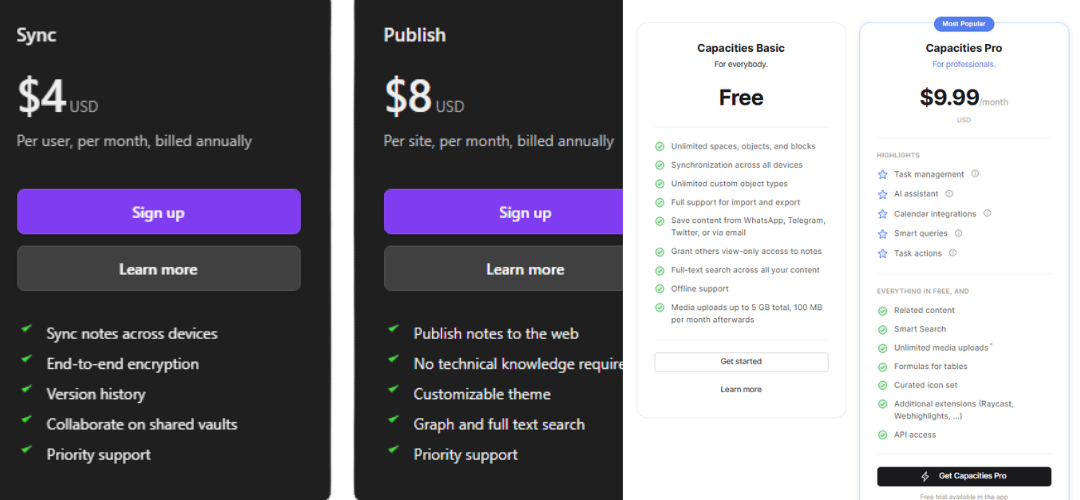
| Plan | Obsidian | Capacities |
|---|---|---|
| Free | ✅ Full local features | ✅ Generous free tier |
| Sync | $4/month (add-on) | Included in paid |
| Pro / Full | $8/month | ~$9/month |
| One-time license | $50 commercial | ❌ |
| Student discount | ❌ | ✅ Available |
Full Comparison Table
| Feature | Obsidian | Capacities |
|---|---|---|
| Storage | Local (offline) | Cloud only |
| Free plan | ✅ | ✅ |
| Offline access | ✅ Full | ❌ Limited |
| Plugin ecosystem | ✅ 1,000+ | ❌ None |
| UI design | Minimal | Modern |
| Object-based notes | ❌ | ✅ |
| Graph view | ✅ Advanced | ✅ Basic |
| Native AI | ❌ | ✅ |
| Mobile app | ⚠️ Decent | ✅ Excellent |
| Real-time sync | Paid add-on | ✅ Included |
| Data privacy | ✅ Strong | ⚠️ Cloud-dependent |
| Learning curve | Steep | Gentle |
| Collaboration | ❌ Weak | ⚠️ Basic |
| Markdown export | ✅ Native | ✅ Supported |
| Customization depth | ✅ Extreme | ⚠️ Moderate |
Obsidian: Strengths and Weaknesses
Strengths
- Full data ownership. Notes never leave your device unless you choose otherwise.
- Best-in-class plugin system. Over 1,000 plugins cover almost every productivity use case.
- Powerful graph view. Visualize connections across thousands of notes interactively.
- Future-proof format. Plain Markdown files are readable by any text editor, forever.
- Completely free for personal use. No paywalled core features.
- Reliable offline access. Works in any environment, no internet required.
Weaknesses
- High learning curve. Setup and plugin configuration requires time and technical comfort.
- Mediocre mobile app. The desktop experience is significantly better.
- Manual sync setup. Free sync requires technical workarounds; native sync costs extra.
- No built-in AI. AI features require external API keys and plugin installation.
Capacities: Strengths and Weaknesses
Strengths
- Object-based organization. Unique system that gives every type of content its own structure.
- Beautiful, intuitive interface. Low learning curve — productive from day one.
- Automatic sync. Zero setup — works across all devices instantly.
- Best mobile experience. Consistently rated above other PKM tools on mobile.
- Built-in AI (2025). Summarization and writing assistance without external tools.
- Great daily notes workflow. Polished system for capturing daily thoughts and tasks.
Weaknesses
- No local storage. All data lives on cloud servers — a real concern for privacy-sensitive users.
- Poor offline support. Not reliable without internet access.
- No plugin system. Cannot extend functionality beyond built-in features.
- Newer product. Still developing some features that Obsidian has had for years.
Who Should Use Obsidian?
Obsidian is the right choice if any of the following apply:
- You are a developer, researcher, or academic managing complex, interlinked notes
- Privacy or data security is a non-negotiable requirement
- You want to customize your workflow extensively using plugins
- You use a Zettelkasten or permanent note-taking system
- You work offline regularly or in low-connectivity environments
- You want long-term data portability in plain text format
- You are comfortable with a technical setup process
Who Should Use Capacities?
Capacities is the right choice if any of the following apply:
- You are a student, creative, or project manager who values visual clarity
- You want to get started quickly without configuration
- You work across multiple devices and need seamless sync
- You prefer structured, object-based organization over free-form notes
- You want built-in AI features without extra setup
- You prioritize mobile usability
- You find Obsidian’s interface or plugin system overwhelming
Can You Use Both Together?
Yes. Many advanced users run both tools simultaneously with a split workflow:
- Obsidian for permanent notes, research archives, Zettelkasten, and technical documentation
- Capacities for daily notes, project tracking, meeting logs, and quick capture
This hybrid approach extracts the best from each tool but adds workflow complexity. It is best suited to experienced PKM users who already understand both systems.
Obsidian vs Capacities: Common Alternatives
If neither tool fits, consider these alternatives:
| Tool | Best For |
|---|---|
| Notion | Teams, collaboration, databases |
| Logseq | Obsidian-like but open source and outline-based |
| Roam Research | Bidirectional linking, academic writing |
| Reflect | Simple daily notes, Apple ecosystem |
| Craft | Apple users, polished document creation |
| Mem | AI-first note-taking, automatic organization |
| Anytype | Local-first alternative to Notion |
Conclusion
Both Obsidian vs Capacities are fantastic for building a personalized knowledge base, but they have different approaches. Obsidian offers maximum control with local files, extensive community plugins, and a strong focus on plain text freedom. Capacities, on the other hand, provides a more structured experience with its object-based system, which is great for a more guided and organized way of connecting your thoughts. Your choice depends on whether you value total customization or a clear, ready-made framework for your ideas.
Frequently Asked Questions (FAQs)
1. Which app is better for beginners?
Capacities often has an easier learning curve for beginners because its object-based system provides a clear structure from the start. Obsidian, while simple at its core, requires more setup and customization, which can be overwhelming at first.
2. Can I use both apps for free?
Yes, both Obsidian and Capacities offer a generous free plan that includes all core note-taking and knowledge-linking features. Paid options are available for features like cloud syncing (Obsidian) or an AI assistant (Capacities).
3. Where are my notes stored in each application?
In Obsidian, your notes are stored locally as plain Markdown files on your device, giving you full control and ownership. Capacities stores your notes in its cloud, but it does offer options to easily export your content to various formats like Markdown.
4. Which app has better customization?
Obsidian is the winner for customization. It has a massive community-driven plugin ecosystem (over 1,000 plugins) and allows you to adjust nearly every aspect of the app’s look and functionality. Capacities relies on its built-in features and structure.
5. What is the main difference in how they organize information?
Obsidian primarily uses folders and tags, with links creating a web between notes (a file-based system). Capacities uses an “object-based” system where notes are specific types of things (like a Person or a Project) that have custom properties and links.
6. Do both apps support a visual graph view of my notes?
Yes, both Obsidian and Capacities have a visual graph view that shows how your notes are connected through links. This feature is a great way to explore your knowledge network and discover new relationships between ideas.
7. Is one of them better for working offline?
Obsidian is truly an offline-first app since your files are stored locally on your device at all times. Capacities offers offline support, but it is primarily a cloud-based tool that requires initial and periodic syncing.
8. Which is better for a structured workflow, like task management?
Capacities, with its object system, can feel more naturally suited for structured workflows like task management, as it lets you create dedicated “Task” objects with properties. Obsidian requires plugins and templates to build a similar, but highly customizable, system.
9. Which app supports the Markdown format?
Both apps support Markdown, a simple way to format text using symbols (like using ** for bold). Obsidian uses plain Markdown files for storage, while Capacities uses Markdown for formatting within its content blocks.
10. Can I share my notes with others?
Obsidian has an optional paid service called Obsidian Publish to share your vaults as a public website. Capacities allows you to grant others view-only access to individual notes and collections, which is useful for quick sharing.
11. Is Obsidian or Capacities better in 2027?
Obsidian is better for power users who need privacy, offline access, and customization. Capacities is better for beginners and users who want a polished, AI-integrated experience. Neither is objectively superior the best choice depends on your specific workflow and priorities.
12.Is Obsidian free?
Yes. Obsidian is free for personal use with full core functionality. Obsidian Sync ($4/month) and Obsidian Publish ($8/month) are optional paid add-ons.
13. Does Capacities work offline?
No. Capacities is a cloud-based application and requires an internet connection for most features. Offline support is very limited.
14. Which is better for students?
Capacities is generally better for students due to its lower learning curve, cleaner interface, and seamless mobile sync. Students doing heavy academic research may prefer Obsidian for its linking and graph features.
15. Can I migrate from Obsidian to Capacities?
There is no official migration tool. You can import Markdown files manually into Capacities, but some formatting may not transfer perfectly.
16. Which app has better AI features?
Capacities has built-in AI (2025) that requires no configuration. Obsidian requires third-party plugins and an external API key to access AI features.
17. Is Capacities safe for sensitive notes?
Capacities stores data on cloud servers. Users with strict privacy requirements, confidential business data, or GDPR obligations should use Obsidian instead, which keeps all data locally.
18. What is the best Obsidian alternative?
The best alternatives to Obsidian are Logseq (open source, local-first), Roam Research (bidirectional linking pioneer), and Capacities (cloud-based, modern UI).
19. What is the best Capacities alternative?
The best alternatives to Capacities are Notion (collaboration-focused), Craft (Apple ecosystem), and Reflect (simple, AI-enhanced daily notes).